


The Shopify website redesign cost can be $150 or $15,000. Both prices are real, but they buy very different work. One is a fresh look on a theme you already have. The other is a store designed and coded from scratch. Know which job you are buying before you pay.
I am a Shopify Select Partner with more than 10 years on Shopify, and I have redesigned many client stores. In this guide I share published prices, what drives them up, and the steps I follow so a redesign doesn’t cost you rankings or sales.
Here is what you will learn:
- What a Shopify store redesign costs by scope, from a homepage refresh to a custom theme
- Clear signs that you need a redesign, and signs that you don’t
- How to redesign without losing SEO or sales, step by step
- How long each type of project takes
- The mistakes that make a redesign cost more than it should
How much does a Shopify website redesign cost?
A Shopify website redesign cost depends on scope more than anything else. A theme you set up yourself costs from $0 to $500. In the price pages I checked, a redesign on a ready-made theme runs from $150 to about $8,000. A fully custom theme starts around $8,000 and can reach $50,000 or more.
There is no official price list for a Shopify redesign. Every number below comes from a public price page I read on November 29, 2026. Prices change, so treat them as a starting point.
- Themes: free themes from Shopify cost $0. Paid themes in the Shopify Theme Store cost $100 to $500, as a one-time fee.
- Miledevs (agency): $1,200 to $3,000 to restyle your current theme, $3,000 to $8,000 for a redesign on a premium theme, and $8,000 to $15,000 for a custom design.
- Kaspian Fuad (consultant): $2,500 to $8,000 for fixes to one to three templates, and $15,000 to $50,000 for a full custom redesign.
- Craftive and Dexxy (agencies): redesigns from $1,500 and from $2,500.
Shopify redesign cost by scope
This table groups the common jobs by scope, so you can see where your Shopify website redesign cost is likely to land. The ranges are the published examples above, not market averages.
| Scope | What changes | Typical time | Published prices |
|---|---|---|---|
| Homepage refresh | Hero, sections, colors, fonts | Under 2 weeks | Often quoted per page |
| Product page redesign | Layout, trust points, add to cart | Under 2 weeks | $2,500 to $8,000 for 1 to 3 templates |
| Restyle current theme | Look of all key pages | 1 to 2 weeks | $1,200 to $3,000 |
| Full theme switch | New theme, all pages rebuilt | 3 to 6 weeks | $3,000 to $8,000 + theme |
| Custom sections or theme | New code built for you | 6 to 12 weeks | $8,000 to $50,000 |

What pushes the price up
Two stores can ask for “a Shopify redesign” and get quotes thousands of dollars apart. These things change the number:
- Number of templates. Each unique page type, such as home, product, collection and cart, is designed and built once. More templates mean more hours.
- Product page features. Bundles, subscriptions, personalization or many variants each add work.
- Apps. Every app that shows something on the store must be added back and tested in the new design.
- Content. If your photos and text are ready, the work moves fast. If not, someone has to create them.
- Who does the work. An agency with a team has higher costs than a solo freelancer.
Costs that are often left out of the quote
Ask about these before you sign:
- The paid theme license, if the new design uses one.
- New product photos and copywriting.
- Paid apps that the new design depends on.
- Fixes in the first weeks after launch, when real shoppers find small issues.
- Your own time to give feedback, which is a real Shopify website redesign cost too.
An honest example: my own packages
To show what a lower budget buys, here are my own published Shopify store redesign packages, as of November 2026. A Basic Redesign is $150, a Standard Redesign is $250, and a Premium Rebuild is $350. They differ in the number of pages, products and apps I set up, and they take 5, 7 and 10 days.
Each one is a theme-based Shopify store redesign, not a custom-coded theme. That is why they cost less than the agency ranges above. If you only need one page redesigned, I quote that on its own. The final price always depends on the work, and we agree on it together after we discuss your project.
Signs you need a Shopify store redesign
You need a Shopify store redesign when the design itself stops shoppers from buying. A new look alone rarely fixes sales. Look for these signs:
- The store looks broken on phones. Text is tiny, buttons are hard to tap, or images get cut off.
- Your theme is old. You can’t add sections on every page, or your theme no longer gets updates from its developer.
- Every small change needs a developer. A good modern theme lets you edit text, images and sections yourself.
- The store is slow, even after cleanup. Old app code and heavy sections pile up over the years.
- Your brand has changed. New products, prices or audience, but the store still looks like the old business.
- You have visitors but few sales. If the leak is on the product page or cart, design is often part of it.
Not sure yet? My free Shopify store audit tool checks the basics in a few minutes. You can also read my list of Shopify store design mistakes, because some can be fixed in an afternoon.
When you don’t need a redesign
Save your money if you have almost no traffic yet. A Shopify store redesign won’t bring visitors on its own. Skip it too if the problem sits on one page, or you are just bored of the look. A targeted fix costs far less. My guide on Shopify traffic but no sales helps you find where shoppers drop off first.
How to do a Shopify redesign without losing SEO or sales
The safe way to do a Shopify redesign is simple. Build it on a copy of your theme, keep your URLs, and test everything on a phone before you publish. These are the steps I follow on client stores.
Step 1: Record how the store performs today
Write down your numbers before anything changes. Otherwise you can’t tell if the Shopify redesign helped or hurt.
- In
 Google Search Console, export your top pages by clicks.
- Note your conversion rate and average order value for the last 30 days.
- Take full-page screenshots of your homepage, a product page, a collection page and the cart.
- List every app that shows something on your store, such as reviews, pop-ups or a size chart.
 Google Search Console, export your top pages by clicks.
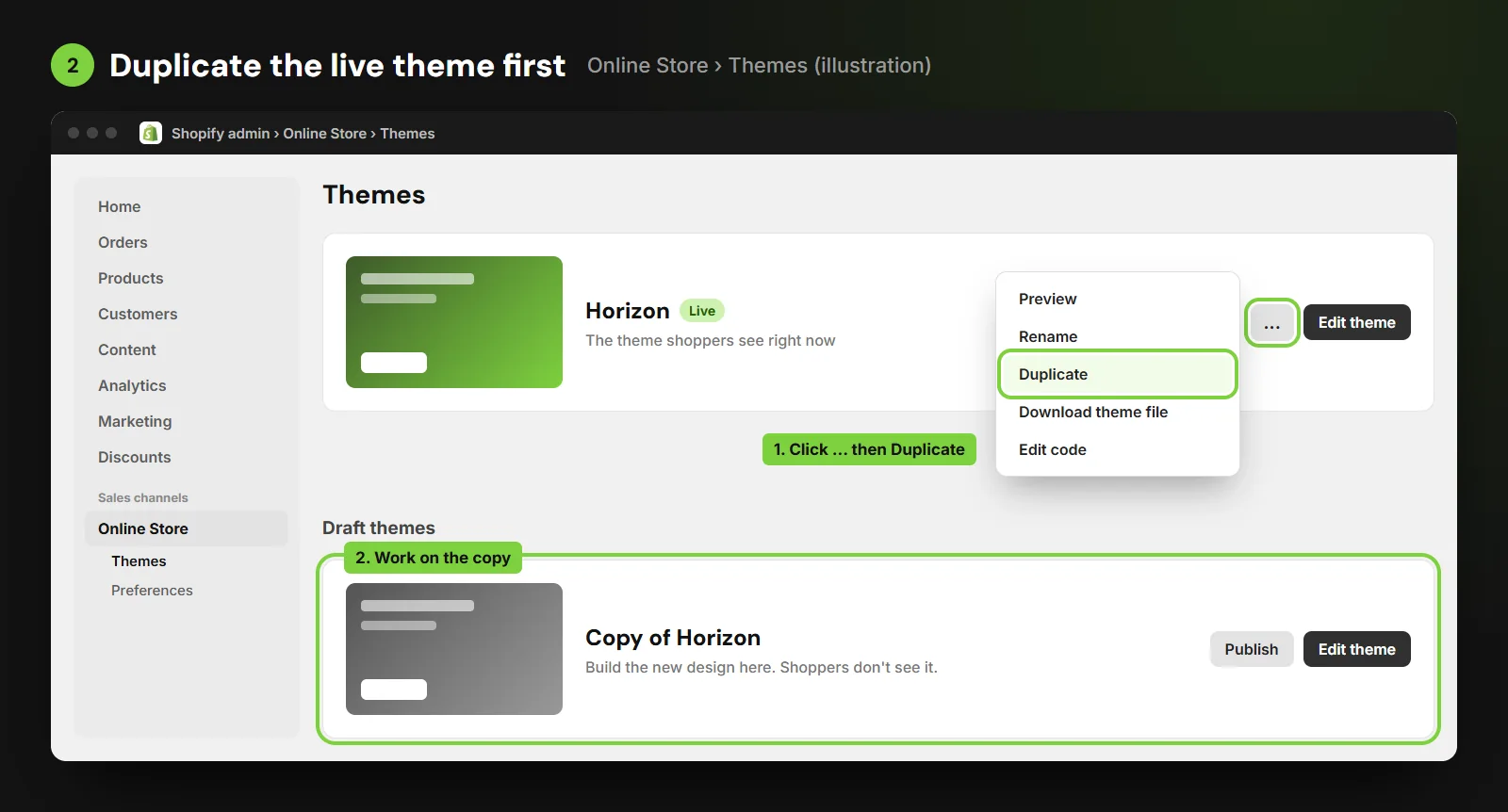
Step 2: Work on a duplicate theme
Never do a Shopify store redesign on the live theme while customers shop. Shopify lets you build a new design in a draft theme instead.
- In your Shopify admin, go to Online Store to open the Themes page.
- Next to your current theme, click the … button and click Duplicate.
- The copy appears as Copy of plus the theme name. Click Edit theme on the copy and work there.
Most plans can hold up to 20 themes, so delete old copies if you hit the limit. You can also try a paid theme for free before you buy it, but you can’t edit its code during the trial. For a full walkthrough, see my guide on how to change your Shopify theme without losing content.
Step 3: Keep your URLs, and redirect the ones that change
Changing your theme doesn’t change your product, collection or page URLs. The Shopify help center says your products, collections, menus, pages and blog posts aren’t changed when you switch themes. URLs only change if you edit a URL handle or delete a page.
If a URL must change, add a redirect from the old address to the new one:
- Go to Content, then Menus, and click View URL Redirects.
- Click Create URL redirect.
- In Redirect from, enter the old URL. In Redirect to, enter the new one.
- Click Save redirect.
Redirect each old page to its closest match, not to the homepage. A redirect only works when the old URL is broken, so it can’t point away from a page that still loads. My Shopify URL redirects guide covers the details.

Step 4: Keep the content that ranks
A cleaner design often means less text. That can hurt you, and it is the quiet way a Shopify redesign loses rankings. Collection descriptions, product details and FAQs often bring in search traffic. Keep the page titles, meta descriptions and main text on your top pages from Step 1. Change the layout first, and the words later, if at all.
Step 5: Turn your apps and tracking back on
Sections, blocks, theme settings and code are saved per theme, including code that an app added. So if you move to a different theme, it starts without your app blocks, app embeds or custom code. Open the theme editor, turn on each app embed, and add each app block again. Then check your tracking. My guides on  GA4 setup on Shopify and the
 Meta pixel help here.
Step 6: Test on your phone before you publish
Many shoppers browse on their phones, so test there first. Click Preview in the theme’s actions menu, then copy the preview link with the link button in the preview bar. Anyone can open that visitor link for 2 days.
- Open your top pages from Step 1 and compare them with the old ones.
- Tap every menu link, filter and button.
- Add a product to the cart and go to checkout.
- Check that reviews, pop-ups and other apps show up.
Step 7: Publish at a quiet time and keep the old theme
Publish on a quiet weekday, not in the middle of a sale. When you publish, your old theme moves to Draft themes with all its settings. If something breaks, you can publish it again in a minute. After launch, check your numbers daily for two weeks and compare them with Step 1. Shopify’s own blog notes that a small dip in search traffic is normal while Google looks at the changed pages again.
How long does a Shopify store redesign take?
A Shopify store redesign takes anything from a few days to three months, depending on scope. Time and price go together, so a longer project also raises the Shopify website redesign cost. Here are the published timelines I found:
- Theme-based redesign by a freelancer: my own packages take 5, 7 or 10 days.
- Restyle of your current theme: 1 to 2 weeks (Miledevs).
- Redesign on a new premium theme: 3 to 6 weeks (Miledevs).
- Custom design and build: 6 to 12 weeks (Miledevs).
- Other agency redesigns: Craftive lists 4 to 8 weeks, and Dexxy says a typical project takes 8 to 9 weeks.
The build is rarely the slow part. Waiting for photos, text and feedback is. Have your content ready and the project stays on schedule.

Mistakes that raise your Shopify website redesign cost
Most extra costs come from rework, not from the design itself. These are the mistakes I see most often:
- Editing the live theme. Shoppers see half-finished pages, and there is no clean way back.
- Changing URL handles without redirects. Old links in Google and in emails lead to “Page not found”.
- Adding too many sections and apps. Shopify’s help center warns that many sections on a page can slow it down.
- Accepting a vague quote. Ask which pages, how many revisions, and whether the theme license is included.
- Forgetting app embeds. Reviews or pop-ups vanish because nobody turned them on in the new theme.
- Redesigning instead of fixing. If one page leaks sales, fix that page first and measure the result.
Before you hire anyone, open real stores they designed on your phone. Ask who owns the theme afterwards and how long they fix bugs after launch.
Frequently asked questions
How much does a Shopify website designer cost?
Published prices I checked in November 2026 range from $150 for a freelancer’s theme-based redesign to $8,000 to $15,000 for a custom design from an agency. Scope decides most of the price.
How do I redesign my Shopify store without losing anything?
Duplicate your live theme and build on the copy. Your products, collections, pages and blog posts stay in the admin. Rebuild sections and app blocks in the new theme, test it on a phone, then publish. The old theme stays in your draft themes.
Will a Shopify redesign hurt my SEO?
A Shopify redesign won’t hurt your SEO if you keep your URLs and the content that ranks. A theme change alone doesn’t change URLs. Redirect any URL you change, keep your titles and descriptions, and watch Google Search Console for a few weeks after launch.
Will my store go offline during a redesign?
No. You build the new design on a draft theme while the live theme keeps selling. Shoppers only see the change when you click Publish.
Can I redesign just one page of my Shopify store?
Yes. Many stores start a Shopify store redesign with the homepage or the product page. A one-page redesign costs less and lets you measure the result before you change more.
Is a Fiverr Shopify redesign a good idea?
Hiring on  Fiverr can work well, if you check the seller first. Look at real stores they designed, read recent reviews, and agree on the exact pages, revisions and delivery time before you order.
A good redesign starts with a clear scope, so you know what you are paying for before work begins. If you want a second opinion or a fixed price for your store, see my Shopify store redesign service. Message me on WhatsApp and I will take a look.



