


You found a theme demo you love, and the price says $380. Shopify gives you good themes for free, so the question is fair: are Shopify premium themes worth it, or is that money better spent on products and ads? The honest answer depends on what your store needs, not on how nice the demo looks.
I am a Shopify Select Partner with more than 10 years on Shopify, and I have set up free and paid themes on many client stores. For this guide I went through all the paid Shopify themes in the Theme Store on November 29, 2026, and counted prices and features. I also read Shopify’s own rules on trials, licenses, support and refunds.
Here is what you will learn:
- What paid Shopify themes really cost, with real counts from the Theme Store
- Which features free themes like Horizon and Dawn have, and which they lack
- What you get for the money: features, support and updates
- When a free theme is enough, and which stores should buy a premium Shopify theme
- How to try a paid theme for free before you buy, step by step
Are Shopify premium themes worth it? The short answer
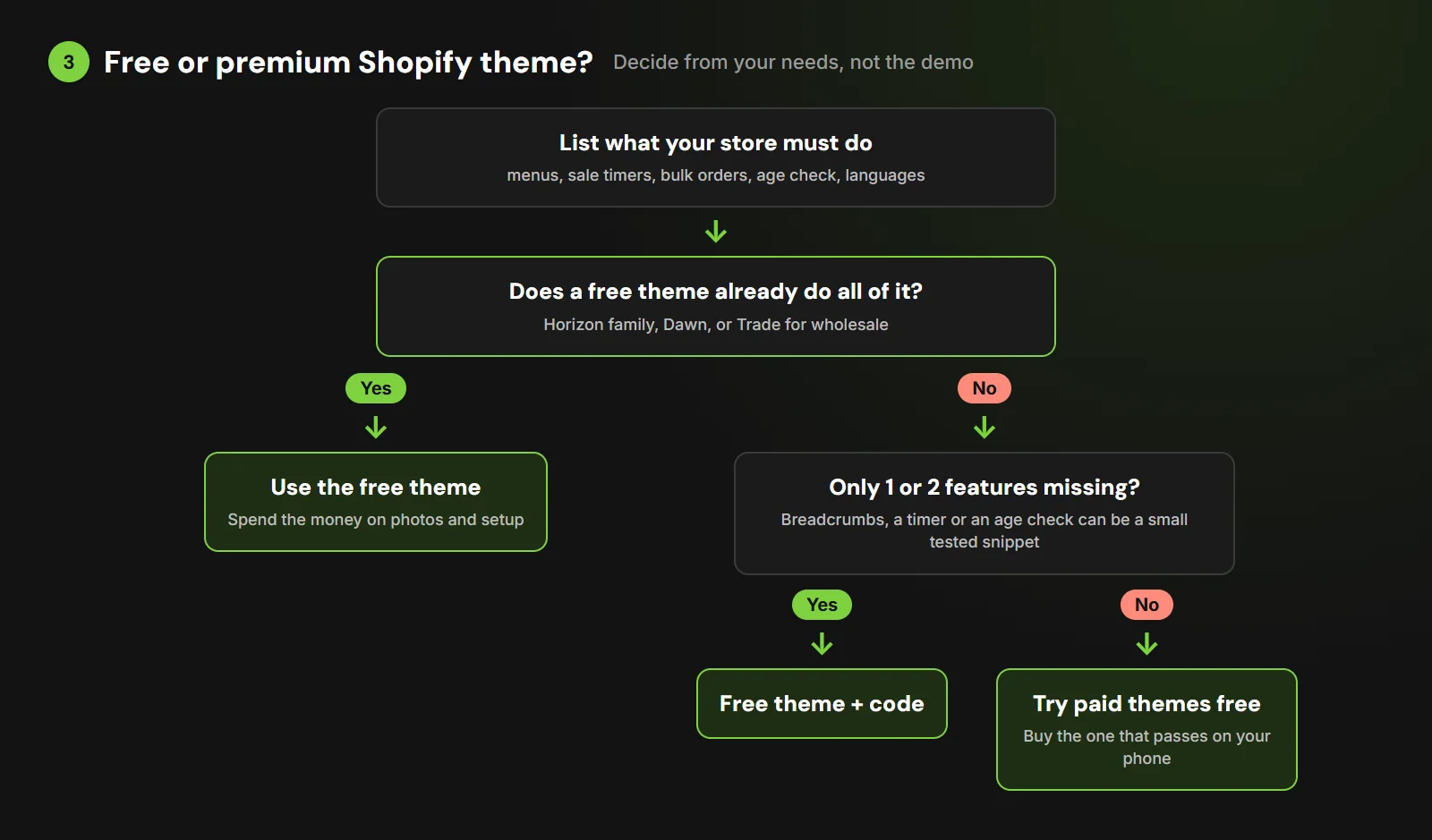
A premium Shopify theme is worth it when it gives you a feature you need now, which your free theme lacks and which would cost more to add another way. If you can’t name that feature, start with a free theme. For most new stores, that means Horizon.
A premium Shopify theme does not make a store sell more by itself. To be sold in the Theme Store, a paid theme must pass Shopify’s base rules: collection filters, color swatches, discounts in the cart, express checkout buttons and minimum speed and accessibility scores. Shopify’s free themes have these basics too. So you are not paying for a “working” store. You pay for extra features, a different starting design and support from the theme’s developer.
So my rule is simple. Make a list of what your store must do. Then check which theme does it without extra apps or code. The cheapest theme that ticks every box is usually the right one.
What paid Shopify themes cost (as of November 2026)
Paid Shopify themes cost $100 to $500 in the Theme Store. It is a one-time payment, not a monthly fee. The theme page calls it a “lifetime license for your store” with “no expiration”. Prices are shown in US dollars.
On November 29, 2026, the Theme Store listed 24 free themes and 336 paid themes. Many paid Shopify themes come in several styles, so the store shows 1,371 paid listings in total. I grouped the 336 themes by price:
| Price | Paid themes | Share |
|---|---|---|
| $100 to $190 | 77 | 23% |
| $200 to $290 | 81 | 24% |
| $300 to $390 | 140 | 42% |
| $400 to $500 | 38 | 11% |
The middle price of paid Shopify themes is $300. The most common price is $320, used by 57 themes. About half of all paid themes (174 of 336) cost between $300 and $450. Only 4 themes cost the top price of $500.

The price of the theme is not the full cost. You still need time, or help, to set it up with your logo, products, pages and apps. A $100 theme you can’t set up well is worse value than a free theme set up properly. For a full picture of running costs, see my Shopify store cost per month guide.
Free vs paid Shopify themes: features compared
Free themes cover the basics well. Paid Shopify themes add extra tools, mostly for sales, big catalogs and special shops. The Theme Store has a feature filter, so I counted how many free and paid themes list each feature.
| Feature | Free themes (24) | Paid themes (336) |
|---|---|---|
| Mega menu | 24 | 321 |
| Color swatches | 23 | 313 |
| Quick view | 11 | 296 |
| Stock counter | 13 | 283 |
| Breadcrumbs | 0 | 273 |
| Countdown timer | 0 | 241 |
| Infinite scroll | 10 | 210 |
| Before/after image slider | 0 | 208 |
| Age verifier | 0 | 195 |
| Right-to-left languages | 0 | 160 |
| Quantity pricing | 3 | 102 |
| Quick order list | 1 | 81 |
A paid theme counts here if at least one of its styles lists the feature. No free theme lists breadcrumbs, a countdown timer, an age check or a before/after slider. Most paid themes do.
What Horizon and Dawn already give you
Horizon is the default theme for most new stores. It shares one building system with nine sister themes: Atelier, Dwell, Fabric, Heritage, Pitch, Ritual, Savor, Tinker and Vessel. All ten are free, and all ten list quick view and infinite scroll. Horizon also has a built-in sticky add to cart bar.
Dawn is simpler but still updated. Version 16.2.0 came out on November 16, 2026. Both themes have a mega menu and color swatches. My Shopify Dawn vs Horizon comparison goes through them setting by setting.

Features you can add to a free theme
A missing feature does not always mean you must buy a theme. Some gaps take a few minutes to close with a small section of code. I have free guides for breadcrumbs, a countdown timer and age verification in Dawn and Horizon. If you need one of those, a free theme plus a tested snippet may be enough. If you need five, a premium Shopify theme is often simpler.
What you really pay for with a premium Shopify theme
With a premium Shopify theme, you pay for three things: built-in features, support from the developer, and a different starting design. Updates come free with both free and paid themes from the Theme Store.
| What you get | Free themes | Paid themes |
|---|---|---|
| Price | $0 | $100 to $500, once |
| Made by | Shopify | Third-party developers |
| Support | Shopify Support | The theme developer |
| Customization help | Up to 60 minutes free | Not included |
| Updates | Free | Free |
| Try before you pay | Not needed | Yes, free trial |
| Refunds | Not needed | Final sale |
| License | Free on any store | One store only |
Built-in features that replace apps or code
This is the main reason to pay. If a theme already has the countdown timer, quick order list or age check you need, you skip an extra app or custom code. Fewer apps also means less code loading on your pages, and that helps store speed. A feature you will never use saves you nothing.
Support from the theme developer
Shopify requires paid theme developers to answer support requests within two business days and to fix bugs in their theme. But Shopify’s help center is clear: “Third-party theme developers don’t provide customizations.” If you want a layout change, you still need a developer.
Free themes are supported by Shopify. On the Basic plan or higher, Shopify Support gives you up to 60 minutes of free design help, in 15 minute blocks, for set changes.
Updates, a different look, and what you don’t get
Themes you buy or add from the Theme Store get free updates in your admin when the developer releases them. A paid theme also gives you demo styles made for one type of shop, like fashion or food. That saves setup time if the style is close to your brand.
What you don’t get: more sales on its own, a faster store or a unique look. Any other store can buy and run the same theme.
When a free theme is enough
A free theme is enough for most new stores and many busy ones. In my experience, it fits you if most of these are true:
- You have fewer than a few hundred products, in a simple menu.
- You sell to shoppers, not wholesale buyers who order in bulk.
- You don’t run timed sales every week.
- Your products don’t need an age check or before/after photos.
- You still test your products and want to keep costs low.
Spend that money on good photos, clear product pages and setup instead. So, are Shopify premium themes worth it if this list fits you? Probably not yet. You can always move to a paid theme later. My guide to changing your Shopify theme shows how to switch without losing content.
Which stores should pay for paid Shopify themes
Paid Shopify themes make the most sense when your store has a clear need that free themes don’t list. Here is how I decide with clients.
| Your store | My pick | Why |
|---|---|---|
| New store, testing products | Free (Horizon) | Low cost, all the basics |
| Fashion with many colors | Free first | Horizon has swatches on cards |
| Weekly sales and launches | Paid | Built-in countdown timers |
| Wholesale or bulk orders | Paid, or Trade | Quick order lists, quantity pricing |
| Age-restricted products | Paid, or free + code | Built-in age verifier |
| Arabic or Hebrew store | Paid | No free theme lists right-to-left |
| Beauty or skincare results | Paid | Before/after image sliders |
Trade is Shopify’s free theme made for wholesale. It is the only free theme that lists a quick order list, so check it before you pay for a wholesale theme.
How to try a paid theme before you buy
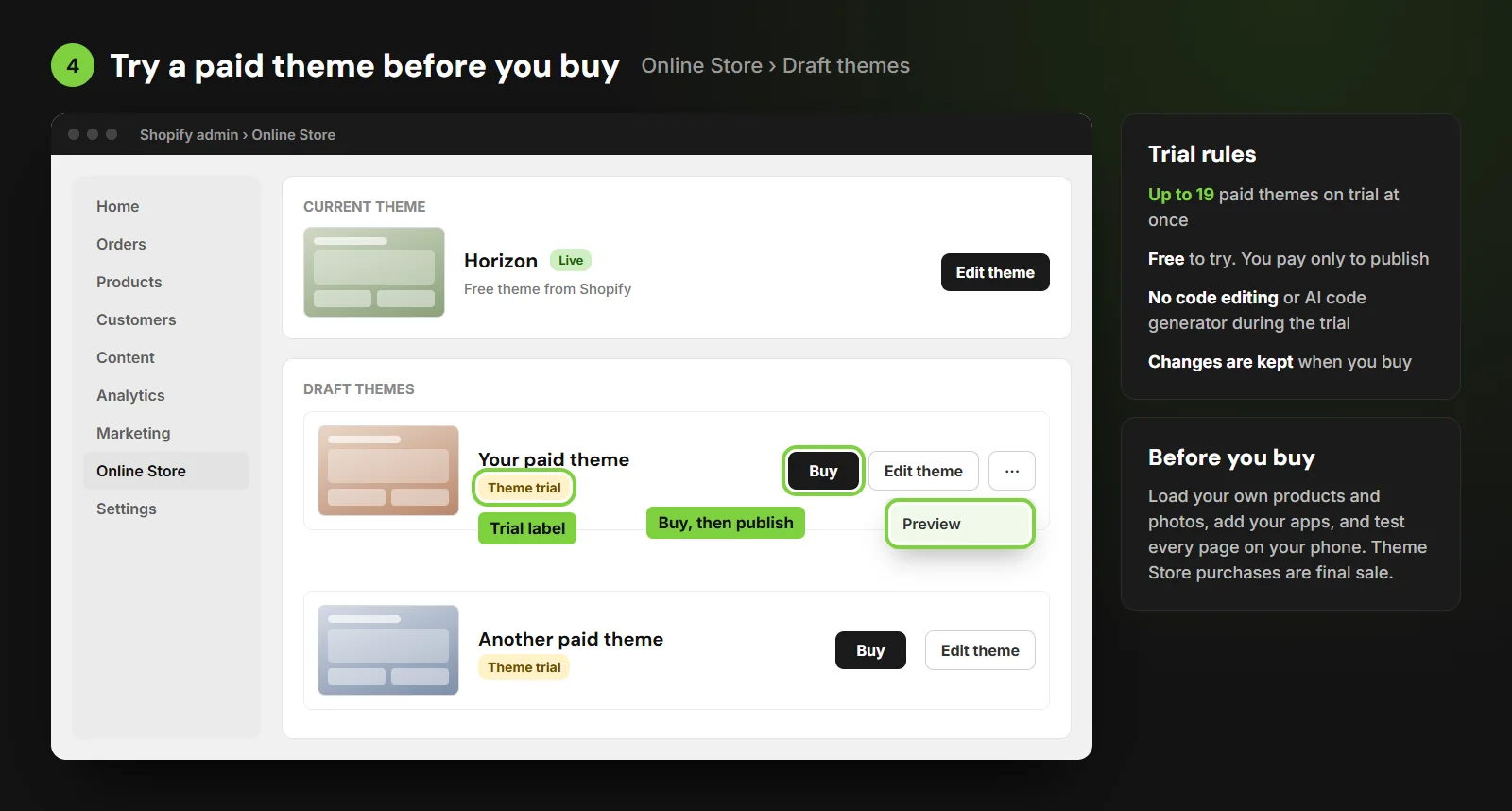
You can try paid Shopify themes in your own store for free, and you only pay when you publish one. Shopify’s help page on adding, previewing and buying themes explains the rules.
- Open the theme in the Shopify Theme Store and click Try theme.
- In your Shopify admin, go to Online Store. The theme shows under Draft themes with a Theme trial label.
- Click Edit theme and set it up with your logo, colors and real products. Your changes are saved if you buy.
- Open the actions menu (the … button) and click Preview. Check every page on your phone.
- To get a second opinion, click the link button in the preview bar. It copies a preview link that works for 2 days.
- Happy with it? Click Buy next to the theme in Draft themes, then publish it.
Trial limits to know
- You can try up to 19 paid themes at the same time.
- You can’t edit the theme code or use the AI code generator during a trial.
- Only staff with the Themes, Manage and install apps and channels and Approve app charges permissions can buy a theme.
Load your own photos, not the demo ones. Add your apps’ blocks. Test the exact features you are paying for, and test them on a phone first.
Mistakes to avoid with paid Shopify themes
Most problems with paid Shopify themes start before the purchase, not after it.
- Buying “free download” copies. Shopify says themes sold in the Theme Store can’t be bought anywhere else. An unlicensed copy shows “Action required: licensing issue”, and you can’t customize or publish it. It gets no updates or support, and it can lead to temporary account restrictions.
- Buying the demo, not the theme. Demos use professional photos and perfect text. Try the theme with your own products before you pay.
- Expecting the developer to customize it. Theme support covers bugs and setup questions. Layout changes and custom features are paid work.
- Buying in a hurry. Theme Store purchases of third-party themes are final sale. The developer can’t refund you, so use the free trial fully.
- Planning a second store on one license. A paid theme is licensed to the store that bought it. A transfer only works if you close the old store, and it can’t be reopened after that.
- Forgetting the setup work. Section settings, colors, fonts and app code don’t carry over to a new theme. Plan time to rebuild them.
What a theme plus setup costs
The license is one part of the bill. Setup is the other. As one honest example, my own Shopify services list a Basic Redesign on a free theme from $150, and a Standard Redesign on a premium Shopify theme from $250, as of November 2026. The final price depends on the work, and we agree on it after we discuss your project.
Whoever sets up your store, buy a paid theme in your own Shopify admin, because Shopify licenses it to the store that buys it. If you want something more personal, you can also see the Shopify themes I design.
Frequently asked questions
Are Shopify premium themes worth it for a new store?
Usually not at the start. A free theme like Horizon has the basics most new stores need. Buy a paid theme when you can name a feature you need that free themes lack, such as a countdown timer, a quick order list or an age verifier.
Why are Shopify themes so expensive?
Paid Shopify themes are made and supported by independent developers. Shopify requires them to answer support requests within two business days and to fix bugs in their theme. The biggest group costs $300 to $390, and you pay once, not every month.
Is a Shopify theme a one-time payment?
Yes. A premium Shopify theme from the Theme Store is a one-time payment with a lifetime license for your store. Updates from the Theme Store are free.
Can I get a refund on a Shopify theme?
No. Shopify says purchases of third-party themes from the Theme Store are final sale. That is why you should use the free trial and test the theme with your own products first.
Can I use a Shopify theme on multiple stores?
No. A paid theme is licensed only to the store that bought it, so each store needs its own purchase. Shopify Plus stores need a license for each storefront.
Are paid Shopify themes for free download safe?
No. A copy from outside the Theme Store is unlicensed. Shopify blocks it from being customized or published until you buy it, it gets no updates or support, and it can lead to temporary account restrictions.
The best theme is the one that does what your store needs with the fewest extras. If you want a second opinion before you pay for a theme, or help setting one up, see my Shopify store redesign service. Message me on WhatsApp and I will take a look.



