


A BigCommerce to Shopify migration moves your products, customers, orders and content from a  BigCommerce store to a new Shopify store. The data is the easy half. The hard half is your old links, your apps and your theme, because none of them move on their own.
I have done this move on many client stores, and the same few things go wrong each time. Every setting, price and limit below comes from official pages, checked in November 2026.
Here is what you will learn:
- What data moves in a BigCommerce to Shopify migration
- How to back up your store and save every old URL
- Which import tool to use, with prices
- How to map and redirect your old links
- Which apps and theme parts to rebuild, and what to test
What moves in a BigCommerce to Shopify migration?
Your data moves. Your theme, apps and settings don’t. Shopify’s guide to migrating to Shopify lists the data most stores bring over.
| Data | Moves? | How |
|---|---|---|
| Products and variants | Yes | App or product CSV |
| Customers | Yes | App or customer CSV |
| Past orders | Yes | Migration app only |
| Reviews | Yes | Review app import |
| Blog posts and pages | Yes | App, or copy by hand |
| Coupons, store credit | Yes | Migration app |
| Customer passwords | No | Customers sign in again |
| Theme and apps | No | Rebuild on Shopify |

Passwords can’t move. BigCommerce won’t export them, and Shopify can’t import them. That’s fine. With Shopify’s new customer accounts, shoppers sign in with their email and a 6-digit code. See my guide to Shopify new customer accounts.
Step 1: Back up everything before you migrate from BigCommerce
Take a full backup first. You will need these files to check the import. BigCommerce’s backup guide gives these paths:
- Products: go to Products, then Export, and click Start export.
- Customers: go to Customers, then Export, and pick the Bulk Edit template.
- Orders: go to Orders, then Export, and pick the Default template.
- Redirects: go to Settings, then 301 Redirects, and click Export All.
- Theme: go to Storefront, then Themes, click Advanced and download your current theme.
Reviews are not in these files. BigCommerce has no review export of its own. Its help center points to the free Product Review Importer & Exporter app.
Save every old URL
Your rankings live on your old links, so list them all before your BigCommerce migration starts. BigCommerce keeps an XML sitemap at yourdomain.com/xmlsitemap.php. It lists your live products, categories, brands, pages and blog posts. Add your top pages from analytics, and keep the redirect export too.
Then open Settings, then URL Structure, in BigCommerce. It decides how your product and category links look. You need it in Step 4.
List your product options and custom fields
Before you migrate from BigCommerce, check your product options. Variants, like size and color, each get their own SKU and stock. Modifiers, like engraving text, add a choice with no SKU. Shopify variants work the same way, with up to 3 options per product. Modifiers have no direct match, so plan them as product personalization fields. Big option sets may hit the Shopify variant limit.
Custom fields, like a book’s ISBN or a wine’s year, become metafields on Shopify. Your theme then needs a spot to show them.
Step 2: Choose a tool for your BigCommerce migration
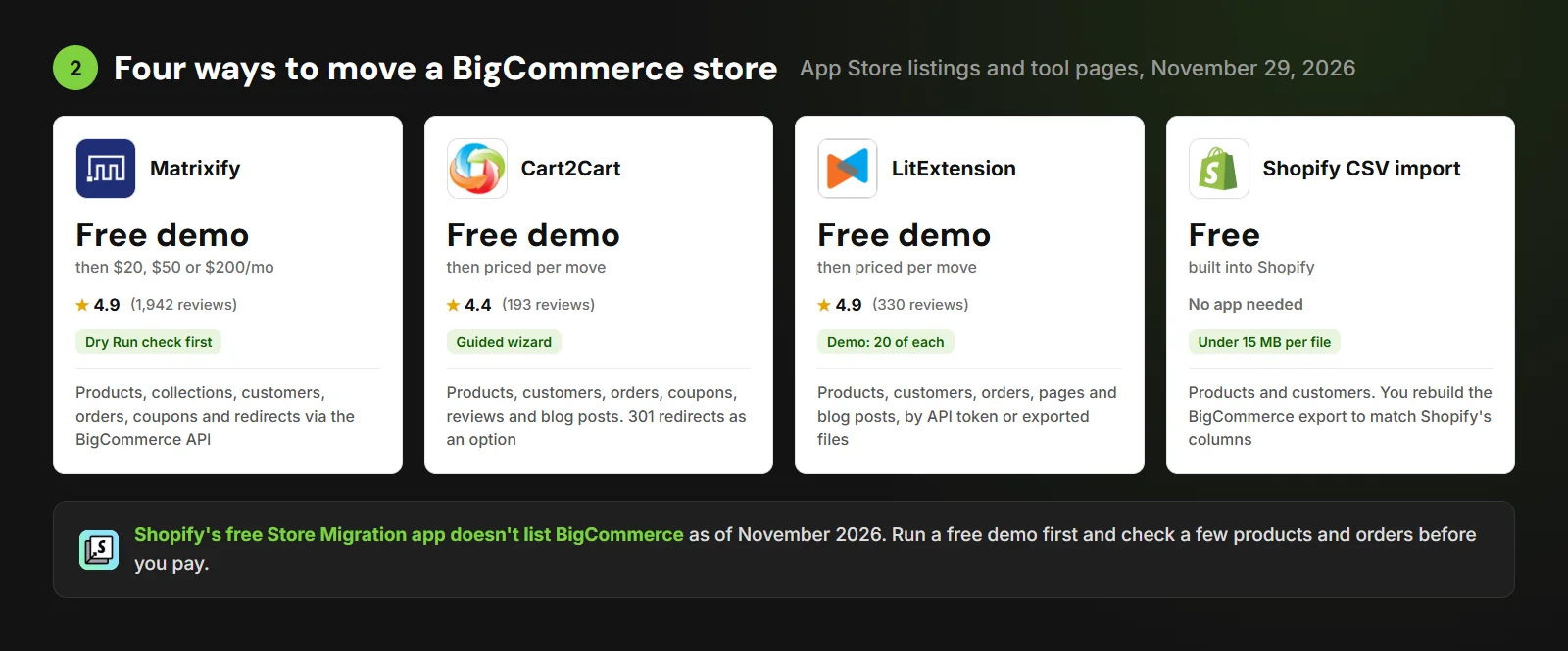
You have four choices: Matrixify, Cart2Cart, LitExtension or a free CSV import. Shopify’s free  Store Migration app is not one. As of November 2026, its listing names Square, WooCommerce, Etsy, Wix, Amazon, eBay, Clover and Lightspeed. BigCommerce is not on that list. I haven’t tested every tool here. This is a neutral look at their own pages, checked on November 29, 2026.
| Tool | Price | What it moves | Rating |
|---|---|---|---|
 Matrixify | Free demo, then $20 to $200/mo | Products, orders, coupons, redirects | 4.9 (1,942) |
 Cart2Cart | Free demo, then priced per move | Products, orders, reviews, blog | 4.4 (193) |
 LitExtension | Free demo, then priced per move | Products, orders, pages, blog | 4.9 (330) |
| Shopify CSV import | Free | Products, customers | Built in |
Matrixify
Matrixify reads your store through the BigCommerce API. You make a read-only API account under Settings, then Store-level API Accounts, and upload the credentials file to the app. Its tutorial lists products, categories, customers, store credit, orders, coupons and promotions. It also creates redirects from your old product and category links.
The best part is the Dry Run option. It builds a spreadsheet of your data without importing anything, so you can check it first. You can also pick orders by date, which helps on launch day. The free demo handles 10 items per file. Paid plans were $20, $50 and $200 a month as of November 2026.
Cart2Cart and LitExtension
Both are guided wizards. You connect both stores, pick your data, run a free demo, then pay for the full move. For a BigCommerce to Shopify migration, Cart2Cart moves products, customers, orders, coupons, reviews and blog posts. It can also add 301 redirects. LitExtension’s demo covers 20 products, 20 orders and 20 customers. Both price each move by your data, so get a quote after the demo.
Shopify CSV files
For a small catalog, a CSV import is free. The BigCommerce export won’t match Shopify’s columns, so you rebuild the file. My free Shopify product CSV template shows every column. Each file must stay under 15 MB. Customers can come in by CSV too, but past orders can’t.
Step 3: Import your data in the right order
Shopify says to import products first, then customers, then past orders. That way each order links to the right product and customer. Here is the order I follow on every BigCommerce to Shopify migration:
- Keep the old store online. The tools copy your images from it.
- Import products. Keep the password page on until launch.
- Turn categories into collections. Each category becomes a collection.
- Import customers. Map customer groups to customer tags, so you can still target them.
- Pause order emails. Turn them off before you import past orders.
- Import past orders. Use Matrixify, Cart2Cart or LitExtension.
- Move reviews. If you used
 Judge.me on BigCommerce, its support team can export your reviews. You import them on Shopify. They show as unverified, since the old orders can’t be matched.
 Judge.me on BigCommerce, its support team can export your reviews. You import them on Shopify. They show as unverified, since the old orders can’t be matched.
Then check 10 to 20 products by hand after your BigCommerce migration: price, variants, stock, images and weight. Also check images in descriptions. Some still load from the old site. Need a new review app? See my Judge.me vs Loox comparison.
Step 4: Map BigCommerce URLs and set up redirects
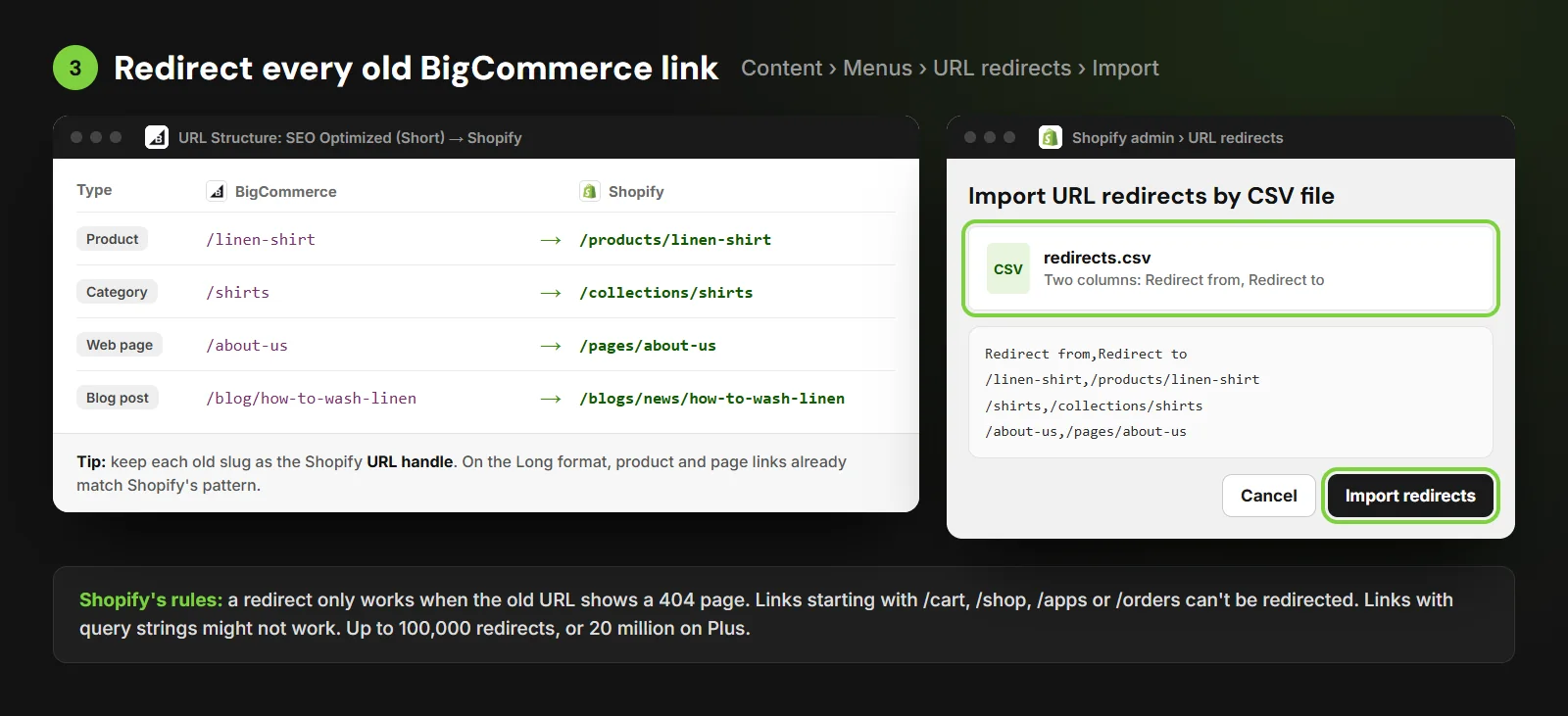
Redirects decide whether your BigCommerce migration keeps its Google rankings. Shopify uses fixed link patterns like /products/ and /collections/. BigCommerce lets you pick yours under URL Structure, and it suggests SEO Optimized (Short).
| Page | BigCommerce Short | BigCommerce Long | Shopify |
|---|---|---|---|
| Product | /linen-shirt | /products/linen-shirt | /products/linen-shirt |
| Category | /shirts | /categories/shirts | /collections/shirts |
| Web page | /about-us | /pages/about-us | /pages/about-us |
With the Long format, product and page links already match Shopify’s pattern. They can keep working when the handle matches. The Short format changes every link, so each page needs a redirect. A third choice, SEO Optimized (Category), puts the category before the product, like /shirts/linen-shirt.
Build the redirect CSV for your BigCommerce migration
Keep each old slug as the Shopify handle, in the URL handle column of the product CSV. Then every redirect follows one pattern. Shopify imports redirects from a CSV with two columns:
Redirect from,Redirect to
/linen-shirt,/products/linen-shirt
/shirts,/collections/shirts
/about-us,/pages/about-us
/blog/how-to-wash-linen,/blogs/news/how-to-wash-linen
Copy each old path just as your sitemap shows it. Keep any slash at the end. Blog posts usually sit under /blog/, but check your own links. Then, in Shopify, go to Content, then Menus, click URL redirects, then Import. Add your file, review it and click Import redirects.
Know Shopify’s redirect rules
- A redirect only works when the old URL shows a 404 page.
- Links that start with /cart, /shop, /apps or /orders can’t be redirected.
- A link ending in .html can’t redirect to the same link without .html.
- Links with query strings might not work as expected. Shopify’s own example is a /brands/ link ending in ?_bc_fsnf=1.
- You can have up to 100,000 redirects, or 20 million on the Plus plan.
Bring over your meta titles and descriptions too. The product CSV has SEO title and SEO description columns. Cart2Cart also moves meta titles. After launch, submit /sitemap.xml to  Google Search Console. My Shopify URL redirects guide covers testing.
Step 5: Replace your apps and rebuild the theme
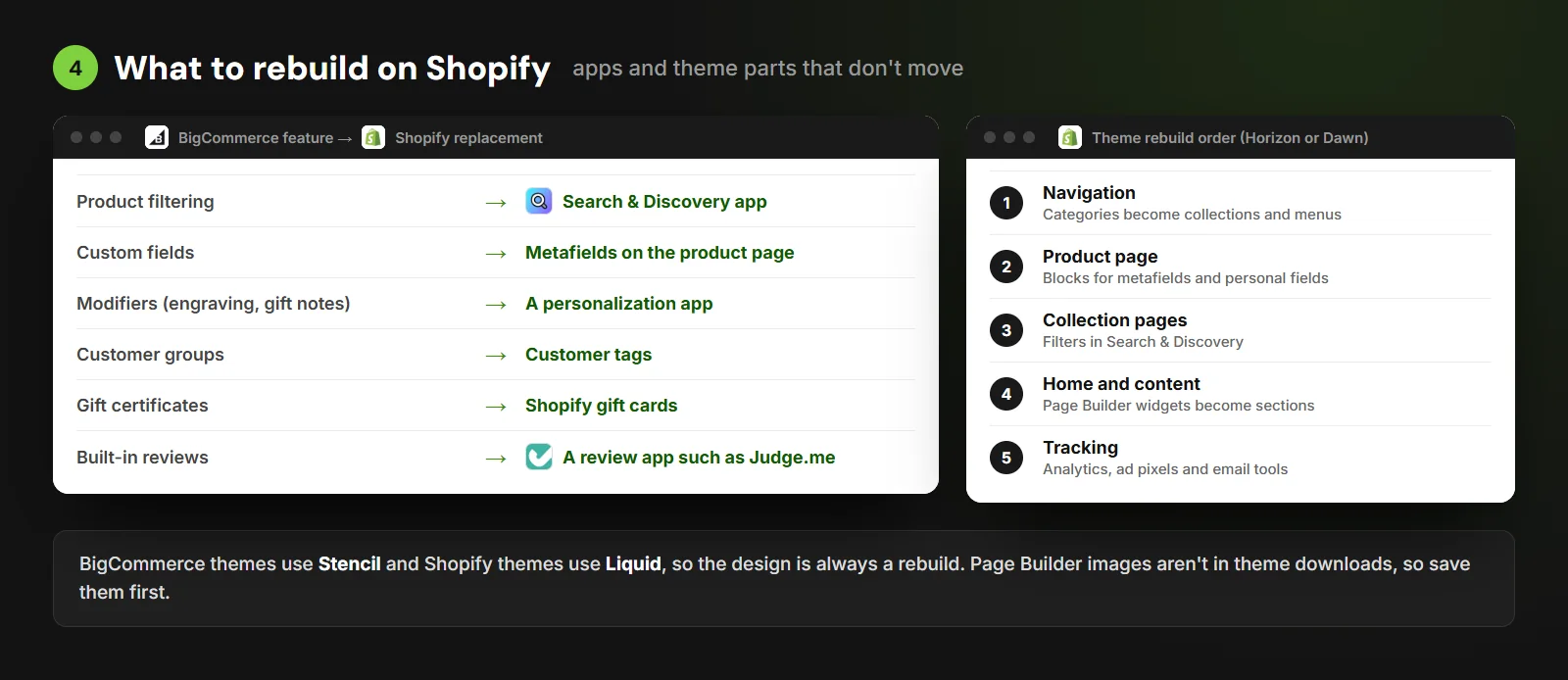
In a BigCommerce to Shopify migration, nothing from your storefront moves. BigCommerce themes are built on Stencil, and Shopify themes use Liquid, so the design is a rebuild.
| On BigCommerce | On Shopify |
|---|---|
| Product filtering |  Search & Discovery app |
| Custom fields | Metafields |
| Modifiers | A personalization app |
| Customer groups | Customer tags |
| Gift certificates | Shopify gift cards |
| Page Builder widgets | Theme sections and blocks |
| Built-in reviews | A review app |
Sell wholesale on BigCommerce? Read my Shopify B2B guide before you pick a plan.
What to rebuild in the theme
Start with a free Shopify theme like Horizon or Dawn. My Dawn vs Horizon comparison explains the difference. Then rebuild these parts in order:
- Navigation. Map categories to collections, then build the menus. A big catalog may need a Shopify mega menu.
- Product page. Add blocks that show your metafields and personalization fields.
- Collection pages. Set up filters in Search & Discovery.
- Home and content pages. Rebuild Page Builder widgets as sections. BigCommerce says Page Builder images aren’t in theme downloads, so save them separately.
- Tracking. Add your analytics, ad pixels and email tools again. See my Shopify GA4 guide.
Step 6: Move your domain
Moving the domain is the last step of a BigCommerce to Shopify migration. First check where you bought it. BigCommerce sells domains through Enom. To move one away, turn off its lock and get an EPP code in your BigCommerce account. Then start the transfer at the new registrar. ICANN rules block a transfer for 60 days after a new sign-up or a WHOIS change.
If your domain is with another registrar, point it to Shopify in your DNS settings:
- Point the A record to 23.227.38.65 and delete any other A records.
- Point the AAAA record to 2620:0127:f00f:5:: and delete any other AAAA records.
- Point the www CNAME record to shops.myshopify.com.
Shopify says a domain can take up to 48 hours to go fully live. Import your redirects first, because they start working the moment the domain points to Shopify.
Step 7: Test before you launch
Test the new store like a shopper before the domain switch. Here is my test checklist for a BigCommerce to Shopify migration:
- Product, variant and stock counts match your old export.
- Ten random products have the right price, SKU, weight and images.
- Imported customers show their past orders and tags.
- Your 20 busiest old URLs redirect to the right page.
- Test orders go through, and test mode is off afterwards.
- Discounts, shipping rates and taxes are right at checkout.
- Order emails are back on and read well.
- Menu, search, filters and checkout work on a phone.
My Shopify launch checklist lists the rest.
Common mistakes to avoid
These are the mistakes I see most often when stores migrate from BigCommerce:
- Switching the domain before redirects exist. Old links break on day one.
- Letting Shopify make new handles. Keep your old slugs, or the redirect list gets messy.
- Forgetting modifiers. Engraving or gift message fields don’t become variants. The product imports, but the choice is gone.
- Closing the old store too early. Image imports and the final order import still read from the old store.
Which way should you use?
The best way to migrate from BigCommerce depends on your data and your time:
- Small catalog, no order history needed: Shopify’s product and customer CSV import.
- Happy in spreadsheets: Matrixify. The Dry Run lets you check it all first.
- Want a guided wizard: Cart2Cart or LitExtension. Run the free demo first.
- Custom fields, B2B or a new design: hire someone to plan the move and rebuild the theme.
Moving from another platform? See my guides for WooCommerce to Shopify and Wix to Shopify, and my free Shopify tools.
Frequently asked questions
Can you migrate BigCommerce to Shopify for free?
Partly. When you migrate from BigCommerce, products and customers can move for free with CSV files, and redirects import for free. Past orders need a paid tool. Shopify’s free Store Migration app doesn’t list BigCommerce as of November 2026.
How do I export products from BigCommerce?
Go to Products, then Export, and click Start export. When it’s done, click the file name to download the CSV.
Can Matrixify migrate BigCommerce to Shopify?
Yes. For a BigCommerce to Shopify migration, it connects to the BigCommerce API and moves products, collections, customers, orders and coupons. It also builds redirects. Run a Dry Run first.
Will I lose SEO if I move from BigCommerce to Shopify?
Not if you plan it. A BigCommerce migration has the best chance to keep its rankings when you keep your slugs, redirect every old URL, copy your meta titles and submit your new sitemap. Expect some movement for a few weeks.
Can I transfer my domain from BigCommerce to Shopify?
Yes. If you bought it through BigCommerce, turn off the lock, get an EPP code and transfer it. If it sits with another registrar, point its DNS records to Shopify.
How long does a BigCommerce migration take?
For a small store, I plan about three weeks for a BigCommerce to Shopify migration. Most of the time goes into redirects, apps, the theme and testing.
A BigCommerce to Shopify migration is mostly careful planning. Don’t rush the redirects or the theme. If you would rather hand it over, I move stores and rebuild their design as part of my Shopify store redesign service. Message me on WhatsApp and I will take a look.



