


A Shopify SEO checklist helps you fix the things that decide whether  Google can find, understand and show your store. The good news is that
 Shopify already does much of the technical work. Most of what is left is filling in the right fields in your admin, in the right order.
I’m a Shopify Select Partner with 10+ years of Shopify work, and I have run this check on many client stores. Every setting below comes from Shopify’s help center, Google’s own guides or the code of Shopify’s free Dawn and Horizon themes. I checked all of it on November 29, 2026.
Here is what you will learn:
- What Shopify does for SEO on its own, so you don’t pay for work that is done
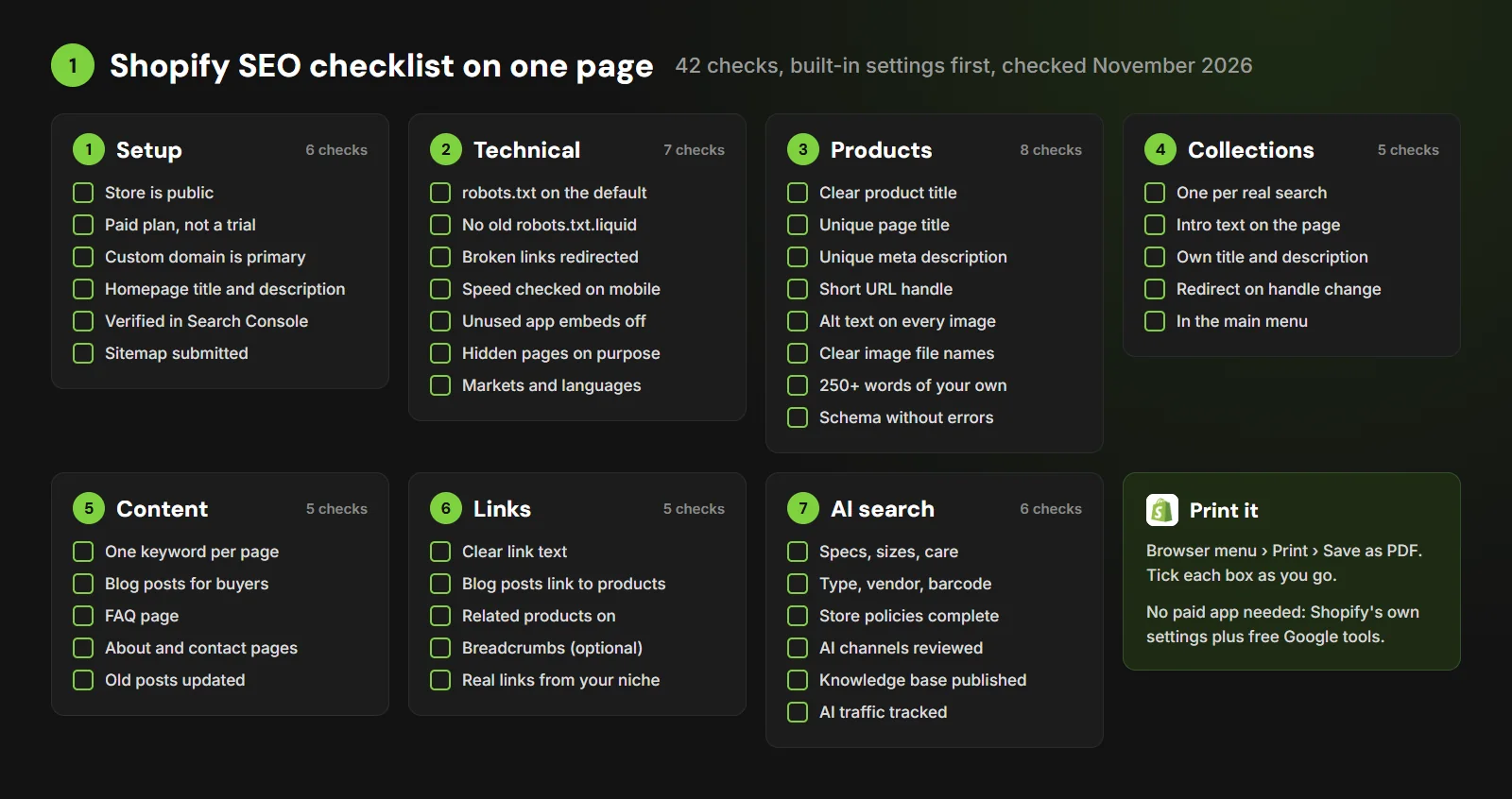
- A printable SEO checklist for Shopify in seven parts, from setup to AI search
- Where each setting lives in your admin, with the steps
- The mistakes I fix most often, and which order to work in
To print this Shopify SEO checklist, open your browser’s print menu and choose Save as PDF.
What Shopify already does for SEO
Shopify handles the technical basics on every store. Its guide to how SEO works on Shopify lists canonical tags, an automatic sitemap.xml and robots.txt, title tags with your store name, and SSL by default.
The free themes add more. I read the code of Dawn and Horizon: both print a canonical tag and your meta description, and both add product structured data. So don’t pay anyone to “create a sitemap” or “add SSL”. Real Shopify store SEO work starts with the checks below.
Part 1: Shopify SEO checklist for setup
Setup makes sure Google can see your store at all. Do this part of the Shopify SEO checklist first, because no other fix matters while your store is hidden. Two checks need a free  Google Search Console account.
| ☐ | Check | Where in Shopify |
|---|---|---|
| ☐ | Store is public | Online Store, access menu |
| ☐ | Paid plan, not a trial | Settings › Plan |
| ☐ | Custom domain is primary | Settings › Domains |
| ☐ | Homepage title and description | Online Store › Preferences |
| ☐ | Store verified in Search Console | theme.liquid, HTML tag |
| ☐ | Sitemap submitted | Search Console › Sitemaps |
Shopify’s SEO FAQ names two common reasons a store doesn’t show in Google: private mode, and a trial plan, because search engines don’t index trial stores. To go public, go to Online Store, click Private, select Public and click Update. My guide to the Shopify password page has more.
For the homepage, go to Online Store > Preferences and fill in the Social sharing image and SEO section.
Verify your store and submit the sitemap
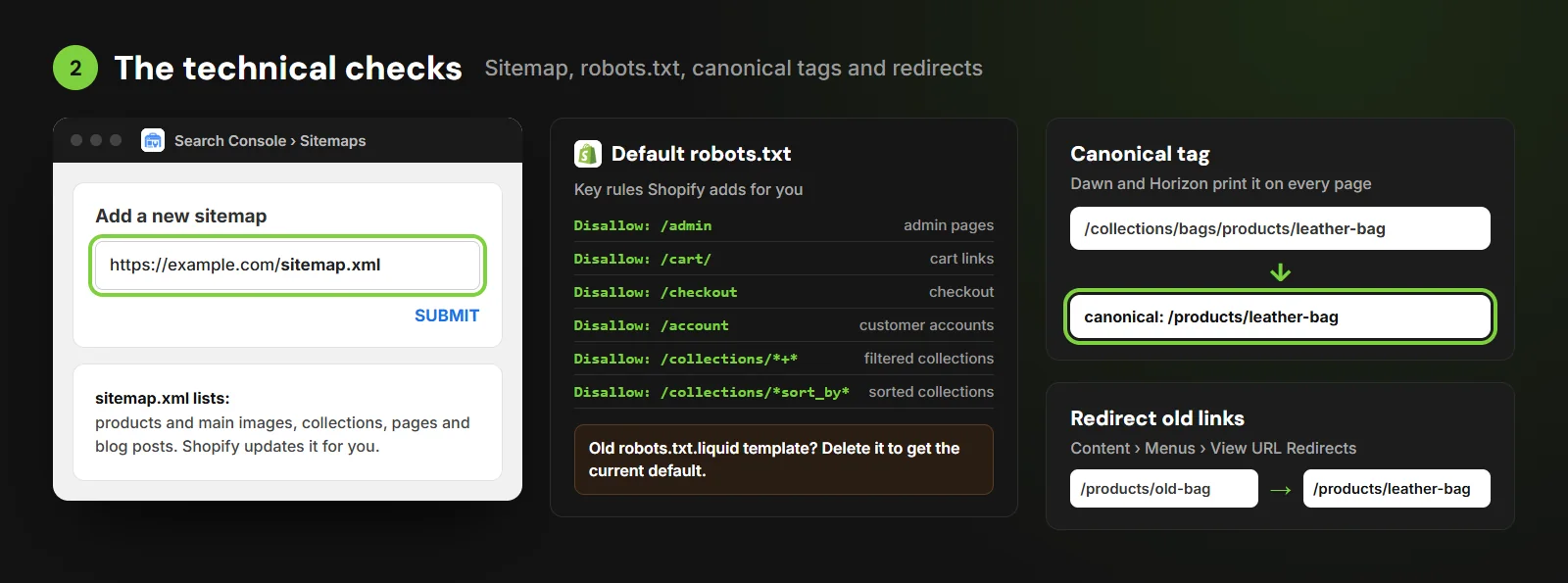
Your sitemap lives at yourdomain.com/sitemap.xml and updates itself. You submit it once in Google Search Console.
- In Search Console, add a property, choose URL prefix and enter your domain with https://.
- Choose the HTML tag method and copy the whole tag.
- In Shopify, go to Online Store > Themes, click the … button next to your theme, then Edit code.
- Open theme.liquid in the Layout folder. Paste the tag on a new line below the opening <head> tag and click Save.
- Back in Search Console, click Verify. If it fails, wait 15 minutes and try again.
- Under Indexing, click Sitemaps, enter sitemap.xml and click Submit.
Shopify notes that Google usually picks up changes within 48 to 72 hours. You can’t force it, and Google doesn’t index every page.
Part 2: Technical Shopify store SEO checks
Technical checks keep search engines on your real pages and away from copies. Shopify does most of this part of Shopify store SEO for you, so don’t break what works.
| ☐ | Check | Where in Shopify |
|---|---|---|
| ☐ | robots.txt on the default | yourdomain.com/robots.txt |
| ☐ | No old robots.txt.liquid | Edit code › Templates |
| ☐ | Broken links redirected | Content › Menus › View URL Redirects |
| ☐ | Speed checked on mobile | Online Store › Themes |
| ☐ | Unused app embeds off | Theme editor › App embeds |
| ☐ | Hidden pages hidden on purpose | seo.hidden, Unlisted status |
| ☐ | Markets and languages set up | Markets page, translations |
The robots.txt check most people miss
Shopify’s default robots.txt keeps crawlers out of your cart, checkout and account pages. It also blocks filtered and sorted collection URLs, because they repeat the collection page. Shopify says the default works for most stores.
If your theme has an old robots.txt.liquid template, it can keep rules Shopify has since dropped, such as blocking /search and /policies/. Shopify’s fix is to delete that template. My free sitemap and robots.txt checker shows what both files contain. Shopify adds that “Indexed, though blocked by robots.txt” in Search Console is normal for these pages.
Redirects, speed and hidden pages
When you delete a product or change a URL, go to Content > Menus > View URL Redirects and click Create URL redirect. Fill in Redirect from and Redirect to, then save. You can only redirect broken URLs, and each market subfolder needs its own redirect. My guide to Shopify URL redirects covers every case.
The performance summary on the Online Store > Themes page shows your three Core Web Vitals: loading speed, interactivity and visual stability. The reports also show when changes such as app installs affect your speed. My Shopify speed optimization guide covers the fixes.
A seo.hidden metafield set to 1 hides a page from search engines, and Unlisted status hides a product. Use them only on purpose.
Selling in Europe and the UK
If you sell in several countries, Shopify Markets adds hreflang tags, canonical URLs and sitemaps for you. Shopify recommends subfolders, such as /de or /fr, for most stores. Translate with  Translate & Adapt, and adapt the text for each market instead of word for word. My guide to Shopify Markets in Europe has the setup.
Part 3: Product page SEO checklist for Shopify
Product pages are where most shoppers land, so this part of the SEO checklist for Shopify is the longest. Start with your best sellers.
| ☐ | Check | Where in Shopify |
|---|---|---|
| ☐ | Clear product title | Product › Title |
| ☐ | Unique page title | Search engine listing |
| ☐ | Unique meta description | Search engine listing |
| ☐ | Short URL handle | Search engine listing |
| ☐ | Alt text on every image | Image › Add alt text |
| ☐ | Clear image file names | Rename before upload |
| ☐ | 250+ words of your own text | Product › Description |
| ☐ | Product schema without errors | Rich Results Test |
How to edit a product’s search engine listing
- Go to Products and open a product.
- In the Search engine listing section, click the pencil icon.
- Write a Page title. The field takes 70 characters, but Shopify suggests 60 or fewer.
- Write a Meta description of up to 160 characters, in plain sentences.
- Optional: shorten the URL handle, but don’t change it often.
- Click Save.

Images and descriptions
Click a product image and choose Add alt text. Shopify allows 512 characters but recommends 125 or fewer. For a big catalog, fill the alt text column in a product CSV file and import it again. My guide to Shopify image sizes covers the rest.
Shopify can’t rename image files after upload, so rename them first. For text, Shopify says not to copy the manufacturer’s description, and to give every page at least 250 words. My guide to product descriptions shows how. Then test one product in Google’s Rich Results Test, as my Shopify product schema guide explains.
Part 4: Collection page checklist
Collection pages often rank for broad searches, like “linen dresses” instead of one dress. In Shopify store SEO, treat each one like a small landing page.
| ☐ | Check | Where in Shopify |
|---|---|---|
| ☐ | One collection per real search | Products › Collections |
| ☐ | Intro text that shows on the page | Collection › Description |
| ☐ | Unique page title and description | Search engine listing |
| ☐ | Redirect when the handle changes | Collection › URL handle |
| ☐ | Linked from the main menu | Content › Menus |
In Dawn, the collection banner section has a Description setting that shows or hides the intro text. If yours is missing, see my fix for a collection description not showing.
When you change a collection’s URL handle, Shopify asks whether to create a redirect. Say yes. Shopify also says every page should have a menu link and sit no more than 3 clicks from the homepage where possible.
Part 5: Content checklist
Content is the part of Shopify store SEO that keeps paying off. Shopify’s SEO FAQ says missing keywords and useful content is the most common reason a store ranks low.
| ☐ | Check | Where in Shopify |
|---|---|---|
| ☐ | One main keyword per page | Your keyword list |
| ☐ | Blog posts that answer buyer questions | Content › Blog posts |
| ☐ | FAQ page with real questions | Online Store › Pages |
| ☐ | About and contact pages | Online Store › Pages |
| ☐ | Old posts kept up to date | Content › Blog posts |
Shopify suggests at least 500 words for blog posts and information pages. My Shopify blog SEO guide shows what a good post needs, and my guide to a Shopify FAQ page covers the format.
Part 6: Links checklist
Links tell Google which pages matter. This part of the Shopify SEO checklist covers links inside your store and from other sites, which Shopify lists among the factors that help a store rank.
| ☐ | Check | Where in Shopify |
|---|---|---|
| ☐ | Link text that says where it goes | Descriptions, blog posts |
| ☐ | Blog posts link to products | Blog post editor |
| ☐ | Related products on product pages | Theme editor |
| ☐ | Breadcrumbs, if you want them | Theme code or app |
| ☐ | Real links from your niche | PR, guest posts, directories |
Write link text like “linen summer dress”, not “click here”. Dawn has a Related products section and Horizon has Recommended products, so products link to each other without code. Neither theme has breadcrumbs. My guide to Shopify breadcrumbs shows how to add them.
For links from other sites, Shopify points to PR, guest posts and industry directories, and says a few respected links beat many weak ones.
Part 7: AI search checklist
The last part of the Shopify SEO checklist is AI search. It uses the same signals as normal search, plus your product data. Google says there are no extra requirements to appear in AI Overviews or AI Mode, and you don’t need AI text files such as llms.txt.
| ☐ | Check | Where in Shopify |
|---|---|---|
| ☐ | Specs, sizes, materials, care | Product › Description |
| ☐ | Type, vendor, barcode, variants | Product details |
| ☐ | Terms, privacy and refund policies | Settings › Policies |
| ☐ | AI channels reviewed | Sales channels › Agentic |
| ☐ | Knowledge base facts published | Agentic › Knowledge base |
| ☐ | AI traffic tracked | Search Console |
What Shopify does for AI search
Shopify Catalog is Shopify’s own source of product data, which AI platforms and shopping sites can read. If your store is eligible, a product joins automatically when it has a title, at least one image and a price above 0, and is published to your online store. Unlisted and hidden products are left out.
As of November 2026, Shopify’s agentic storefronts are on by default for eligible stores. They let shoppers find and buy your products in AI channels, such as Google AI Mode and Gemini. Every channel needs your Terms of service, Privacy policy and Return and refund policy filled in. You manage them under Sales channels > Agentic.
The knowledge base holds facts that aren’t about products, such as returns and shipping times, so AI agents can answer questions about your store. Facts that Shopify generates from your storefront stay unpublished until you publish them.

Shopify’s AI guide also asks for comparisons with similar products and sizing guides. Being in Shopify Catalog doesn’t guarantee a spot in any AI answer.
For Google, feeds in  Google Merchant Center help products show in AI answers and normal results. To measure your visibility there, Google points to the Generative AI performance report in Search Console.
Common Shopify store SEO mistakes
Most problems I fix on client stores come from changes, not missing features.
- Changing URL handles without a redirect. Old links break.
- Copying supplier descriptions. Other stores already use that text.
- Leaving the store private after launch. Google can’t see it, and AI channels can’t use it.
- Running two SEO apps. You often get two copies of your schema. Read my list of the best Shopify SEO apps before you install one.
- Keyword stuffing. Shopify warns that search engines might ignore pages without readable phrases.
- Paying for “AI SEO” files. Google says llms.txt and similar files aren’t needed for Google Search.
Which order should you work in?
Start with what blocks you today. This table shows where I would start the Shopify SEO checklist on different stores.
| Your store | Start with | Then |
|---|---|---|
| New, under 50 products | Setup, products | Content |
| Growing, blank SEO fields | Products, collections | Links |
| Just migrated | Redirects, technical | Products |
| Selling in several countries | Markets, translations | Content per market |
| Hundreds of products | CSV bulk edits | Best sellers by hand |
You can do every check in this Shopify SEO checklist yourself, with no app. Get help when the list is longer than your time, such as after a big migration. My free Shopify tools help with the first checks.
Frequently asked questions
Is Shopify good for SEO?
Yes. Shopify creates your sitemap, robots.txt, canonical tags and SSL. Good Shopify store SEO then comes down to your fields, content and links.
How do I do SEO on my Shopify store?
Follow a Shopify SEO checklist like this one. Make the store public, submit your sitemap, fill in titles, meta descriptions and alt text, and add useful content.
Is there a free Shopify SEO checklist PDF?
Use this page. Choose Save as PDF in your browser’s print menu, and the tables print as a list you can tick.
How do I check if Google has indexed my Shopify store?
Search Google for site:yourdomain.com. If your pages show up, Google is indexing them. For one page, use the URL Inspection tool in Search Console.
Do I need an SEO app for Shopify?
Not to start. Every step in this Shopify SEO checklist works with built-in settings and free Google tools. An app mainly saves time on big catalogs.
Should I use tags or collections for SEO?
Use collections for pages you want to rank. Each one has its own title, description and search engine listing. Tags are for sorting and filtering.
Work through one part of this SEO checklist for Shopify each week, and your store improves without a single new app. If you would rather have someone run it for you, see my Shopify SEO services, or message me on WhatsApp and I will take a look.



