


Good Shopify product descriptions answer a shopper’s questions before they ask them. Who is this for? Will it fix my problem? What size is it, and when will it arrive? When the page answers those, people buy. When it doesn’t, they leave.
You don’t need to be a writer to get this right. You need a simple formula and a clean layout. I have written and fixed product pages on many client stores, and the same few rules work for almost every product.
Here is what you will learn:
- A 7-part formula to write a product description from scratch
- A layout shoppers can scan on a phone
- Benefits vs features, with before and after product description examples
- Length, tone and SEO for the product page
- How to use Shopify’s AI writer and fix supplier copy
- A free product description template you can fill in
What Shopify product descriptions need to do
A shopper can’t touch your product. The text has to explain what it is, who it suits and why it is worth the price. Good Shopify product descriptions do three jobs:
- Help the shopper decide. Answer the questions that stop a sale: size, fit, materials, delivery time.
- Build trust. Specific facts feel honest. Vague praise like “high quality” feels like a sales pitch.
- Help search engines.
 Google reads your text to understand the page. Unique, plain words help it show your product to the right people.
 Google reads your text to understand the page. Unique, plain words help it show your product to the right people.
If you get visitors but few orders, weak product pages are often part of the reason. My guide on Shopify traffic but no sales covers the other common causes.
The 7-part formula for Shopify product descriptions
Shopify’s help center gives the same core advice: write for your ideal customer, lead with benefits, be specific and give proof. Its page on writing engaging product descriptions is worth a read. I turned that advice into seven parts you fill in one by one.
To keep it concrete, I use one made-up product in this guide: the “Trail Bottle”, a 750 ml insulated stainless steel water bottle. It is only an example, not a real brand.
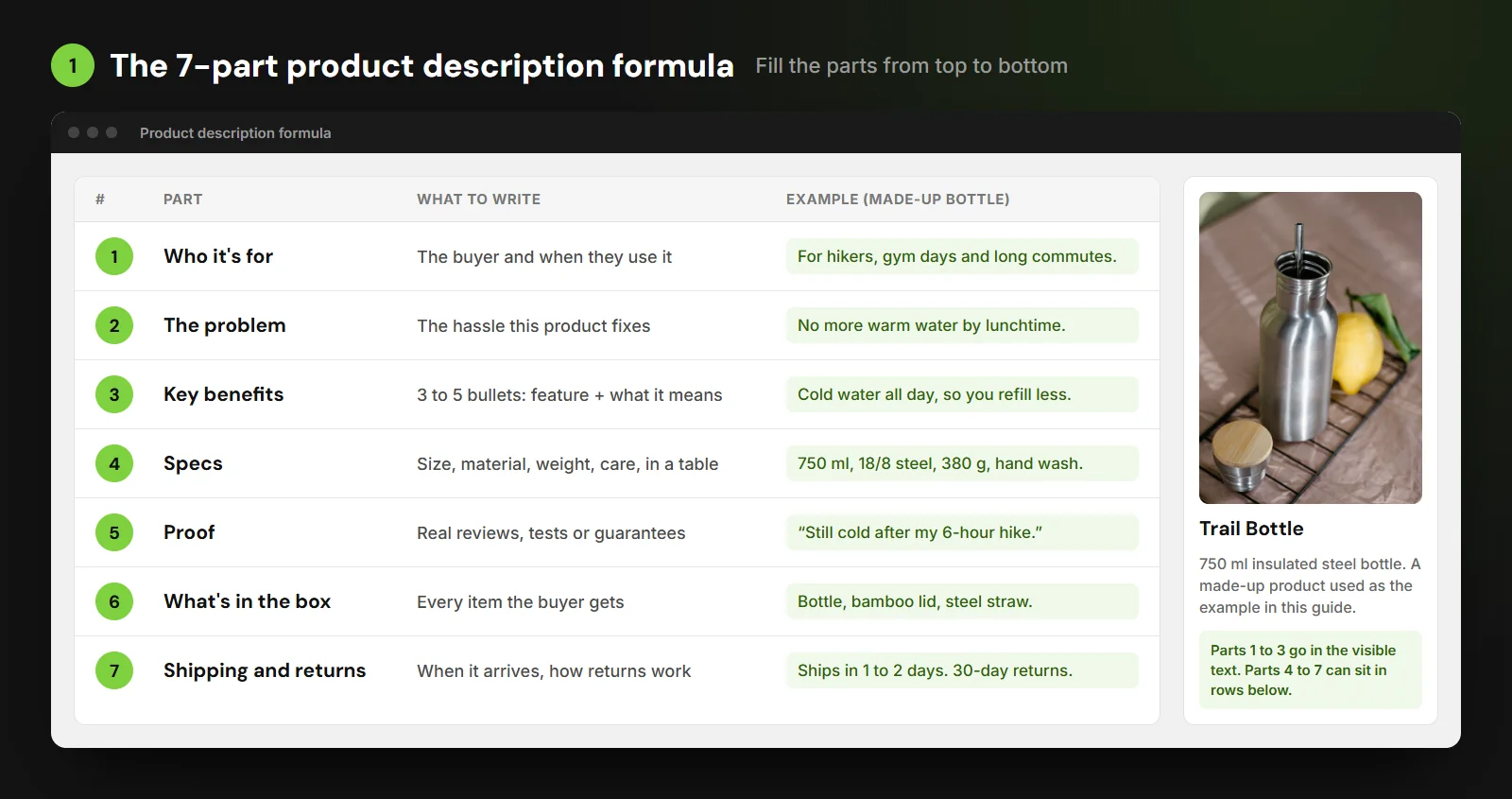
1. Who it’s for
Start with the buyer, not the product. One line is enough: “For hikers, gym days and long commutes.” The right shopper reads that and thinks, “That’s me.”
2. The problem it solves
Name the hassle your product removes. For the bottle, it is warm water by lunchtime. Use your customers’ own words from reviews and emails.
3. Key benefits
Give three to five bullets. Each one pairs a feature with what it means for the buyer. “Double steel walls” is a feature. “Cold water all day, so you refill less” is the benefit.
4. Specs
Put the plain facts in a small table: size, material, weight, capacity, care. Shoppers who compare products look for this first. Keep units clear.
5. Proof
Back up your claims with a real review quote, a simple test you ran or a clear guarantee. Never invent reviews or numbers. If you can’t prove “best”, don’t write it.
6. What’s in the box
List every item the buyer gets: “Bottle, bamboo lid, steel straw.” This one line stops a lot of “Where is my straw?” emails.
7. Shipping and returns
Say when it ships, roughly when it arrives and how returns work. Keep it short and link to your full policy.
A scannable layout: intro, bullets, specs table
Most people don’t read Shopify product descriptions word by word. They scan, often on a phone. So the order and shape of your text matter as much as the words. Here is the layout I use on most stores:
- Short intro (two or three sentences): who it’s for and the problem it solves.
- Benefit bullets (three to five lines): the main reasons to buy.
- Specs table: the facts in rows. In the product editor, click the Insert table button in the description toolbar.
- Proof: a review quote or a reviews widget close to the facts.
- Collapsible rows for the rest: what’s in the box, shipping and returns, care.

If you sell clothing, add a size guide link near the size buttons. My guide on how to add a size chart in Shopify shows three free ways.
Benefits vs features: product description examples
A feature is what the product has. A benefit is what the shopper gets from it. Benefits sell, because they connect the product to the buyer’s day.
The trick is simple. Take each feature and add “so you can…” or “which means…”. Here is how that looks for the bottle:
| Feature | Benefit for the buyer |
|---|---|
| Double steel walls | Water stays cold all day |
| Screw lid with a seal | No leaks in your bag |
| 7.4 cm wide base | Fits most car cup holders |
| 18/8 stainless steel | No plastic taste |
Now look at two product description examples for the same bottle. The “before” is the kind of text you often get from a supplier. The “after” uses the formula.
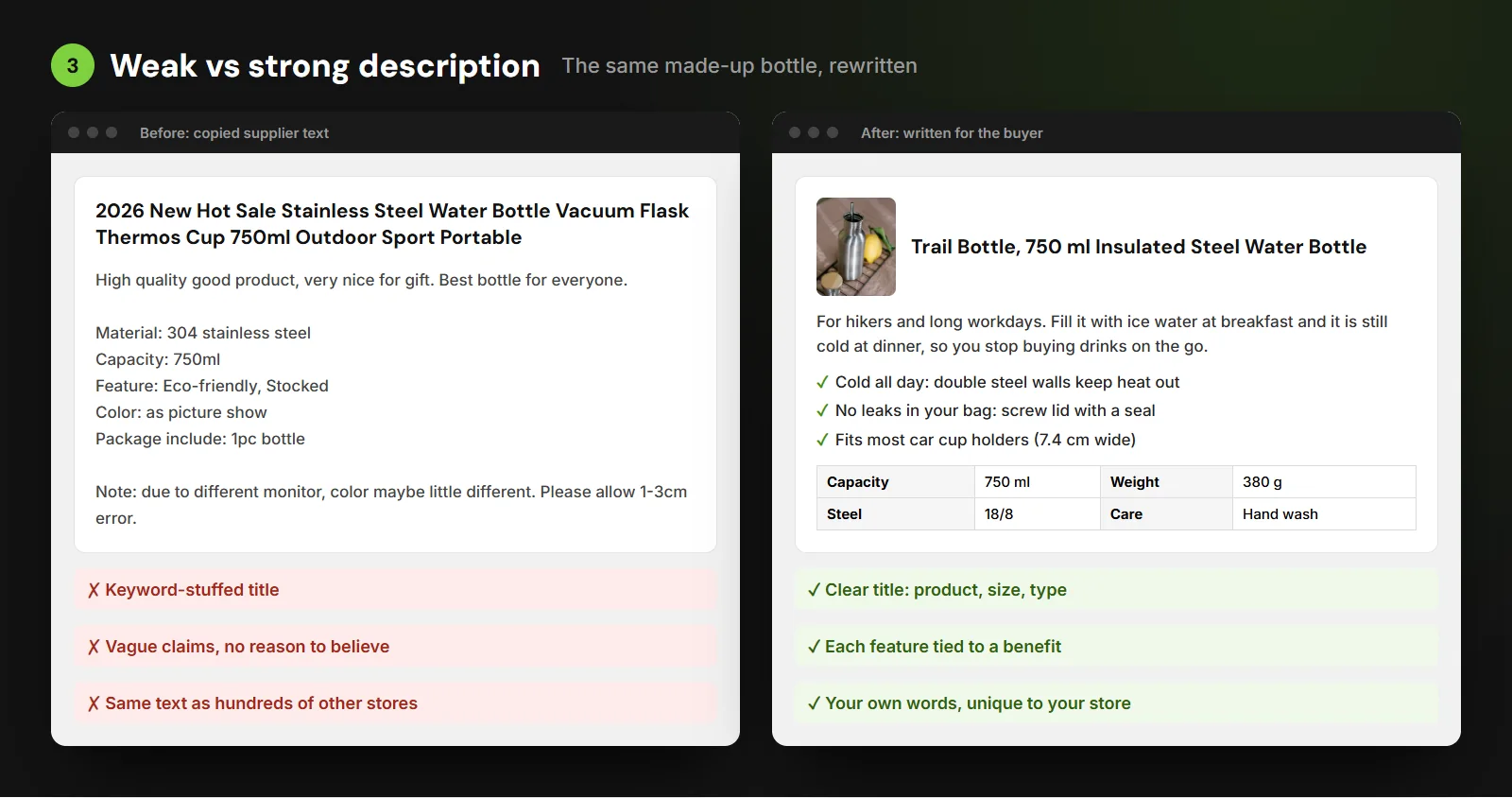
Before: “High quality good product, very nice for gift. Material: 304 stainless steel. Capacity: 750ml.”
After: “For hikers and long workdays. Fill it with ice water at breakfast and it is still cold at dinner.” Then three benefit bullets and a small specs table.
How long should Shopify product descriptions be?
There is no magic word count. Write as much as the shopper needs to decide, and no more. Expensive or technical items need more, because buyers have more questions.
| Product type | What to include | Rough length |
|---|---|---|
| Simple, low price | Intro, 3 bullets, specs | Short |
| Clothing | Fit, fabric, size guide, care | Medium |
| Tech or tools | Specs, compatibility, setup | Longer |
| Gifts | Who it suits, packaging | Short to medium |
A good test: read your page as a first-time visitor. If you still have a question, add the answer. If a sentence answers nothing, cut it.
Tone: write like you talk to one buyer
Picture one real customer and write to them. Use “you”, short sentences and everyday words. If you wouldn’t say a line out loud in a shop, don’t write it.
Match the tone to your buyer. A toy store can be playful. A store selling medical supports should sound calm. Keep the same tone on every product. And skip hype words like “amazing”. They add no facts.
SEO for Shopify product descriptions
Search engines can only rank what they understand. These four places matter most.
Product title
Say what the product is in plain words, with the key detail: “Trail Bottle, 750 ml Insulated Steel Water Bottle”. Avoid long chains of keywords. They look spammy to shoppers and to Google.
Description
Write Shopify product descriptions with the words people search for, used naturally once or twice. If your text matches hundreds of other stores, Google has little reason to rank it.
Search engine listing
This is the text Google may show in results. To edit it:
- In your Shopify admin, go to Products and click the product.
- In the Search engine listing section, click the pencil icon.
- Fill in the Page title: the product type, a key detail and your store name.
- Fill in the Meta description: the main benefit and a reason to click, such as free returns.
- Check the URL handle. Short and readable is best, such as “trail-bottle”.
- Click Save.
Shopify notes that titles over 70 characters and descriptions over 320 characters might get cut off. I keep titles near 60 characters and meta descriptions near 150, so they show in full on most screens.

Image alt text
Give each product photo short alt text that says what it shows. For the right photo sizes, see my Shopify image sizes cheat sheet.
Put specs and shipping in collapsible rows
Keep the intro and bullets visible, and fold the rest into drop-down rows. Both free Shopify themes have this built in.
- Dawn: in the theme editor, open the Default product template. In Product information, click Add block and choose Collapsible row. Set a Heading and add text in Row content, or pick a page in Row content from page.
- Horizon: in Product information, open the Details block, click Add block and choose Accordion. Each Accordion row holds a heading and a text block.
Shipping text is the same on every product, so write it once on a page and pull it into the row. Trust icons such as “free returns” fit well next to these rows; my guide on Shopify trust badges shows honest ways to add them.
Use Shopify Magic as a first draft, then edit
Shopify has a free AI writer inside the product editor. The App Store page still calls it  Shopify Magic, while the help center now says Sidekick writes the text. The steps are the same:
- Go to Products and open the product.
- In the description box, click the Generate text icon in the toolbar.
- Type a prompt with the product type, two or more features, the buyer and the tone you want.
- Submit it. The draft goes straight into the description box.
- Edit it, then click Save.
More detail gives a better draft. “Water bottle” gets you generic text. “750 ml insulated steel bottle for hikers, cold all day, leak-proof lid, friendly tone” gets you close. Then edit the draft:
- Check every fact. AI can guess sizes or claims you can’t back up.
- Cut filler such as “perfect for any occasion”.
- Turn long paragraphs into bullets and a specs table.
- Add what the AI can’t know: box contents, shipping times, real review quotes.
Dropshipping: rewrite supplier and AliExpress copy
If you dropship, apps like  DSers import the supplier’s text from
 AliExpress in one click. Please don’t publish it as it is.
Supplier text often has broken English, keyword stuffing and vague claims. The same text also sits on many other stores, so it gives Google no reason to pick your page. Shopify’s help center says the same: if you resell, don’t copy the maker’s exact description.
Use supplier text only as a source of facts. Pull out the specs, check them against the photos and samples, then write the rest with the formula. If you are still picking an import app, my dropshipping app comparison covers the options.
Which way should you write your descriptions?
| Way | Speed | Quality | Best for |
|---|---|---|---|
| Write from scratch | Slowest | Best | Best sellers |
| AI draft + edit | Fast | Good after edits | Most products |
| Rewrite supplier copy | Fast | Good after rewrite | Dropshipping |
| Copy and paste as is | Instant | Poor | Never |
My advice: hand-write your Shopify product descriptions for your top five or ten products, since they get most of the traffic. Use an AI draft plus the formula for the rest.
Free product description template
Copy this product description template into a note or spreadsheet. Fill in the blanks each time you write a product description, then paste the result into the description box.
| Part | Fill in the blank |
|---|---|
| Intro | For [buyer] who [situation]. |
| Problem | No more [hassle]. |
| Benefit 1 to 3 | [Benefit]: [feature that causes it] |
| Specs | Size, material, weight, care |
| Proof | “[Real review quote]” or [guarantee] |
| In the box | [Item], [item], [item] |
| Shipping | Ships in [X] days. [Returns policy]. |
The intro, problem and benefits go in the main text. The rest can go in a table or collapsible rows. The same product description template works for almost any product.
Common mistakes with Shopify product descriptions
Only listing features
“304 stainless steel” means little to most shoppers. Add what it does for them, such as “no plastic taste”.
One big wall of text
Long paragraphs get skipped on phones. Break the text into a short intro, bullets and a table.
Copying the supplier or the brand
Duplicate Shopify product descriptions give shoppers and search engines no reason to choose you. Always write your own version.
Claims you can’t prove
“Best on the market” and made-up stats hurt trust. Use facts and real reviews.
Missing the questions that stop a sale
If customers keep emailing the same question, the answer belongs on the page. My Shopify FAQ page guide shows how to collect those questions.
Leaving the search engine listing blank
Without your own page title and meta description, Google may show whatever text it picks. Two minutes per product fixes this.
Frequently asked questions
How do you write a good product description on Shopify?
Say who it is for and what problem it solves, list three to five benefits, add a specs table, then cover proof, box contents and shipping. Keep it easy to scan.
How long should a Shopify product description be?
Long enough to answer the buyer’s questions. Simple items can be short; technical or pricey items need more. Cut any line that answers nothing.
Can I use AI to write a product description in Shopify?
Yes. Click the Generate text icon in the description box, give a detailed prompt, then check every fact and edit the draft before you save.
Should I use the supplier’s product description?
Use it only for facts. Rewrite the text in your own words, because copied text often has poor English and appears on many other stores.
How do I make the product description collapsible in Shopify?
In Dawn, add a Collapsible row block to the product template. In Horizon, add an Accordion block inside Details. Put specs, shipping and care in the rows.
Why is my Shopify product description not showing?
In the theme editor, check that the Description block (Dawn) or the Product description text block (Horizon) is not hidden or deleted, and that you edited the template the product uses.
Clear, honest Shopify product descriptions are one of the cheapest ways to turn more visitors into buyers. If you want help writing or rewriting your listings, I do this as part of my Shopify product listing service. Message me on WhatsApp and I will take a look.



