


A Shopify one product store has one job: turn a visitor into a buyer on a single page. There is no catalog to browse, so every section has to answer a question the shopper has before they will pay. Get the order right and the page does the selling. Get it wrong and even good ads won’t save it.
I have built and redesigned many single product stores on  Shopify for clients in the US, UK and Europe. This guide shows the page structure I use, how to set it up in a free theme, and how to raise order value. Every setting name comes from the Dawn and Horizon theme code and Shopify’s help center, checked on November 29, 2026.
Here is what you will learn:
- The 7 sections a one-product sales page needs, in order
- Whether you need a paid one product Shopify theme (most stores don’t)
- How to turn your homepage into the product page in Horizon and Dawn
- How to add bundles and quantity breaks for a bigger order
- The mistakes I fix most often on these stores
What is a Shopify one product store?
A Shopify one product store is a store built around one hero product. The homepage, the product page, the ads and the emails all sell that one item. It doesn’t have to mean one SKU, though. There are three common types:
- One product, one version. A single item with no options.
- One product with variants. The same item in a few colors, sizes or pack sizes.
- A hero product plus add-ons. The main item, with refills, cases or spare parts.
A general store can lean on choice. A single product store has to win with clarity, proof and a strong offer.
The page structure that sells in a single product store
The best structure follows the questions a shopper asks, in the order they ask them. Here are the seven sections I build, from top to bottom. Each one should end with an easy way to buy.

1. Hero: what it is and what it costs
The first screen of a Shopify one product store must show the product, one clear promise, the price and the buy button. On a phone, the price and button should appear before the shopper scrolls far. Keep the headline to one line about the result.
2. Problem and benefits
Name the problem in the shopper’s words, then show three or four benefits. Write benefits, not specs: “Stays cold for a full workday” beats “Double-wall steel”. My guide to writing Shopify product descriptions covers this in detail.
3. Proof
Proof is where most Shopify one product store pages are weakest. Use real customer reviews, photos from buyers, press mentions you can link to, and clear numbers you can back up. Never add reviews you didn’t collect. The US FTC rule against fake reviews has applied since October 21, 2024, the UK banned them from April 6, 2025, and EU rules have banned them since May 28, 2022. A small, honest set of reviews beats a wall of five stars nobody believes. Add trust badges for payment and returns near the button.
4. How it works
Show three simple steps, or a short demo video of the product in use. It answers more questions than a long text block. See my guide to adding a product video in Shopify.
5. Comparison
A small table, “us vs the usual option”, helps shoppers decide. Compare against a type of product, not a named competitor, and only use claims you can prove. Three to five rows is enough.
6. FAQ
Answer the objections you hear: shipping time, sizing, care, what is in the box. Collapsible rows keep the page short on phones.
7. Guarantee and final call to action
End with your return promise, delivery times and one last buy button. Be careful with the wording. In the EU, shoppers can cancel most online orders within 14 days of delivery without a reason. UK law gives them 14 days to cancel too. So a “14-day money-back guarantee” offers nothing extra in those markets. Offer longer, or simply state your policy clearly.
Which theme section to use for each part
You can build every section of a Shopify one product store with a free theme. Here is what I use:
| Page section | Dawn | Horizon |
|---|---|---|
| Hero with buy button | Featured product | Featured product |
| Problem and benefits | Multicolumn | Media with text |
| Proof | Multicolumn or app block | Review stars + app block |
| How it works | Video, Multirow | Video block, Media with text |
| Comparison | Page (with a table) | Page block or Comparison slider |
| FAQ | Collapsible content | Accordion |
| Guarantee | Image with text | Icon blocks in a Section |
Horizon’s Comparison slider block is a before and after image slider, good for cleaning, beauty and repair products. For a feature table, build the table on a normal page, then show it with the Page section in Dawn or the Page block in Horizon. My size chart guide shows how to make a table page.
Do you need a one product Shopify theme?
Usually not. A free theme can do everything a Shopify one product store needs, and it costs nothing.
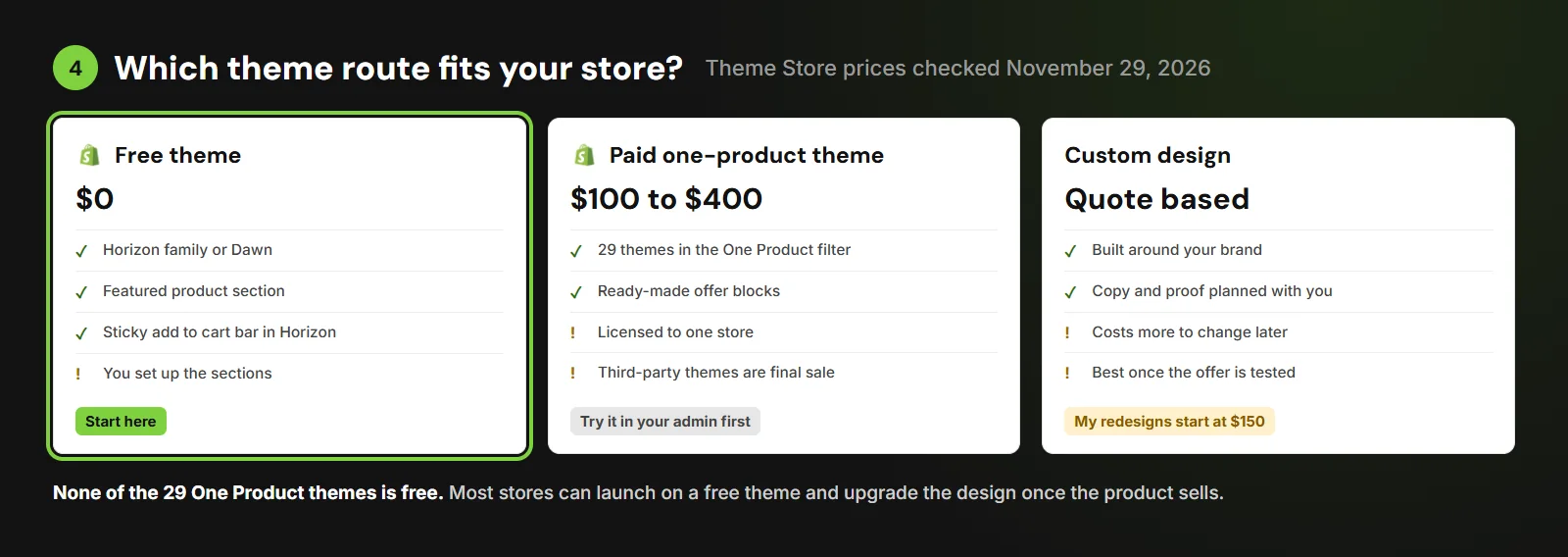
The Shopify Theme Store has a Catalog size filter with a One Product option. On November 29, 2026, it listed 29 themes, priced from $100 to $400, and none of them was free. A paid one product Shopify theme often adds ready-made blocks, such as a sticky buy bar or quantity offers. Those are nice, but you can build most of them in a free theme.
Shopify’s free themes include Dawn and ten themes from the Horizon collection: Horizon, Atelier, Dwell, Fabric, Heritage, Pitch, Ritual, Savor, Tinker and Vessel. My pick for a new store is Horizon or one of its family. Its Product information section has a Sticky add to cart bar setting, and its blocks can be nested, so you can build almost any layout. Dawn is simpler and very stable. My Dawn vs Horizon comparison explains the difference.
If you still want a paid one product Shopify theme, try it first. Shopify lets you preview a paid theme in your admin before you buy it. A theme bought from the Theme Store is licensed to one store only, and third-party theme purchases are final sale.
How to make your homepage the product page
In a Shopify one product store, the homepage should sell the product directly. Shoppers who land there should not need to click “Shop” first. You do this with the Featured product section, which puts the full buy box on any page.

In Horizon (and the Horizon family)
- Go to Online Store, then Themes, and click Customize.
- Stay on the Home page template.
- Click Add section and choose Featured product.
- Under Product, select your product.
- Drag the section to the top, and remove the Hero and product list sections you don’t need.
- Keep the Review stars, Variant picker and Buy buttons blocks. Add a Description block and an Accordion for shipping and returns.
- Below it, add Media with text sections for benefits and how it works, then click Save.
In Dawn
- Open the theme editor on the Home page template.
- Click Add section and choose Featured product.
- Select your product, and keep the Title, Price, Variant picker, Quantity selector and Buy buttons blocks.
- Add Product rating and Icon with text blocks for proof and delivery promises.
- Dawn’s Featured product section has no description block. Add Multicolumn, Image with text and Collapsible content sections below it for the rest of the story. Then click Save.
Can you redirect the homepage to the product page?
No, not with Shopify’s built-in URL redirects. Shopify’s help center says redirects only work from broken URLs, and your homepage always loads. So build the homepage as a sales page instead. Then go to Content > Menus and point your menu links and buttons at the product page, not at a collection with one item.
Homepage or product page: which one gets the full story?
Give the full story to the product page, and keep a shorter version on the homepage. Ads and shared links usually go to the product URL, so that page must sell on its own. In Horizon, you build the product page in the Default product template with the same sections, and you can turn on the sticky add to cart bar there. My guide to the Shopify sticky add to cart shows the Dawn options too.
Raise order value with bundles and quantity breaks
In a Shopify one product store, the easiest way to earn more per order is to sell more than one. A single product store has three free options for this.
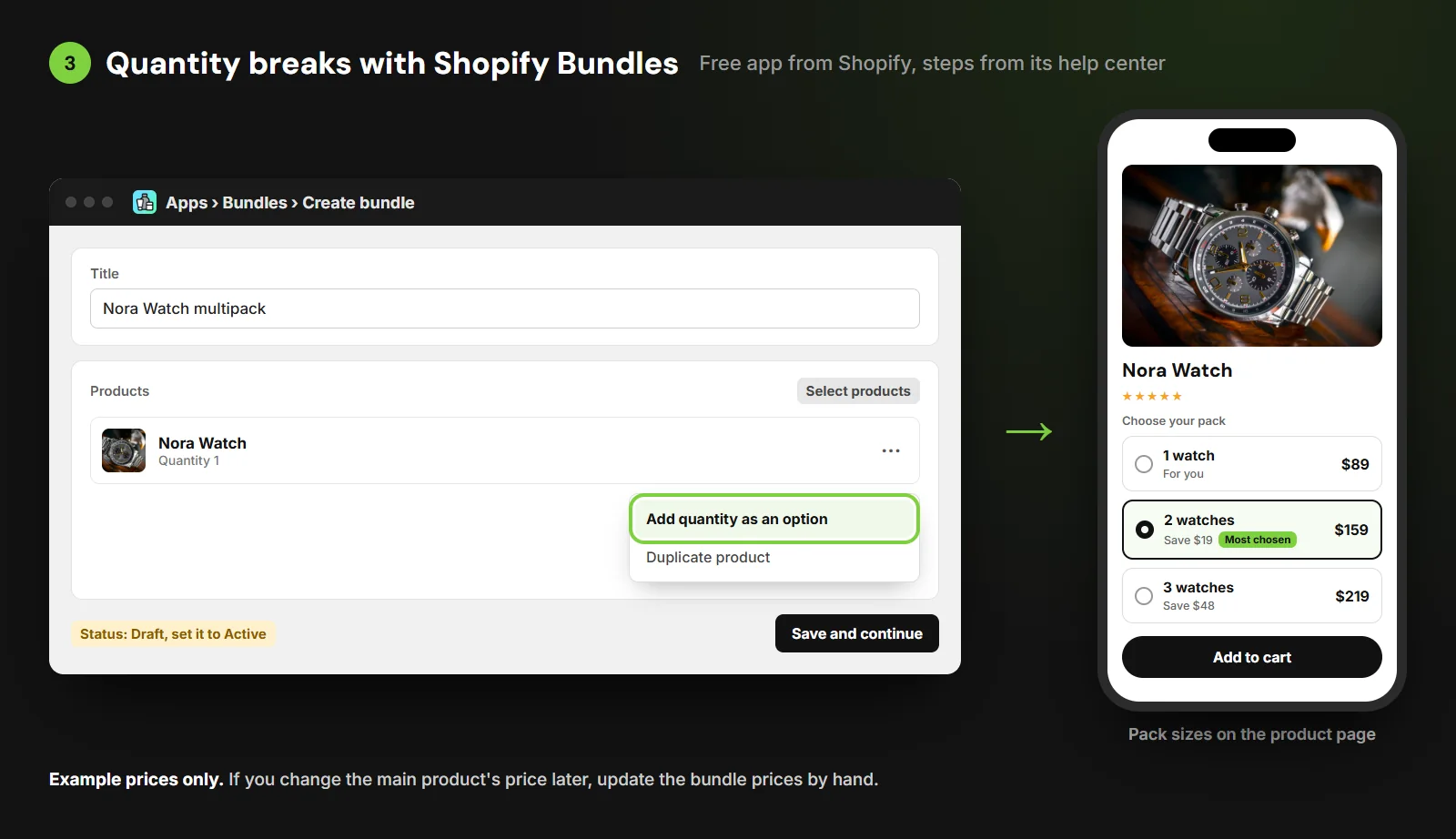
Multipacks with Shopify Bundles
 Shopify Bundles is Shopify’s own free bundles app, available on all plans. It makes fixed bundles and multipacks from your admin.
- Install Shopify Bundles from the Shopify App Store.
- Go to Apps > Bundles and click Create bundle.
- Enter a title, click Select products and pick your product.
- Click the menu next to the product and choose Add quantity as an option. This creates pack sizes, such as 1, 2 and 3.
- Click Save and continue, set a price for each pack, and change the status from Draft to Active.
One catch from Shopify’s Bundles guide: if you change the price of the main product later, the bundle price does not update by itself. Update it by hand.
Quantity discounts with automatic discounts
You can also give a discount for buying more. Go to Discounts, create an Amount off products discount, choose Automatic discount, and set Minimum quantity of items to 2. For tiered discounts, Shopify points you to apps, so I explain the options in my Shopify volume discount guide.
Add-ons and refills
If your product has refills, cases or spare parts, offer them next to the buy button or in the cart. My guide to Shopify upsells without an app shows how, and Shopify bundles without an app covers other ways to pair items.
Free theme, paid theme or custom design?
Here is how the three routes compare for a Shopify one product store:
| Route | Cost (Nov 2026) | Best for | Watch out for |
|---|---|---|---|
| Free theme, DIY | $0 | Testing a product | Your time |
| Paid one-product theme | $100 to $400 | Ready-made offer blocks | Final sale, one store |
| Freelancer on a free theme | Quote based | A tested product, ads soon | Check the portfolio |
| Fully custom page | Quote based | Strong brands | Cost and upkeep |
As one honest example, my own store redesign packages start at $150 as of November 2026, built on a free theme. The final price depends on the work, and we agree on it after we discuss your project.
Common mistakes on a single product store
These are the problems I fix most often when a client brings me a Shopify one product store:
- A slow hero. A big video or slideshow on the first screen delays the buy button on phones. Use one sharp image. Check Shopify image sizes.
- Fake urgency. Countdown timers that reset on every visit, and fake “only 2 left” labels, break trust and can break consumer law.
- Leftover pages. Menus that still link to “Shop all”, a collection with one item, or an empty blog look unfinished.
- Too many apps. Each one adds code and often a monthly bill. Use theme blocks first.
- A price you have to hunt for. Show it in the hero, near the button.
- Never testing on a phone. Check every section on a small screen before you run ads. These Shopify store design mistakes are worth a check before launch.
Which way should you build it?
- New product, small budget: Horizon, a Featured product section on the homepage, and the full story on the product page.
- Proven product, ads ready: the same build, plus multipacks with Shopify Bundles and a sticky add to cart bar.
- A brand with a big launch: a custom design makes sense once the offer and the copy are tested.
Whichever route you take, a Shopify one product store lives or dies on the offer and the proof, not on the theme. For more help, see my free Shopify tools.
Frequently asked questions
Are one product stores good?
They can be. A Shopify one product store keeps the message, the ads and the page simple, which often helps. The risk is that everything depends on one product, so test demand and margins before you build the whole brand.
What is the best free theme for a one product store on Shopify?
Horizon or another theme from the Horizon collection is my pick, because its blocks are flexible and its product page has a sticky add to cart bar setting. Dawn also works well. You don’t need a paid one product Shopify theme to start.
How do I make my Shopify homepage the product page?
In the theme editor, add a Featured product section to the Home page, pick your product and move it to the top. Add benefits, proof and FAQ sections below.
Can I redirect my Shopify homepage to a product page?
Not with Shopify’s URL redirects, which only work from broken URLs. Build the homepage as a sales page instead, and link your menus to the product page.
Is a one product dropshipping store a good idea?
A dropshipped single product store can work, but supplier shipping times and product quality decide the reviews. Order samples, state real delivery times, and add your own branding.
What is a branded one product store?
It is a single product store with its own name, logo, packaging and story, not a generic product page. Branding builds trust and lets you sell add-ons later.
A clear structure and an honest offer are what make a one-product page sell. If you would rather have it designed and set up for you, take a look at my Shopify store redesign service. Message me on WhatsApp and I will take a look.



