


Moving a store from  Wix to Shopify takes planning, but it is not hard. Wix lets you export your products, contacts and orders as CSV files, and Shopify gives you a free app and a CSV importer to bring them in. The parts people get wrong are the ones around the data: redirects, the domain and the launch day.
I have done this move on many client stores. This guide walks you through every step of a Wix to Shopify move, in the order I use, with the exact menu names from Wix help and Shopify’s own Wix migration guide (checked in November 2026).
Here is what you will learn:
- What you can and can’t move from Wix to Shopify
- How to export products from Wix and import them with the free
 Store Migration app, a CSV file or Matrixify
- How to move customers, orders, reviews and blog posts
- How to redirect old Wix links so you keep your Google rankings
- How to connect or transfer your Wix domain, plus a launch checklist
 Store Migration app, a CSV file or
 Matrixify
 Google rankings
What moves from Wix to Shopify (and what doesn’t)
Products, customers and past orders can move. Your design, your reviews and your apps can’t. Wix sites run only on Wix servers, so there is no way to copy the site itself. You rebuild the look in a Shopify theme and move the data into it.
| Data | From Wix | Into Shopify with |
|---|---|---|
| Products | CSV export | Store Migration app or CSV |
| Digital products | Not exported | Add by hand |
| Customers | CSV export | Store Migration app or CSV |
| Past orders | CSV export | Migration app (no CSV import) |
| Reviews | Not exported | Review app import |
| Blog posts and pages | Copy the text | Paste in, or use an app |
| Design | Can’t move | Rebuild in a theme |
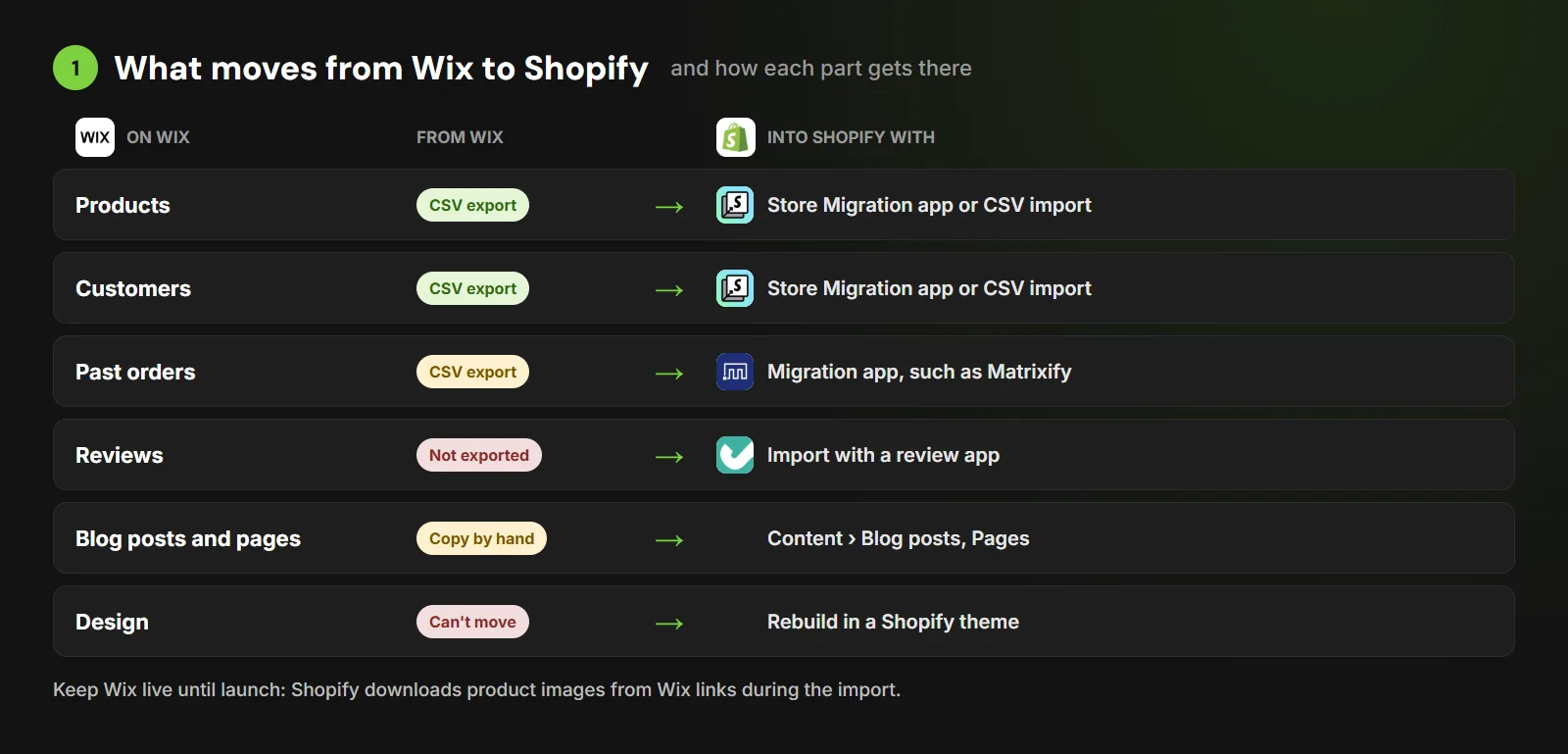
Keep your Wix site and plan active until the end. Shopify downloads your product images from Wix links during the import.
Before you start: list your Wix URLs
Step 1: Save every old link
Before you move from Wix, save every old link. These are the pages Google ranks and people share, and you will redirect each one later.
- Open your Wix sitemap. Add sitemap.xml to the end of your domain, for example yourstore.com/sitemap.xml. It lists your product pages, blog posts and pages.
- In Google Search Console, open the Performance report, switch to the Pages tab and export the pages that get the most clicks.
- Paste all the links into one sheet. This is your redirect list.
By default, Wix product pages look like /product-page/red-wool-sweater and blog posts look like /post/my-post. Normal pages sit right after the domain, like /about.
How to export products from Wix
Step 2: Download your product CSV
- In your Wix dashboard, open the Products tab.
- Tick the checkbox at the top left to select all products.
- Click More Actions, then Export.
- Choose an export option and click Export.
Two limits to know. Wix can’t export digital products, so you add those to Shopify by hand. And each Wix file holds up to 5,000 rows, so a big catalog needs several exports. Shopify suggests naming the file WixProductDownload.csv.
3 ways to import Wix products into Shopify
Step 3: Pick your import method
Most Wix to Shopify moves use one of these three.
Way 1: the Store Migration app (free). This is Shopify’s own app, and it reads the Wix file as it is. You don’t edit anything.
- From your Shopify admin, install Store Migration from the Shopify App Store.
- Upload your Wix product CSV without changing it.
- Click Import products. If you also exported contacts, click Import customers.
- Read the import report. It lists what came in and what had problems.
Products arrive as drafts. Your Wix collections and ribbons become product tags. One big catch: Shopify products can have 3 options, while Wix allows 6. A Wix product with 4 or more options is imported as one product with no variants, so you rebuild those by hand.
Way 2: edit the CSV yourself. You rename the Wix columns to match the Shopify product CSV, then import it. My free Shopify product CSV template shows every column. The main changes:
- handleId becomes URL handle. Use only letters, numbers and dashes. Tip: make it match the old Wix product slug, and your redirects get much easier.
- productImageUrl holds several links split by semicolons. Put each image on its own row with the same handle.
- price plus surcharge is the variant price. Wix discounts become the Compare-at price.
- weight goes into grams, and inventory values like InStock must become real numbers.
- Color values like #000000:Black become just Black.
Wix also puts each product on a “Product” row with its variants below. Shopify wants one row per variant. So merge each Product row with its first Variant row, and delete the fieldType column.
To import, go to Products, click Import, then Add file. Untick Publish new products to all sales channels, so products you hid on Wix stay hidden. Click Upload and preview, then Import products. One file can be up to 15 MB.

Way 3: Matrixify (paid for most stores). Matrixify is a bulk import and export app. It can bulk import data the free tools can’t, like past orders and blog posts. You fill in its spreadsheet template first. As of November 2026 it has a free demo plan limited to 10 items per file, and paid plans from $20 a month.
| Method | Cost (Nov 2026) | Best for | Watch out |
|---|---|---|---|
| Store Migration | Free | Products, customers | No orders or blog |
| CSV import | Free | Full control | Manual column work |
| Matrixify | Free demo, then from $20/mo | Big stores, orders, blogs | Template prep needed |
Move customers, orders and reviews
Step 4: Move your customers
In Wix, go to Contacts, click Import / Export, then Export. Pick Regular CSV file. Only the site owner can do this, and you can export up to 50,000 contacts at a time.
Upload that file to the Store Migration app, or edit it to match Shopify’s customer CSV. Then go to Customers, click Import, add the file and click Import customers. The country column must hold a 2-letter country code, like US, GB or DE.
Your customers will sign in fresh on Shopify. With new customer accounts, shoppers sign in with a one-time 6-digit code sent to their email, so nobody needs a password.
Step 5: Decide what to do with orders and reviews
In Wix, open Orders, select the orders and click Export. Order times in the file are in UTC. Shopify has no CSV import for orders, so you need an app like Matrixify to load them.
Shopify’s Wix guide says reviews can’t be exported or moved. Review apps such as  Judge.me and
 Loox can import reviews you collect by hand. My Judge.me vs Loox comparison helps you pick one.
Move your Wix blog and pages
Step 6: Copy posts and pages
Shopify’s importer has no blog CSV option, so most small stores copy posts over by hand. In Shopify, go to Content, then Blog posts, and click Add blog post. Paste the text, add the images again and publish. Every store starts with a blog called News, so posts live at /blogs/news/post-name.
Pages work the same way under Online Store, then Pages. A Wix page at /about becomes /pages/about. With many posts, Matrixify can bulk import them.
Set up Wix to Shopify redirects
Wix to Shopify redirects send anyone who opens an old Wix link to the new Shopify page. Without them, old links show a 404 page and lose the traffic they earned. Google says permanent 301 redirects don’t lose ranking value, so this step protects your SEO.
Step 7: Add your redirects
- From your Shopify admin, go to Content, then Menus.
- Click View URL Redirects, then Create URL redirect.
- In Redirect from, enter the old path, like /product-page/red-wool-sweater.
- In Redirect to, enter the new path, like /products/red-wool-sweater.
- Click Save redirect.
For more than a handful, import them as a CSV. On the URL redirects page, click Import, add the file and click Import redirects. The file needs two columns, in the same format as Shopify’s sample file:
Redirect from,Redirect to
/product-page/red-wool-sweater,/products/red-wool-sweater
/post/how-to-wash-wool,/blogs/news/how-to-wash-wool
/about,/pages/about
/contact,/pages/contact
Change these example paths to your own. A redirect only works when the old address shows a 404 on Shopify, which is true for Wix paths like /product-page/. You can’t redirect from Shopify’s own paths, like /products/. You can add up to 100,000 redirects (more on Shopify Plus). My Shopify URL redirects guide covers fixes when one doesn’t work.

Connect or transfer your Wix domain
You can keep your Wix domain registered at Wix and point it to Shopify, or transfer it to Shopify. Pointing is faster. Transferring puts the store and domain in one place.
Step 8, option A: Point your Wix domain to Shopify
- In your Wix account, go to Domains, click the Domain Actions icon and select Manage DNS Records.
- Change the main A record to Shopify’s IP address 23.227.38.65. Delete any old A records.
- If there is an AAAA record, point it to Shopify’s IPv6 address 2620:0127:f00f:5::.
- Change the www CNAME record to shops.myshopify.com. (with the final dot).
- In Shopify, go to Settings, then Domains, click Connect existing domain and enter your domain.
It can take up to 48 hours to go fully live. If you use email on that domain, leave the MX records alone.
Step 8, option B: Transfer your Wix domain to Shopify
- Connect the domain first (option A), so the store stays online during the transfer.
- In Wix, go to Domains, click Domain Actions and select Transfer away from Wix. Wix emails a transfer code (EPP code) to the domain’s contact email.
- In Shopify, go to Settings, then Domains, click Transfer domain, enter the domain and the code.
Rules to check first: you can’t transfer a domain within 60 days of buying it, and the transfer includes a 1-year renewal fee. Shopify says a transfer can take up to 20 days. Some endings can’t be moved to Shopify at all, including .co.uk, .de and .at. If you sell in the UK or Germany on one of those, connect the Wix domain instead.

Launch checklist: keep your Google rankings
Step 9: Go live and check everything
- Pick and set up a theme. My Dawn vs Horizon comparison helps you choose between Shopify’s free themes.
- Check prices, weights, stock and variants on your top 20 products.
- Set imported draft products to Active and check they show on the Online Store channel.
- Set up shipping, taxes and payments, then place a test order.
- Open 10 old Wix links and confirm each one lands on the right page.
- Submit your Shopify sitemap at yourstore.com/sitemap.xml in Google Search Console.
- Update your store link on social profiles and marketplaces.
Only cancel your Wix plan once Shopify is live and the images are in. Wix plans come with a 14-day money back period. After that, a cancelled plan stays active until the end of its billing cycle. For the full list, use my Shopify launch checklist.
Common mistakes when you move from Wix
- Closing Wix too early. Shopify pulls images from Wix links during the import. Close Wix first and the images fail.
- Leaving “Publish new products” ticked. Hidden Wix products go live on Shopify.
- Ignoring products with 4 to 6 options. They arrive without variants, so check them by hand.
- Trying to transfer a .co.uk or .de domain. Shopify can’t take those. Connect them instead.
Which way should you use?
For most small Wix to Shopify moves, use the free Store Migration app for products and customers, copy the blog by hand, and import redirects as a CSV. If you have more than a few hundred products, or you want orders and blog posts moved in bulk, a paid tool like Matrixify saves a lot of manual work. For the domain, connect it if it ends in .co.uk or .de, or if you want to go live fast. Transfer it if it’s a .com and you want one bill.
Frequently asked questions
Can I transfer my Wix website to Shopify?
You can move the data, not the design. Products, customers and orders export from Wix as CSV files. You then rebuild the look with a Shopify theme.
How do I export products from Wix to Shopify?
In Wix, go to Products, select all, click More Actions and Export. Upload that file to Shopify’s free Store Migration app, or edit it to match the Shopify product CSV and import it.
Can I move my domain from Wix to Shopify?
Yes. Point it by changing the A record to 23.227.38.65 and the www CNAME to shops.myshopify.com, or transfer it with a code from Wix. Endings like .co.uk and .de can only be connected.
Will I lose my Google rankings if I switch from Wix to Shopify?
Not if you redirect every old Wix link to its new Shopify page. Shopify says Google can take a few days to a few weeks to index a new store, so expect some movement at first.
Is it easy to switch from Wix to Shopify?
For a store with under a few hundred products, yes. The import is quick. The real work is checking variants, rebuilding the design and setting up redirects.
How long does a Wix to Shopify move take?
In my experience, a small store can move in a few days. A domain transfer adds up to 20 days, but your store can run on a connected domain during that time.
A move from Wix goes smoothly when you take it one step at a time and keep Wix running until the new store is checked. For more free help, see my free Shopify tools. If you would rather have the move and the new design done for you, that is part of my Shopify store redesign service. Message me on WhatsApp and I will take a look.



