


Many Shopify stores have a blog with a few old posts and almost no visitors. That is a waste, because a blog post can rank for questions your product pages never will. Good Shopify blog SEO is not a trick. You pick topics people really search, write clear answers, fill in a few fields in your admin, and link each post to the products it talks about.
I plan every guide on my own blog with this Shopify blog SEO process, and I have set up blogs on many client stores. Every setting name here comes from Shopify’s help center and the code of the free Dawn and Horizon themes, checked as of November 2026.
Here is what you will learn:
- How to find topics with
 Google autocomplete and Google Search Console
- A post structure that answers fast and ranks
- Every blog post SEO field in the Shopify admin, with its limits
- How to link Shopify blog posts to products and collections so they sell
- Schema basics, how often to post, and 20 blog post ideas for stores
 Google autocomplete and
 Google Search Console
Does a Shopify blog help SEO?
Yes, when each post answers a real search. Shopify’s help center calls the built-in blog a way to improve SEO, build an audience and bring more traffic. Every post you publish is added to your sitemap automatically, so Google can find it.
The real gain is reach. A product page can rank for “linen shirt”, but rarely for “how to wash linen shirts”. Shopify blog posts can, and they send that reader straight to your shirts. Shopify suggests at least 500 words per post. I write as many words as the answer takes, and no more.
How to pick Shopify blog SEO topics people search
Start from what people type, not from what you want to say. I use three sources, in this order.
1. Google autocomplete
- Open Google in a private window, so your history does not change the suggestions.
- Type a product word with a question word, such as “how to wash linen”, “best”, “vs” or “for”.
- Write down every suggestion that matches what you sell.
- Add a letter after your phrase (“linen shirt a”, “linen shirt b”) to see more.
These suggestions come from real searches, so they make the best blog post ideas. They also give you the exact words for headings and FAQ questions. For this guide, autocomplete suggested “shopify blog posts on homepage” and “shopify blog image size”, so both are answered below.

2. Google Search Console
Once your store has a few months of data, Search Console is the better source.
- Verify your store in Search Console and submit your sitemap. Shopify’s help center shows each step.
- Open the Performance report. By default, it shows the last three months.
- Click the Queries tab and sort by Impressions.
- Look for questions with many impressions but few clicks. Those are Shopify blog posts waiting to be written.
Also open the Pages tab. An old post with many impressions and a low click rate usually needs a better title, not a new post.
3. Your customers’ questions
Read your support emails, chat messages and product reviews. Every repeated question, such as “Does this fit a 15-inch laptop?”, belongs on your list of blog post ideas. Check it in autocomplete for the words people really use.
Which topic source should you use?
| Source | Best for | What you need | Cost |
|---|---|---|---|
| Google autocomplete | New stores | Nothing | Free |
| Search Console | Stores with traffic | Verified site, some data | Free |
| Customer questions | Buying questions | Inbox and reviews | Free |
| Paid keyword tools | Search volume numbers | An account | Monthly fee |
New store? Start with autocomplete and customer questions, then let Search Console lead once you have data. Before you write, search the phrase yourself. If page one shows only product pages, improve your collection page instead. If it shows guides, a post fits.
How to structure Shopify blog posts that rank
Answer the question in the first lines, then add detail. Many readers skim on phones, and Google and AI answers pick short, clear passages.
- One H1, from the title. Shopify turns the post title into the main H1 heading. Put the main keyword near the start.
- The answer first. Under each H2, start with one or two sentences that answer the heading directly.
- H2 for questions, H3 for steps. Don’t use a heading just to make text bigger.
- Tables and lists. Comparisons, sizes and steps read better that way.
- Your own photos and experience. Google’s guide for its AI features asks for first-hand, “non-commodity” content.
- A short FAQ at the end. Use real questions from autocomplete.
One update: Google stopped showing FAQ rich results on May 7, 2026, so FAQ markup no longer adds drop-downs under your listing. I still end every post with a short FAQ, because readers use it.

Fill in the blog post SEO fields in Shopify
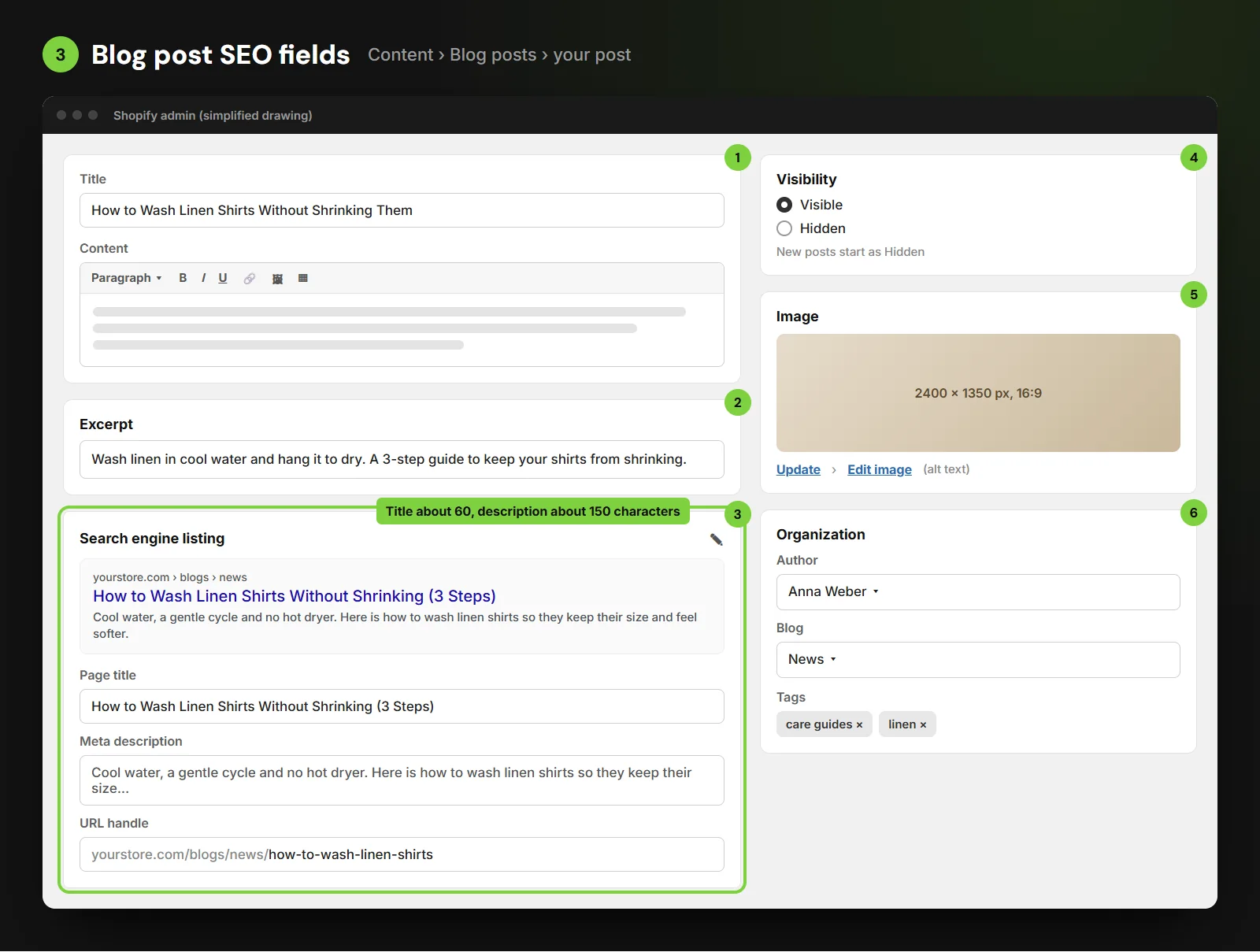
In your Shopify admin, go to Content, then Blog posts, and click a post or Add blog post. Shopify’s guide to adding and managing blog posts lists them all. Here is what each one does for Shopify blog SEO.
| Field | Section | What to enter |
|---|---|---|
| Title | Top of the editor | Main keyword near the start |
| Excerpt | Excerpt | One or two sentences |
| Image | Image | 16:9 photo with alt text |
| Author | Organization | A real staff name |
| Tags | Tags | One or two topic tags |
| Page title | Search engine listing | About 60 characters |
| Meta description | Search engine listing | About 150 characters |
| URL handle | Search engine listing | Short, with hyphens |
| Visibility | Visibility | Visible, or a set date |
A post title can have 255 characters, but Dawn cuts titles in blog cards at 50, so keep it short.
Search engine listing
- Scroll to Search engine listing preview and click the pencil icon.
- In Page title, write the title you want in Google. Shopify warns that text past 70 characters may be cut off, and its SEO guide recommends 60 or fewer.
- In Meta description, write one or two sentences that make people click. The post editor warns at 320 characters, but Shopify’s SEO guide recommends about 160. Test yours with my free meta description length checker.
- In URL handle, keep a short handle with the main keyword and hyphens between words.
- Click Save.
Changing the handle of a live post? Keep Create a URL redirect ticked, so old links still work. My Shopify URL redirects guide covers the rest. Google can still rewrite your title or description in its results.
Excerpt
The excerpt is the short text under each post in your blog list. Leave it empty and Shopify uses the start of the post, which Dawn and Horizon usually trim to 30 words. So click Add Excerpt and write one sentence that says who the post is for and what they get.
Featured image and alt text
The featured image shows at the top of the post and in blog lists. Use one shape for every post. I use 2400 x 1350 px (16:9), the size from my Shopify image sizes guide. Shopify suggests JPEG for blog post images.
For alt text, click Update under the image, then Edit image. Describe the photo in plain words.
Author and tags
Pick a real person under Author. Neither free theme shows the author by default. In Dawn, open the blog post template and tick Author in the Title block. In Horizon, tick Author in the Details block. A real name helps readers trust the advice, and trust is part of Shopify blog SEO too.
Tags group posts by topic, and shoppers can tap a tag to see related posts. Keep a short, fixed list, such as “care guides” and “gift ideas”. One-off tags make thin pages that help nobody.
Link Shopify blog posts to products and collections
A post that ranks but links nowhere brings visitors who leave. Internal links are the part of Shopify blog SEO that turns readers into buyers. They send readers, and Google, to the pages that make money.
- Link the main collection early. Add one link in the first few paragraphs, where it fits the text.
- Link products where you mention them. Use the product name as the link text, not “click here”.
- Link related posts. A care guide can link to a size guide, and back.
- Link back from products. Add a short line in the product description that points to the guide.
Shopify’s own gift guide template does the same: a photo, name, price and link for every product. If a post brings traffic but no sales, check the product pages too. My guide to Shopify traffic but no sales shows where buyers drop off, and my product descriptions guide helps those pages close the sale.

Schema basics for Shopify blog SEO
Schema is code that tells search engines what a page is. Dawn and Horizon already add it to every post, using Shopify’s built-in structured data filter. It outputs Article markup with the title, image, author and dates. Google’s Article guide has no required fields, only recommended ones, so this covers the basics.
- Test one post in Google’s Rich Results Test after you publish.
- Older or paid theme? View the page source of a post and search for “ld+json”. If nothing shows, ask your theme developer.
- Skip FAQ schema as a ranking feature. Google no longer shows FAQ rich results, so an app selling them adds nothing there.
How often should you post?
There is no official number. Google’s own guide says a high number of pages doesn’t make a site higher quality, so good Shopify blog SEO comes from quality, not volume. Its spam policy on scaled content abuse also warns against many low-value pages, including ones made with AI tools.
For most small stores, I suggest one or two solid posts a month instead of many quick ones. Every few months, update your best Shopify blog posts with new photos, current prices and answers to new questions. Updating a post that already ranks is often faster than writing a new one.
20 blog post ideas for Shopify stores
Here are 20 blog post ideas that fit most stores. Four of them, the gift guide, roundup, how-to and interview, are the formats Shopify’s help center suggests for new bloggers. The last column shows where each post should link, so it sells as well as ranks.
| Post type | Example title | Link to |
|---|---|---|
| How-to | How to style a linen shirt | Product |
| Care guide | How to wash wool socks | Collection |
| Size guide | How to measure your ring size | Size chart |
| Comparison | Linen vs cotton bedding | Two collections |
| Best for | Best yoga mats for hot yoga | Collection |
| Gift guide | Gifts for new dads | Products |
| Seasonal | Winter skincare routine | Collection |
| Problem fix | Why candles tunnel | Product |
| Buying guide | How to choose a backpack | Collection |
| Materials | What is vegan leather? | Collection |
| Behind the scenes | How we make our soap | About page |
| Customer story | How Anna plans her week | Product |
| Interview | Q&A with our designer | New arrivals |
| Roundup | 15 ways to organize a pantry | Products |
| Recipe or project | 3-ingredient dog treats | Product |
| Mistakes | 7 coffee brewing mistakes | Product |
| Worth it? | Is a standing desk worth it? | Product |
| Local | Best hiking trails near Leeds | Collection |
| Trend | Spring color trends | New arrivals |
| Quick answer | Can cast iron go in the dishwasher? | Product |
Before you write any of these blog post ideas, run the title through autocomplete and adjust the wording to match what people type.
Common Shopify blog SEO mistakes
These are the Shopify blog SEO mistakes I fix most often on client stores.
- Leaving posts hidden. New posts are hidden by default. Check Visibility before you share the link.
- Writing about the store, not the buyer. Few people search for “we moved warehouses”.
- An empty search engine listing. Without your own page title, the theme uses the post title and store name. Without a description, Google picks text from the page. Write both.
- No links to products. The post gets read, and nobody buys.
- Mass AI posts. AI can help with research and drafts, but check every fact and add your own experience.
- Heavy images. Upload images about 2400 px wide, not straight from the camera. My Shopify speed guide explains why.
Frequently asked questions
Is Shopify good for blogging?
Yes, for a store blog. Posts, tags, excerpts, comments, scheduling and SEO fields are built in. You get several blogs and tags, but no nested categories.
Is Shopify good for SEO?
Yes. Shopify builds your sitemap and lets you edit titles, descriptions, URL handles and alt text. Rankings then depend on your content.
How do I add blog posts to Shopify?
Go to Content, then Blog posts, and click Add blog post. Add a title and content, fill in the search engine listing, set Visibility to Visible and click Save.
What is the best Shopify blog image size?
I use 2400 x 1350 px (16:9) for every featured image. It looks sharp at the top of a post and in blog lists. Keep the same shape for all posts.
How do I show Shopify blog posts on the homepage?
Open the theme editor on your home page and add a blog section. In Dawn, add Blog posts and choose your blog under Blog. In Horizon, add Blog posts: Grid or Blog posts: Carousel and pick your blog the same way.
Can I have more than one blog on Shopify?
Yes. Go to Content, then Blog posts, click Manage blogs and then Add blog. Every store starts with one blog called News.
Shopify blog SEO is slow, but a good post can keep bringing buyers for years. For more practical guides, see my Shopify tips and the free Shopify tools. If you would rather have your blog set up and your first posts planned for you, that is part of my Shopify store management service. Message me on WhatsApp and I will take a look.



