

Search the Shopify App Store for “SEO” and you get hundreds of results, so picking from the best Shopify SEO apps can feel like a big job. Here is the honest part first:  Shopify and its free themes already do most of the basic SEO work. An app helps with a few jobs at scale, and every app you add can cost you some speed.
I have set up SEO on many client stores, but I don’t run these apps on a store of my own. So this look at the best Shopify SEO apps uses official sources only: Shopify’s help center, the free theme code and each App Store listing. It covers  TinySEO,
 Booster SEO,
 Avada SEO,
 SearchPie,
 Smart SEO and
 Plug in SEO. I checked every rating and price on November 28, 2026. There are no affiliate links here.
Here is what you will learn:
- What Shopify, Dawn and Horizon already do for titles, alt text, sitemaps and structured data
- Six popular apps side by side: rating, free plan, price and what each one adds
- Which SEO jobs need an app, and which don’t
- How to stop an SEO app for Shopify from slowing your store
- Which setup fits a new store, a big catalog and a store in several languages
Do you need an SEO app for Shopify?
Most small stores don’t need one to start. Shopify writes your title tags, sitemap, robots.txt and canonical tags for you, and Dawn and Horizon add product structured data. The work that is left is writing: page titles, meta descriptions, alt text and good product text.
An app starts to make sense when that manual work gets too big. Think hundreds of products with no alt text, lots of broken links after a migration, or schema types your theme doesn’t add. Even a free SEO app saves real time in those cases. For a 20-product store, it mostly adds another dashboard.
What Shopify already does for SEO
Shopify handles the technical basics on every store. Its guide to how SEO works on Shopify lists canonical tags, an automatic sitemap.xml and robots.txt, title tags from your theme and SSL turned on by default.

Page titles and meta descriptions
Every product, collection, page and blog post has a Search engine listing section. On a product, click the pencil icon in that section. You can use up to 70 characters in Page title and up to 160 in Meta description. If you leave the title blank, your theme uses the product title and your store name.
For the homepage, go to Online Store > Preferences and fill in the title and description. Want to test your text before you save it? My free meta description length checker shows a Google preview on desktop and phone.
Image alt text
Open a product, click an image and choose Add alt text. Shopify allows up to 512 characters but recommends 125 or fewer. For many products at once, the product CSV file has an Image alt text column. You fill it in a spreadsheet and import it again. It is slower than a free SEO app with a bulk editor, but it costs nothing. My guide to Shopify image sizes covers the rest of the image side.
Sitemap and robots.txt
Every store gets a sitemap at yourdomain.com/sitemap.xml. It lists products, collections, pages, blog posts and main images, and it updates itself. You only submit it once in  Google Search Console. The robots.txt file is automatic too. Shopify says the default works for most stores. You can only change it with a robots.txt.liquid template. My free sitemap and robots.txt checker shows what both files contain.
Canonical tags and structured data in Dawn and Horizon
I read the code of both free themes on GitHub. Dawn and Horizon print a canonical tag and your meta description on every page. They also add product structured data with Shopify’s structured_data filter. A product with variants comes out as a ProductGroup. One without variants comes out as a Product, with price and stock in the offer. Blog posts get Article data, and the header adds Organization data with your logo.
What the themes don’t add is breadcrumb or FAQ schema. That is one of the few places where an SEO app for Shopify adds something your theme lacks. Not sure which theme you run? See my Dawn vs Horizon guide.
Speed, redirects and hidden pages
Shopify serves stores from its own CDN and minifies CSS and JavaScript files when they load. It also compresses JPG images and often serves them as WebP. So when an SEO app for Shopify sells “minify” or “compress”, part of that job is already done.
You can add 301 redirects yourself under Content > Menus > View URL Redirects, or import them from a CSV file. My guide to Shopify URL redirects walks through it. To hide a page from search, Shopify supports a seo.hidden metafield set to 1, and the Unlisted status for products.
Shopify is also testing its own AI tool, Grow SEO, with certain merchants. It suggests longer page titles and product or collection descriptions, in English only, up to 100 at a time.
The best Shopify SEO apps compared
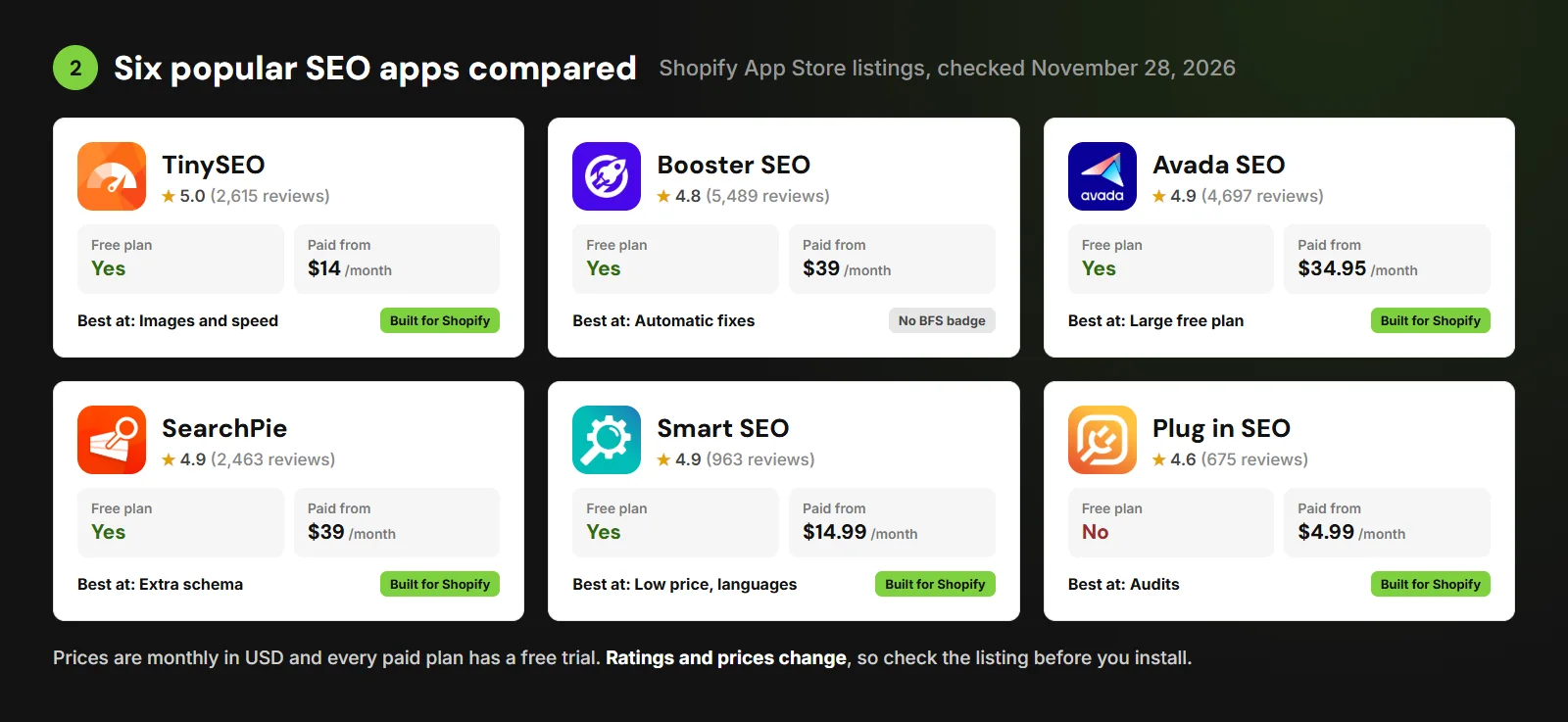
By review count, these six are among the best Shopify SEO apps on the App Store. I read each listing on November 28, 2026. Prices are in USD per month, as of November 2026, and every paid plan has a free trial.
| App | Rating | Free plan | Paid from | Best at |
|---|---|---|---|---|
| TinySEO | 5.0 (2,615) | Yes | $14 | Images and speed |
| Booster SEO | 4.8 (5,489) | Yes | $39 | Automatic fixes |
| Avada SEO | 4.9 (4,697) | Yes | $34.95 | Large free plan |
| SearchPie | 4.9 (2,463) | Yes | $39 | Extra schema |
| Smart SEO | 4.9 (963) | Yes | $14.99 | Low price, languages |
| Plug in SEO | 4.6 (675) | No | $4.99 | Audits |
Five of the six carry the Built for Shopify badge. Shopify gives it to apps that meet its highest standards for performance, design and integration. Booster SEO did not show the badge when I checked.
What each SEO app for Shopify adds
Each listing promises a lot. Here is what each one adds on top of Shopify, plan by plan.
TinySEO
The free plan covers 100 image optimizations a month, alt text and SEO file names. Beginner ($14) adds a site audit with automatic fixes, JSON-LD schema, lazy loading and image resizing. Advanced ($23) adds AI meta titles and descriptions, broken link detection with 301 redirects and JS and CSS minification. It fits stores where images are the main problem.
Booster SEO
The free plan gives an SEO score, alt text templates, broken link reports, manual audits and an image sync of 50 images a week. Pro ($39) adds meta tag templates, automatic fixes, broken link fixes, structured data and sitemap submission. Premium ($69) adds image compression and file name changes.
Avada SEO
On the App Store it is now called Avada AI SEO Visibility. As a free SEO app, it has one of the widest plans here: 100 image optimizations, meta tags, an alt text tool, an HTML sitemap, 20 page audits and basic structured data. Pro ($34.95) adds unlimited images, a broken link manager, a robots.txt editor and AI alt text.
SearchPie
The free Starter plan includes bulk meta tags and alt text with templates, breadcrumbs, store schema, image compression and 404 detection. Premium ($39) adds price, rating, stock and FAQ schema, plus automatic 404 fixes. If you want breadcrumb or FAQ schema without code, this is the one to look at first.
Smart SEO
It is made by Sherpas Design. The free plan covers meta tags, alt tags, noindex tags, a 100-page broken link check, 50 images and 20 AI generations. Pro ($14.99) adds JSON-LD and bulk edits. Business ($24.99) adds multi-language support, which helps stores selling across Europe in several languages.
Plug in SEO
It is the oldest app here, launched in 2011, and the only one without a free plan. Starter ($4.99) scans up to 30 pages, runs one audit a month and adds JSON-LD tools and one-click broken link redirects. Lite ($29.99) adds title and description tools and bulk AI edits for alt text, file names and URLs.
Most listings now also sell “AI search” extras such as llms.txt files. Google’s own AI guide says you don’t need llms.txt or other AI text files to appear in Google Search, including its AI features. Shopify’s advice is plainer: clear titles, full product details, alt text and structured data.
Which SEO jobs need an app?
Only a few jobs truly need an SEO app for Shopify, mostly because of volume. The table shows what Shopify covers and when an app is worth paying for.
| SEO job | Built into Shopify | App worth it when |
|---|---|---|
| Titles and meta | Yes, per page | Hundreds of blank fields |
| Image alt text | Yes, or by CSV | Many images, no time |
| Sitemap, robots.txt | Yes, automatic | Almost never |
| Canonical tags | Yes, in theme | Almost never |
| Product schema | Yes, Dawn and Horizon | You want FAQ or breadcrumbs |
| Broken links | Redirects by hand | After a migration |
| Image compression | Partly | Very large uploads |
| SEO audits | No | You want a to-do list |
If two or more rows in the last column match your store, one of the best Shopify SEO apps will save you time. If none match, keep your money and spend an hour on your product descriptions instead.
The speed cost of SEO apps
Any app that runs on your storefront can slow it down. SEO apps are no different. Shopify’s own web performance guide says every feature you add, including apps, can affect loading speed. It also says uninstalling an app doesn’t automatically remove its code from your theme.
Features that only edit data in your admin, such as meta tags or alt text, add nothing to your pages. Features that change the storefront, such as schema, lazy loading or speed scripts, usually run through an app embed. Those are the ones to watch.

- Test a product page and your homepage on a phone before you install anything. Note the scores.
- Install the app and turn on only the features you need.
- Go to Online Store > Themes > Edit theme and click the App embeds icon. Turn off any embed you don’t use, then click Save.
- Test the same pages again. If they got clearly slower, contact the developer or remove the app.
- When you uninstall, ask the developer how to remove any code the app left in your theme.
My Shopify speed optimization guide covers testing in more detail.
Which way should you go?
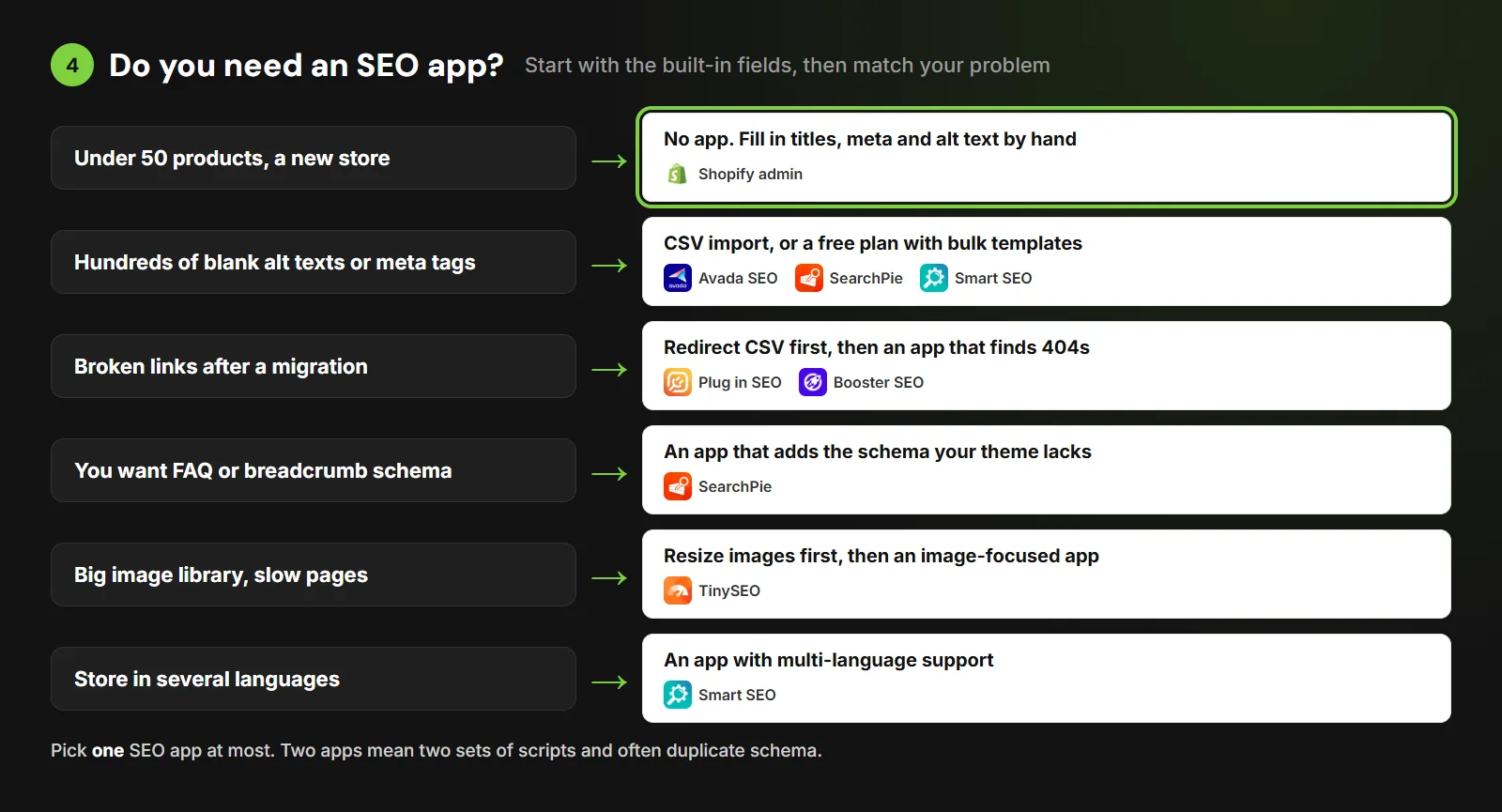
Pick by the problem you have today, not by the longest feature list. Here is how I would choose between the best Shopify SEO apps, or none, in common cases.
New store with under 50 products
Skip the app. Write a page title and meta description for each product, add alt text, and submit your sitemap. This takes an afternoon and costs nothing.
Big catalog with blank alt text and meta tags
Use the CSV file, or try a free SEO app with bulk templates. The free plans of Avada, SearchPie and Smart SEO all cover meta tags and alt text.
Migrated store with broken links
Import your old URLs as redirects first. Then use an SEO app for Shopify that finds 404s over time. Plug in SEO Starter at $4.99 has one-click redirects, and Booster’s free plan reports broken links.
Store selling in several languages
Smart SEO Business ($24.99) lists multi-language support. Test it on one market first, since each language needs its own titles.
Common mistakes with SEO apps
Most SEO app problems I fix on client stores come from too many tools, not too few. A free SEO app is still one more app.
- Running two SEO apps at once. You get two sets of scripts and often two copies of your schema. Pick one.
- Adding product schema twice. Dawn and Horizon already output it. Test a product page in Google’s Rich Results Test after you install.
- Paying for work Shopify does. Shopify already handles sitemaps, canonical tags, CSS and JavaScript minifying and basic image compression.
- Letting AI rewrite everything. Read each new title and description before you publish it.
- Expecting the app to rank you. Shopify’s own FAQ says the most common reason for low rankings is missing keywords and useful content.
Frequently asked questions
Is Shopify good for SEO?
Yes. Shopify handles the technical basics: sitemap, robots.txt, canonical tags, SSL and title tags. That is why even the best Shopify SEO apps add less than you might expect. Rankings then depend on your content and links.
Does Shopify have built-in SEO tools?
Yes. You can edit page titles, meta descriptions, URL handles and alt text, add 301 redirects and hide pages from search, all without an app.
What is the best free SEO app for Shopify?
For most stores, the best free SEO app is Avada SEO or SearchPie. Both free plans include meta tags, alt text tools and some schema, as of November 2026. But for a small store, Shopify’s own fields may be all you need.
Is there a Yoast SEO plugin for Shopify?
Yes.  Yoast SEO has a Shopify app. It starts at $19 a month with a 14-day trial and no free plan, and it was rated 4.4 from 175 reviews when I checked.
Do SEO apps slow down Shopify?
They can. Admin-only features don’t, but storefront scripts and app embeds add code to your pages. Test your speed before and after you install any SEO app for Shopify.
Which is the best AI SEO app for Shopify?
Most of the best Shopify SEO apps above now write meta tags and alt text with AI. Smart SEO’s free plan includes 20 AI generations, and TinySEO adds AI meta tags on its $23 plan. Treat every AI suggestion as a draft.
Start with Shopify’s built-in fields, then add one SEO app for Shopify only for the job you can’t do by hand. If you want your titles, alt text, redirects and schema set up without slowing your store, see my Shopify store management service. Message me on WhatsApp and I will take a look.



