


You open Settings > Payments, and the  PayPal card says “Partially active”. Shopify PayPal partially active comes up again and again in the Shopify Community, so you are not alone. It looks scary. But it almost always comes down to a few open tasks in your PayPal account.
I have fixed this on many client stores. In this guide, I explain what each PayPal status means, whether you still get paid, and the exact steps to make PayPal fully active.
Here is what you will learn:
- What “Partially active”, “Setup incomplete”, “Inactive” and “Payment pending” mean
- Whether buyers can still pay, and where their money goes
- A 5-step fix to fully activate PayPal
- How to switch to the right PayPal account
- Common causes of PayPal not working on Shopify
What does Shopify PayPal partially active mean?
When you create a Shopify store, Shopify sets up a PayPal Express Checkout account for you. It uses the email address you sign in with. That is why PayPal can show at checkout before you ever connect anything.
Shopify’s help page says you can receive payments right away if a PayPal account already uses that email. But to issue refunds and capture payments by hand, you need to finish the Shopify PayPal setup. A Shopify PayPal partially active status sits in between. Your store is linked to PayPal, but the link is not done.
Shopify’s Help Center doesn’t explain this exact label. I checked in November 2026. On the stores I have worked on, and in many Shopify Community threads, the causes are the same few things:
- The PayPal email address is not confirmed yet.
- PayPal still needs your ID, business or bank details.
- The linked account is a personal one, not a business one.
- The setup steps in Shopify were started but not done.
So when you see Shopify PayPal partially active, Shopify is waiting on PayPal. Shopify only shows the status. The missing tasks live in your PayPal account, so most of the fix happens there.
A note for stores in the US and France
Is your store in the United States or France, and do you use Shopify Payments? Then PayPal works another way. It runs as PayPal Wallet inside Shopify Payments. It is not listed under Additional payment methods. This guide covers PayPal Express Checkout, which stores in most other countries use.
PayPal statuses in Shopify, explained
Here is what each status means, and what to do next. “Payment pending” isn’t shown on the PayPal card. It shows on orders, but it has the same root cause, so I include it here.
| Status | What it means | Can buyers pay? | What to do |
|---|---|---|---|
| Active | Fully connected | Yes | Place a test order |
| Setup incomplete | Auto account, not finished | Yes | Click Complete setup |
| Partially active | PayPal needs more details | Usually, money may wait | Finish PayPal’s tasks |
| Inactive | Turned off or not linked | No | Activate PayPal |
| Payment pending | Paid to an unconfirmed account | Money waits | Confirm your email |

Can buyers still pay with PayPal while it is partially active?
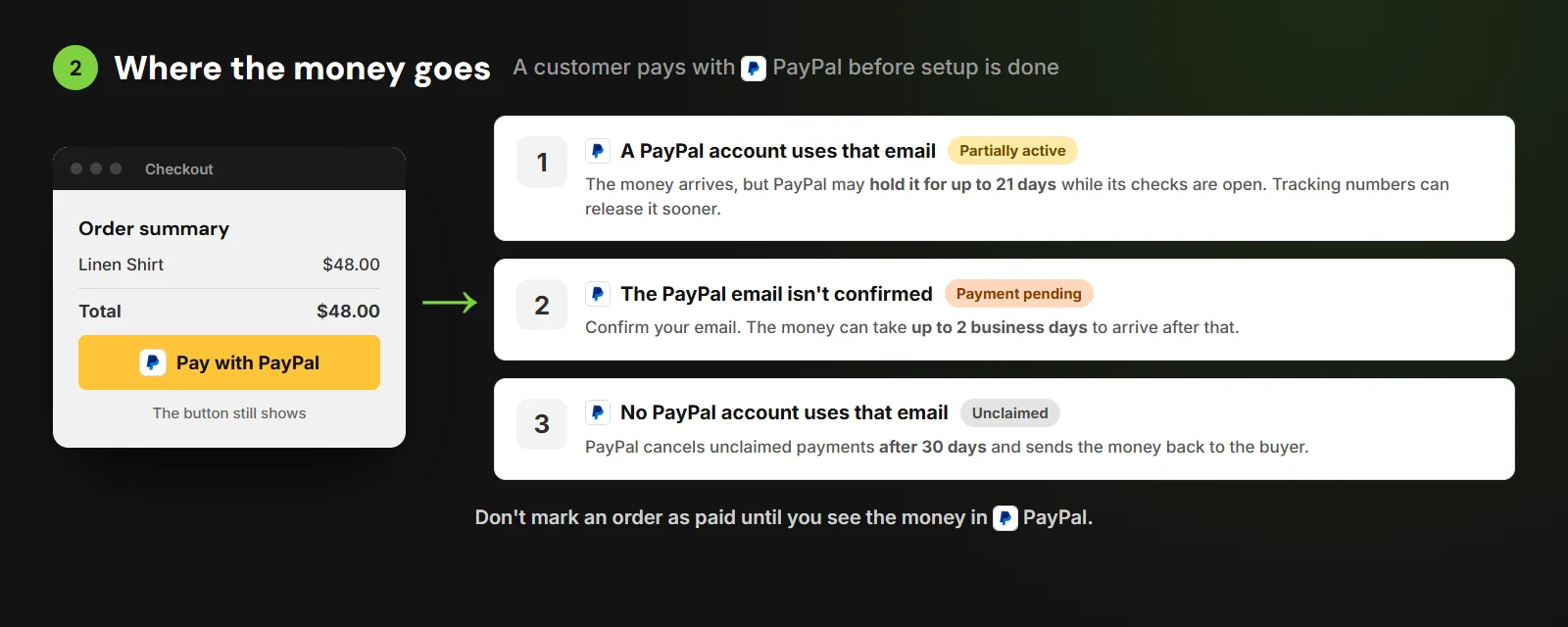
Most of the time, yes. A Shopify PayPal partially active status doesn’t turn off the PayPal button. Buyers can still pay. The real question is where the money goes. And when can you use it? There are three cases.
1. A PayPal account uses that email, but it isn’t fully set up
The money reaches your PayPal account, but PayPal may hold it. PayPal says it can hold money for new sellers for up to 21 days. The same goes for accounts with open ID checks. Adding a tracking number to the sale in PayPal can release held money sooner.
2. The email isn’t confirmed ( Shopify PayPal payment pending)
Shopify says a “payment is pending” error means the payment went to an unverified PayPal account. After you confirm your email, it can take up to two business days for the money to arrive. Don’t mark these orders as paid until you see the money in PayPal.
3. No PayPal account uses that email
Then the payment waits as unclaimed. PayPal’s help center says pending or unclaimed payments are canceled after 30 days, and the money goes back to the buyer. So connect a PayPal business account with that email quickly, or turn PayPal off until you can.
How to fix Shopify PayPal partially active in 5 steps
Do these steps in order to clear the Shopify PayPal partially active status. Most store owners only need steps 1 to 4. Step 5 proves that everything works.
Step 1: Check which account is linked
- In your Shopify admin, go to Settings > Payments.
- In the Additional payment methods section, click PayPal.
- Check which email address the connection uses.
- Compare it with your Store email. You find it in Settings > General, in the Store contact details section.
If the email belongs to someone else, such as the developer who built the store, skip to the section on switching accounts below.
Step 2: Make sure it is a PayPal business account
Shopify’s help page is clear: the PayPal account must be a business account. A personal account is a common reason for PayPal not working on Shopify. To upgrade, log in to PayPal, open Settings, and in the Account options section click Upgrade to a Business Account.
PayPal lets you have one personal and one business account. Each one needs its own email address.
Step 3: Confirm your email and clear PayPal’s to-do list
- Log in to PayPal and open Settings.
- In the email section, click Confirm next to your email if it isn’t confirmed yet. Then click the link in the email PayPal sends you.
- Go back to your PayPal dashboard and look for alerts or notices.
- Finish each task you see. That can be an ID check, business details, or a bank account to link and confirm.
- Check your inbox and spam folder for PayPal emails that ask for documents.
Some of these checks take a few days on PayPal’s side. Shopify can’t speed them up, so start early. On the client stores I have fixed, this step is usually the one that clears Shopify PayPal partially active.
Step 4: Complete the Shopify PayPal setup
These steps come from Shopify’s help page. The PayPal screens may look a bit different where you live.
- Go to Settings > Payments.
- In Additional payment methods, click the status next to PayPal (for example Setup incomplete).
- Click Complete setup.
- Enter your PayPal email and click Next. Then enter your password and click Next.
- Fill in Tell us about your business, accept the policy statements, and click Agree and Create Account.
- On Describe your business, choose your business type, add your details, and click Next.
- On Tell us more about you, add your details and click Submit.
- Click Go back to Shopify.
If your business account already exists, PayPal may just ask you to log in and approve Shopify’s permissions. Then refresh Settings > Payments. The card should now say Active.

Step 5: Place a real test order
Shopify tells you to make a test payment after the Shopify PayPal setup. Your store needs a paid plan for this. Buy a cheap product with a PayPal account other than the one that gets your money.
Then check two things. The order shows as paid in Shopify. The money shows in your PayPal business account. Finally, refund the order from Shopify. This also proves refunds work. They don’t until the Shopify PayPal setup is complete.
How to switch to a different PayPal account
Use this when the wrong account is linked. It might be the developer’s own PayPal, or an old account you no longer use.
- In Shopify, go to Settings > Payments, click PayPal under Additional payment methods, and click Deactivate.
- Log in to the old PayPal account. Check it for customer payments that you still need to ship or refund.
- Open PayPal’s Third Party API users page. Click the three dots next to Shopify, then click Delete.
- Log out of PayPal. Open a private browser window, so the old login isn’t remembered.
- In Shopify, activate PayPal again and log in with the correct business account.
- Place a test order, as in step 5.
Shopify keeps your old PayPal details when you deactivate, so watch which email you log in with. Some store owners find no Deactivate button while the setup is incomplete. If that happens, contact Shopify Support and ask them to unlink the old account. Also note that only the store owner can edit the PayPal settings, so use the owner login for all of this.
Common problems: PayPal not working on Shopify
If your Shopify PayPal partially active status still won’t change, match your error to this table. The first five come from Shopify’s PayPal troubleshooting page.
| Problem | Likely cause | Fix |
|---|---|---|
| Unable to complete activation | Country mismatch | Match store and PayPal country |
| Payment is pending | Unconfirmed email | Confirm email, then wait |
| Payment already processed | One PayPal, two stores | Add an order ID prefix |
| Unable to refund | Broken connection | Reconnect PayPal |
| Too many requests | Many calls at once | Contact PayPal |
| Unable to accept payments | No card provider | Add a card provider |
Your store country doesn’t match PayPal
To activate PayPal, your store’s country must match the country in your PayPal account. You can change your store’s country in Settings > General. Is your PayPal account set to the wrong country? Then talk to PayPal. You can’t just edit it.
One PayPal account on two stores
Both stores start at order #1001, so PayPal sees the same order numbers twice. Go to Settings > General, find Order ID format, and add a Prefix such as “B-” on the second store.
Refunds fail with a permission error
The error “Unable to refund: You don’t have permissions to make this API call” means the connection broke. Log in to PayPal and give Shopify access. Then turn PayPal off and on again in Shopify. Until it works, refund those orders manually in PayPal.
The PayPal button doesn’t show at checkout
Check that PayPal isn’t Inactive. Then test in a private window or another browser. In the US or France with Shopify Payments, look for PayPal in your Shopify Payments settings instead. If you see “This store is currently unable to accept payments”, PayPal isn’t the problem. You need a card payment provider too, because PayPal only handles PayPal payments.
Which fix should you start with?
- Setup incomplete: do steps 2 to 5.
- Shopify PayPal partially active: start with step 3, then do steps 4 and 5.
- Inactive: activate PayPal in step 4, then test in step 5.
- Wrong email linked: follow the switching steps above.
- Shopify PayPal payment pending on orders: do step 3, then wait for the money before you ship.
Mistakes to avoid
- Marking PayPal orders as paid too early. Wait until the money is in your PayPal account.
- Running ads before a test order. A broken payment wastes every click. My first sale guide covers what to check before you launch.
- Leaving a developer’s email as the store email. PayPal money follows that email, so set your own before launch.
- Ignoring PayPal emails. Requests for documents often land in spam, and nothing moves until you reply.
- Turning off card payments. PayPal doesn’t replace a card provider. Most shoppers still pay by card.
A working PayPal button also builds trust at checkout. If you want to show it on product pages too, see my guide to Shopify trust badges.
For the full official Shopify PayPal setup steps, see Shopify’s guide to setting up PayPal Express Checkout.
Frequently asked questions
What does partially active mean on Shopify PayPal?
Shopify PayPal partially active means your store is linked to PayPal, but PayPal still needs something from you. Most often it is a confirmed email, ID or business details, or a bank account. Finish those tasks in PayPal, then complete the Shopify PayPal setup.
Why is PayPal not working on my Shopify store?
PayPal not working on Shopify most often comes down to four things. You use a personal account, not a business one. Your email isn’t confirmed. The wrong account is linked. Or your store country doesn’t match PayPal. Check the PayPal status in Settings > Payments first.
Why is my Shopify PayPal payment pending?
The payment went to a PayPal account that wasn’t verified when the order was placed. Confirm your PayPal email. Shopify says the money can then take up to two business days to arrive.
Can I use a personal PayPal account for Shopify?
No. Shopify requires a PayPal business account. You can upgrade a personal account in PayPal under Settings, Account options, Upgrade to a Business Account.
How do I change the PayPal account on Shopify?
Deactivate PayPal in Settings > Payments. Remove Shopify from the old account’s third-party users. Then activate PayPal again in a private window, and log in with the new business account.
How long does PayPal hold money from Shopify sales?
PayPal says it can hold money for new sellers for up to 21 days. The same goes for accounts with open checks. Adding tracking numbers can release it sooner.
Once the Shopify PayPal partially active status turns Active and your test order goes through, you can stop worrying about it. For more fixes like this, browse my Shopify tips, such as what to do when a Shopify discount code is not working. If you would rather have it checked for you, I fix payment settings as part of my Shopify store management service. Message me on WhatsApp and I will take a look.



