


A Shopify loyalty program gives your past buyers a reason to come back. It rewards them with points, credit or perks, so the second order feels like a smart choice.
Many store owners think they need a paid app on day one. You don’t. Shopify already gives you store credit, customer segments, segment-only discounts, email and automation for free. In this guide I show you how to build a simple rewards program with those tools, when an app is worth paying for, and how to check that your rewards don’t eat your margin. I have set up loyalty rewards on many client stores, and this is the order I follow.
Here is what you will learn:
- What Shopify includes for loyalty, and what it doesn’t
- How to build a free Shopify loyalty program in 5 steps
- Points vs tiers vs referrals, and which one fits your store
- The free plans of 5 popular loyalty apps, compared (November 2026)
- The margin math, and the EU, UK and US wording rules to respect
Does Shopify have a loyalty program?
No, not a full one. As of November 2026, Shopify has no built-in points system, VIP tiers or referral links. Those come from apps. But Shopify does have the building blocks of a basic rewards program, and they cost nothing extra.
- Store credit: money you add to a customer’s account. They spend it at checkout.
- Customer segments: lists that update themselves, such as “customers with 3 or more orders”.
- Discounts with eligibility: a code or automatic discount that only one segment can use.
 Shopify Messaging: emails to a segment, with 10,000 free emails a month on Basic and higher plans.
- Shopify Flow: a free automation app that reacts when a customer joins a segment.
 Shopify Messaging: emails to a segment, with 10,000 free emails a month on Basic and higher plans.
 Shopify Flow: a free automation app that reacts when a customer joins a segment.
Together, these let you reward your best customers without an app. You just don’t get a points widget.
Build a free Shopify loyalty program with Shopify’s own tools
This setup rewards repeat buyers with credit and a members-only discount. It takes about an hour. Do the steps in this order.
Step 1: Turn on customer accounts and store credit
Credit only works when the customer is signed in. Shopify says it isn’t available for legacy customer accounts, so your store must use the current customer accounts.
- In your Shopify admin, go to Settings, then Customer accounts.
- Make sure the store uses customer accounts, not legacy accounts.
- In the Customer accounts section, turn on the Store credit toggle.
The toggle is on by default, but check it anyway. Dawn and Horizon both show the account icon in the header only when customer accounts are turned on, so members can sign in from any page.
Step 2: Give store credit as a reward
You can add credit to any customer by hand. It is the simplest reward you can give, and it works online, on  Shopify POS and in the
 Shop app.
- Go to Customers and open the customer’s profile.
- In the Store credit section, click Edit.
- If you see the Adjustment field, choose Credit.
- Enter the Amount. If you sell in several currencies, pick the Currency first.
- Optional: pick an Expiration date and tick Notify customer, so they get an email.
- Optional: click Add note to record the reason, such as “VIP reward”.
- Click Issue credit.
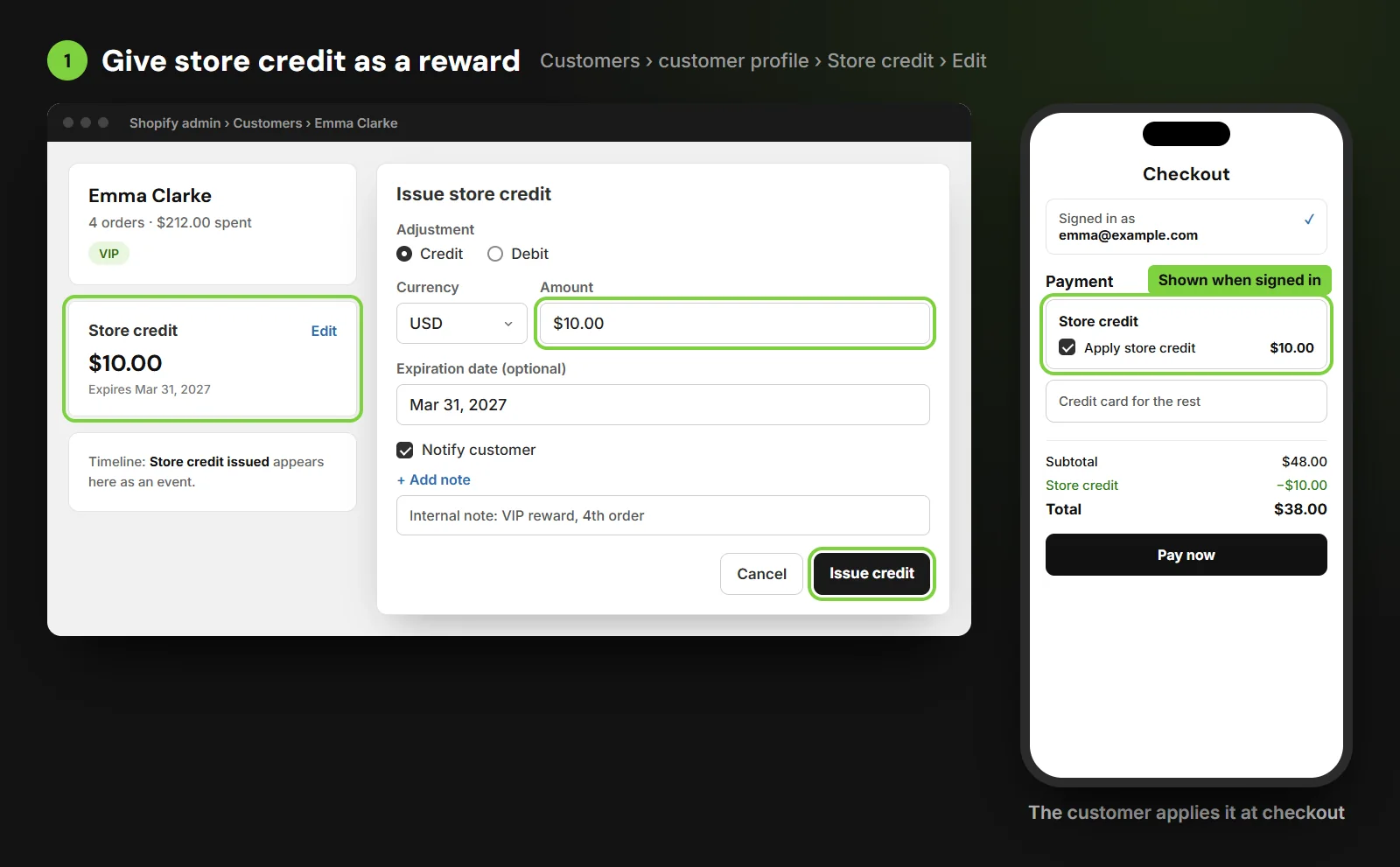
Know the limits before you promise anything. A customer account can hold up to $15,000 USD of credit. At checkout, the customer uses the full balance; they can’t pick part of it. Only the balance in the checkout currency shows. And for stores created on or after May 12, 2025, Shopify charges third-party transaction fees on the amount paid with credit.
Step 3: Create a VIP customer segment
A segment decides who counts as a loyal customer. Shopify adds and removes people from it automatically.
- Go to Customers, then Segments, and click Create segment.
- Type a rule in the editor, for example number_of_orders >= 3 or amount_spent >= 200.
- Click Run query to see who matches.
- Click Save segment and name it, for example VIP customers.
Shopify also has a store_credit_accounts filter. With it you can find customers whose credit expires in the next 7 days and remind them.
Step 4: Give the segment its own discount
Now give your VIP segment a perk that new visitors don’t get.
- Go to Discounts and click Create discount.
- Choose Amount off orders (or free shipping).
- Pick Discount code or Automatic discount, and set the value.
- In the Eligibility section, select Customer segments and add VIP customers.
- Set Combinations on purpose, so the perk doesn’t stack with every sale. Then save.

If a code doesn’t apply for a VIP at checkout, my guide on why a Shopify discount code is not working covers the usual causes.
Step 5: Tell members and automate the rest
Use Shopify Messaging to email the VIP segment about their perk. Its email editor can show each person’s balance with the customer.store_credit_account.balance variable. Then use Shopify Flow so the work runs on its own:
- Trigger: Customer joined segment (your VIP segment).
- Action: Add customer tags, for example “VIP”, so staff and other apps can see it.
- Email: a marketing automation that thanks people when they join the segment. These automations now live in the Shopify Messaging app, under Automations.
Flow has no ready-made action for issuing credit. Advanced users can call the storeCreditAccountCredit mutation with the Send Admin API request action. Test that on your own customer profile before you turn it on. For the full rules, read Shopify’s store credit help page.
Points vs tiers vs referrals: which rewards program fits?
Most loyalty apps mix three ideas. Pick the one that matches how often people buy from you.
| Type | How it works | Best for | Free in Shopify? |
|---|---|---|---|
| Points | Earn per $1, swap for rewards | Frequent, cheaper orders | No, needs an app |
| VIP tiers | Spend more, reach better perks | Few big spenders | Partly, with segments |
| Referrals | Reward for sending a friend | Products people talk about | No, needs an app |
| Cash back | A share of each order as credit | Simple, clear offers | Yes, by hand or Flow |
Points suit stores where people buy every few weeks, like coffee or skincare. Tiers suit stores where a few buyers spend most of the money. If people buy once or twice a year, simple cash back is easier to understand than points.
When is a loyalty app worth it?
The free Shopify loyalty program above is enough for many small stores. An app starts to make sense when you need any of these:
- A points balance that customers see on the storefront, in a widget or on a loyalty page
- Points for actions beyond orders, such as sign-ups, birthdays or social follows
- Referral links with fraud checks
- Automatic VIP tiers with different earning rates
- Rewards that work at your shop counter with Shopify POS, without manual work
Most loyalty apps add their widget as an app embed. In both Dawn and Horizon, go to Online Store, click Edit theme, open the App embeds icon in the sidebar, and turn the app on. Product page blocks, such as “earn 50 points”, go into the product section as app blocks.
Free plans of popular Shopify loyalty apps (November 2026)
Here are the free plans of five popular apps, taken from their Shopify App Store listings on November 26, 2026. I haven’t run these apps on client stores myself, so this is a neutral comparison of the listings, not a review. Prices change often, so check the listing before you install.
| App | Free plan limit | Free plan includes | VIP tiers from | Rating |
|---|---|---|---|---|
 Smile | 200 orders/month | Points, rewards, referrals | $199/month | 4.9 (4,708) |
 Joy | 250 orders/month | Points, referrals, widget | $129/month | 4.9 (1,784) |
 Rivo | 200 orders/month | Points, emails | $49/month | 4.7 (1,439) |
 LoyaltyLion | 400 orders/month | Points, discount rewards | $199/month | 4.7 (555) |
 BON Loyalty | 150 orders/month | Points, referrals, emails | $129/month | 5.0 (2,012) |
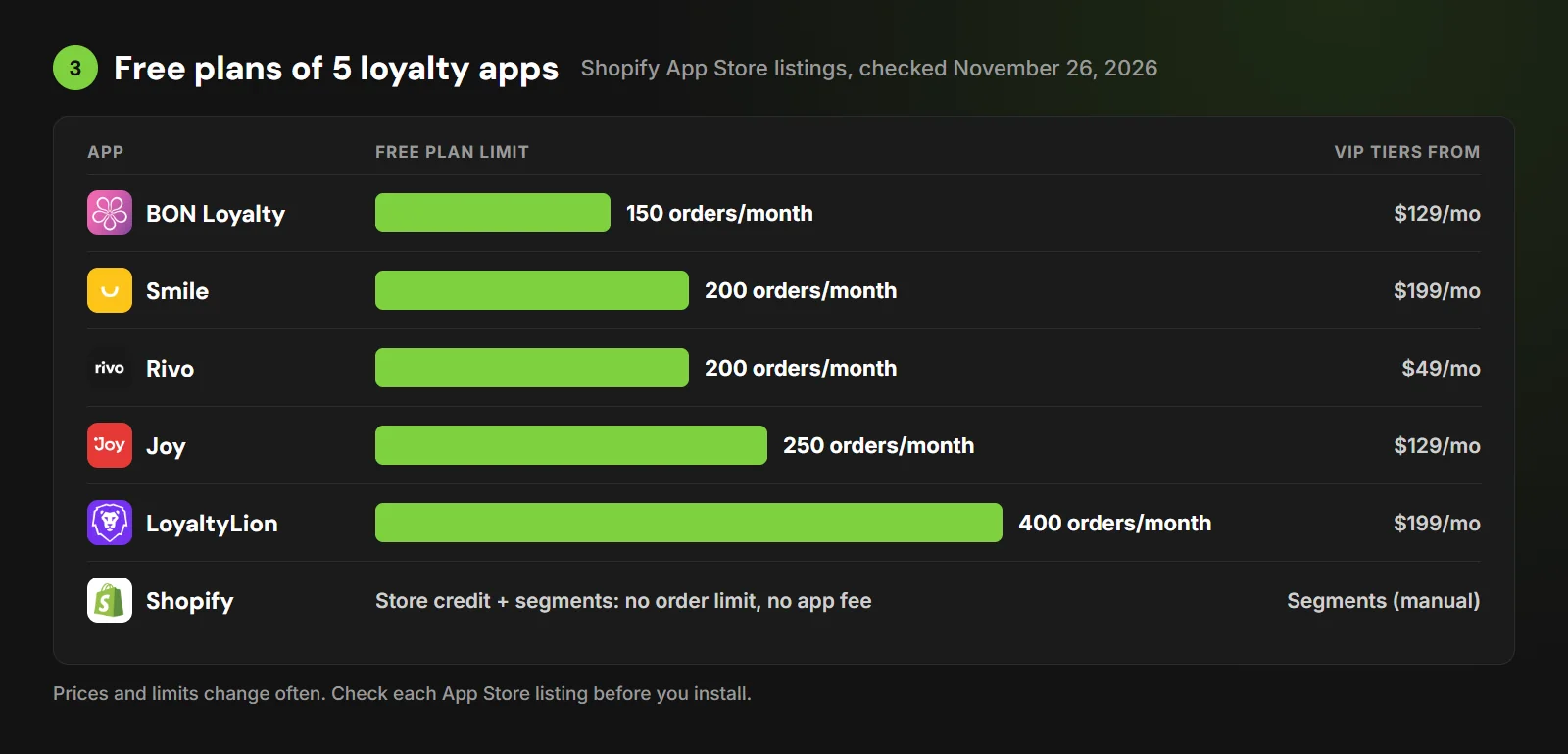
Two things stand out. First, every free plan caps your monthly orders, so a busy month can push you onto a paid plan. Second, VIP tiers are a paid feature in all five. If tiers are your main goal, a segment plus a segment-only discount gets you a simple version for free.
Margin math: what a reward really costs
A reward in a Shopify loyalty program is a discount that arrives later. So treat it like one. A program that gives 1 point per $1 and turns 100 points into $5 gives back 5% of what people spend. If 200 points equal $5, you give back 2.5%.
Take a $50 order with a $20 product cost and $8 of other costs, such as shipping and fees. Your profit is $22, a 44% margin. Here is what different reward rates do in the worst case, when every reward gets used:
| Reward rate | Profit per order | Margin | More orders needed |
|---|---|---|---|
| None | $22.00 | 44.0% | None |
| 2.5% back | $20.75 | 42.6% | +6.0% |
| 5% back | $19.50 | 41.1% | +12.8% |
| 10% back | $17.00 | 37.8% | +29.4% |

Run your own numbers in my free Shopify discount calculator. Enter your reward rate as a percent discount. It shows your new margin and how many more orders you need to keep the same profit. Then add the app’s monthly fee, and the third-party fee on credit payments if your store is new.
EU, UK and US rules for rewards wording
Consumer law applies to loyalty offers too. This is general information, not legal advice, so check the rules for your own country.
- “Free” must mean free. The EU’s Unfair Commercial Practices Directive bans calling something “free” if the customer has to pay anything other than the unavoidable cost of responding and delivery. “Free gift with 500 points” is fine. “Free gift” that secretly needs a purchase is not.
- Don’t pay for positive reviews. The UK’s Competition and Markets Authority tells businesses not to offer money or gifts for positive reviews. The US FTC allows incentives for reviews only if they don’t depend, openly or by hint, on the review being positive. So reward “any honest review”, never “a 5-star review”.
- Show the terms. State how points are earned, what they are worth, and when they expire. Shopify itself says to check local laws before you add expiry dates to credit.
- Get consent for marketing. Email and SMS about rewards go only to people who agreed to receive them.
Running a members-only sale in the EU? Price reduction notices have their own rules, explained in my guide to the Omnibus Directive on Shopify.
Common mistakes with a Shopify loyalty program
- Rewards too small to notice. 1% back on a $30 order is 30 cents. People ignore it.
- Customers can’t sign in. Credit needs a signed-in customer on the current customer accounts. Test the full path on your phone.
- Stacking everything. A VIP code plus a sitewide sale plus points can sell at a loss. Check your discount Combinations.
- Forgetting the fees. Credit payments on newer stores carry a third-party transaction fee, and app plans rise with order volume.
- Nobody knows the program exists. Mention it on the order confirmation page, in your emails and on a short “Rewards” page.
- Treating store credit like a gift card. They work differently. Read my Shopify gift card guide if you want a code that anyone can use.
Which way should you use?
Start your Shopify loyalty program for free if you have fewer than a few hundred orders a month. Use store credit for cash back and thank-you rewards, a VIP segment with its own discount, and Shopify Messaging to tell people. That is a real rewards program with no monthly fee.
Move to an app when customers ask about points, when you want referrals, or when you need tiers that update on their own. Install one free plan, watch your redemption rate for a few months, and upgrade only when the numbers say so. If customers leave items in their cart, fix that first; my guide on abandoned cart emails that don’t send helps there.
Frequently asked questions
How do I create a loyalty program on Shopify?
Start with Shopify’s own tools: turn on store credit, build a VIP segment, give it a segment-only discount and email it with Shopify Messaging. Add a loyalty app when you need points, tiers or referrals.
What is the best free Shopify loyalty program?
It depends on your order volume. Based on the listings in November 2026, LoyaltyLion’s free plan allows the most orders (400 a month), while Smile, Joy, Rivo and BON Loyalty allow 150 to 250. Shopify’s own credit feature has no order limit.
How do I give store credit on Shopify?
Open the customer in Customers, click Edit in the Store credit section, enter the amount, and click Issue credit. Tick Notify customer to send them an email.
What is the difference between store credit and a gift card?
A gift card has a code that anyone can use. Store credit sits on one customer’s account and needs them to sign in. Gift cards can have a store-wide expiry setting, while credit expiry is set each time you issue it.
Why is store credit not showing at checkout?
The customer is usually not signed in, the store still uses legacy customer accounts, or the credit is in a different currency. Also check the Store credit toggle in Settings, then Customer accounts. Draft orders can’t use it.
Can customers earn rewards in my physical shop?
Yes. Customers can pay with their credit on Shopify POS, and most loyalty apps offer POS earning and redeeming, often on a paid plan.
Small, clear rewards that customers can actually use beat a complex points scheme nobody understands. For more free tools, see my Shopify tools. If you would rather have the segments, discounts and rewards set up for you, I do this as part of my Shopify store management service. Message me on WhatsApp and I will take a look.



