


Knowing how to hire a Shopify developer saves you money, time and stress. The wrong hire can break your theme, slow your store or disappear with your deposit. The right one fixes the problem, explains what they did, and leaves your store safer than before.
I have worked on the developer side for more than 10 years, as a  Shopify Select Partner and a
 Fiverr Vetted Pro. This guide shows you how to hire a Shopify developer the way I would explain it to a friend who is about to pay someone.
Here is what you will learn:
- How to decide what job you actually need done
- How to write a one-page brief (free template you can copy)
- Where to find a Shopify developer: the Partner Directory, Fiverr,
 Upwork and referrals
- 12 questions to ask, and the red flags that should stop you
- How to pay safely and give access without sharing your password
 Upwork and referrals
Step 1: Decide what job you need done
Before you try to find a Shopify developer, name the job in one sentence. “Make my product page look like this example” is a job. “Make my store better” is not. A clear job tells you who to look for and how to pay.
“Shopify developer” is a wide label, and every Shopify developer for hire describes their skills differently. Some mostly work in the theme editor. Others write Liquid code, build custom apps or connect Shopify to other systems. Match the person to the job.
| Your job | Who to look for | How to pay |
|---|---|---|
| Small fix or tweak | Theme freelancer | One fixed price |
| New store setup | Store builder | Fixed price, 1-2 parts |
| Redesign | Designer who codes | Milestones |
| Custom app or integration | App developer or agency | Milestones |
| Ongoing help | Freelancer or agency | Monthly plan |
Not sure what is wrong? Make the first job a paid review: a short written list of problems and fixes. Then hire for the fixes. My list of common Shopify store design mistakes is a good place to check your store first.
Step 2: Write a one-page brief
A one-page brief is a short document that describes the job, the finish line, the budget and how you will give access. If you take one tip on how to hire a Shopify developer from this guide, make it this one. Every developer reads the same facts, so the quotes are accurate, and the brief becomes the scope you both agreed on.
Copy this template into a document and fill in every line. Short answers are fine.
SHOPIFY PROJECT BRIEF

Store URL:
Theme name and version:
What I sell, and who buys it:

The job in one sentence:
Done means (3-5 checks I can test myself):
1.
2.
3.

Do NOT change:
Pages or templates involved:
Examples I like (2-3 links):
Apps that matter for this job:

Budget range:
Deadline:
Access: collaborator account (I will share the request code)
My time zone and best way to reach me:
The most useful line is “Done means”. Write checks you can test, such as “The size guide opens on mobile”. Vague goals lead to arguments about whether the job is finished.

Step 3: Where to find a Shopify developer
There are four good places to find a Shopify developer: the Shopify Partner Directory, Fiverr, Upwork and referrals. None is best for everyone, so here are the honest pros and cons.
The Shopify Partner Directory
The Shopify Partner Directory is Shopify’s own list of service partners. Shopify’s help center says it lists established agency Partners, and that Partners in the Select tier or above are invited to join. You can browse by service or tier and filter by details such as location.
- Pros: each profile shows Shopify data, such as how long they have been a Partner, team size, top services and up to 6 featured clients. Shopify says it removes fake and paid reviews.
- Cons: no payment protection. The Partner bills you directly, and the charge is not on your Shopify bill. Many listings are agencies with agency prices.
It is a good place to find a Shopify developer team for a big project. Shopify has announced new Partner tiers from January 1, 2027, so tier names may change.
Fiverr
Fiverr works best for clear, fixed jobs. Sellers list packages with a set price, delivery time and number of revisions. You pay upfront through Fiverr, and the order completes when you accept the delivery.
- Pros: fixed prices you can compare, public reviews from past orders, and Fiverr Pro sellers who are vetted by the Fiverr Pro team.
- Cons: a service fee on top. As of November 2026, Fiverr lists 5.5% of the price, plus $3.50 on orders under $200. Orders also complete by themselves three days after delivery if you take no action.
When you pick a Shopify developer for hire on Fiverr, read the package details line by line. Ask for a custom offer if your job does not fit a package.
Upwork
Upwork suits jobs with a custom scope or ongoing hours. You post a job, and each Shopify developer for hire who is interested sends a proposal. Then you choose a fixed-price contract with milestones or an hourly contract.
- Pros: funded milestones on fixed-price work, and hourly protection with a work diary.
- Cons: a client fee. As of November 2026, Upwork lists 5% for most clients paying by card, 7.99% in some locations, and 3% for eligible US bank payments. Expect many copy-paste proposals.
Referrals
The easiest way to find a Shopify developer you can trust is often to ask other store owners. A referral comes with real history, but nobody holds the money for you, so still use a brief and milestones.
| Where | Best for | Your money | Fee for you |
|---|---|---|---|
| Partner Directory | Bigger projects | Paid to the Partner | No platform fee |
| Fiverr | Fixed tasks | Paid via Fiverr | 5.5% + $3.50 under $200 |
| Upwork | Custom scope | Funded milestones | 3% to 7.99% |
| Referrals | Trusted names | As agreed | None |

Step 4: 12 questions to ask a Shopify developer for hire
These questions are the core of how to hire a Shopify developer well. Ask them in writing, so you keep the answers.
- Can I see 2-3 live Shopify stores you worked on? Ask what exactly they did on each.
- Have you done this exact job before? “Yes, last month, on Dawn” beats “I can do anything”.
- How will you do it? Theme settings, code or an app? Apps often add a monthly fee and extra code.
- Will you work on a copy of my theme first? The answer should be yes.
- What is included in the price, and what costs extra?
- How many rounds of changes are included?
- What is the timeline, and what do you need from me?
- What access do you need? Expect a collaborator request with a short list of permissions.
- Will you write down what you changed? It helps the next person.
- Will this slow down my store? A good developer thinks about speed without being asked.
- What happens if something breaks after delivery? Ask how long bug fixes are free.
- Will you do the work yourself? You should know who touches your store.
You need honest answers, not perfect ones.
Red flags and mistakes to avoid
Knowing how to hire a Shopify developer also means knowing when to walk away. If you see one of these signs, slow down. If you see two, find a Shopify developer somewhere else.
Red flags in the developer
- They ask for your password. Shopify’s Partner help center says asking a merchant for their password, or using a merchant’s login, is prohibited. Use a collaborator account (Step 6).
- No portfolio, or only pictures. Mockups are not proof. Ask for live stores.
- No fixed scope. “I will fix everything” means nobody can say when the job is done.
- They want payment off the platform. Fiverr says it cannot help if you pay outside Fiverr, and Upwork does not allow it after you meet there.
- Guaranteed results. Nobody can promise a number of sales or a top spot on Google.
- Several paid apps with no reason. Ask why each one is needed.
- Work straight on your live theme. One mistake can break your store while customers shop.
Mistakes store owners make
- Choosing the cheapest quote without comparing what each includes.
- Paying 100% upfront, outside any platform, for a big job.
- Changing the job halfway and expecting the same price.
- Forgetting to remove access when the job is done.
- Accepting a collaborator request from someone they never talked to.
Shopify’s help center says that if you don’t recognize the sender of a request, you should not accept it. If someone you don’t trust already got in, follow my guide for a hacked Shopify store.
Step 5: How to pay a Shopify developer safely
Payment is the part of how to hire a Shopify developer that owners most often get wrong. The safe way is to pay in parts, tied to work you can check. Approve one part before the next one starts.
- On Upwork: use a fixed-price contract with milestones. You fund each milestone, and Upwork holds it until you approve. If you do nothing, the funds are released 14 days after the work is submitted, so review on time.
- On Fiverr: you pay upfront through Fiverr. For big jobs, ask for a custom offer with milestones. Fiverr allows up to 6 milestones in a custom offer, on orders over $100. Check each delivery within three days, or extend the review time.
- Off a platform: agree the scope in writing, get an invoice, pay a deposit, and pay the rest when the job passes your “done” checks.

What a Shopify developer for hire costs
Prices depend on the job, the scope and the person’s experience, so I won’t quote other people’s rates. A fixed price suits a defined job, and hourly pay suits open-ended work.
As one honest example, my own starting prices as of November 2026 are: speed optimization from $80, Shopify SEO from $100, a dropshipping or print-on-demand store from $100, and a redesign from $150. The final price depends on the work and is agreed after we discuss the project. See them all on my Shopify services page, and see what a Shopify store costs per month for running costs.
Step 6: Give access with a collaborator account
Safe access is the last step of how to hire a Shopify developer. A collaborator account is a separate login that a Shopify Partner uses to work in your store, so you never share your own. It does not count toward your store’s user limit, and you choose what they can see. Shopify explains it in its collaborator accounts guide.
- In your Shopify admin, go to Settings, then Users.
- Click Users & permissions (or Users if your store is part of an organization).
- Click Security and copy the 4-digit collaborator request code.
- Send the code to your developer. They send a request from their Shopify Partner account.
- You get an email. On the Users page, click the Requests status and open the request.
- Check Partner since, Signed up from and Request sent from. A “(possible VPN)” note is not always bad, but confirm with the developer.
- Review the role and remove any permission the job does not need.
- Click Accept request.
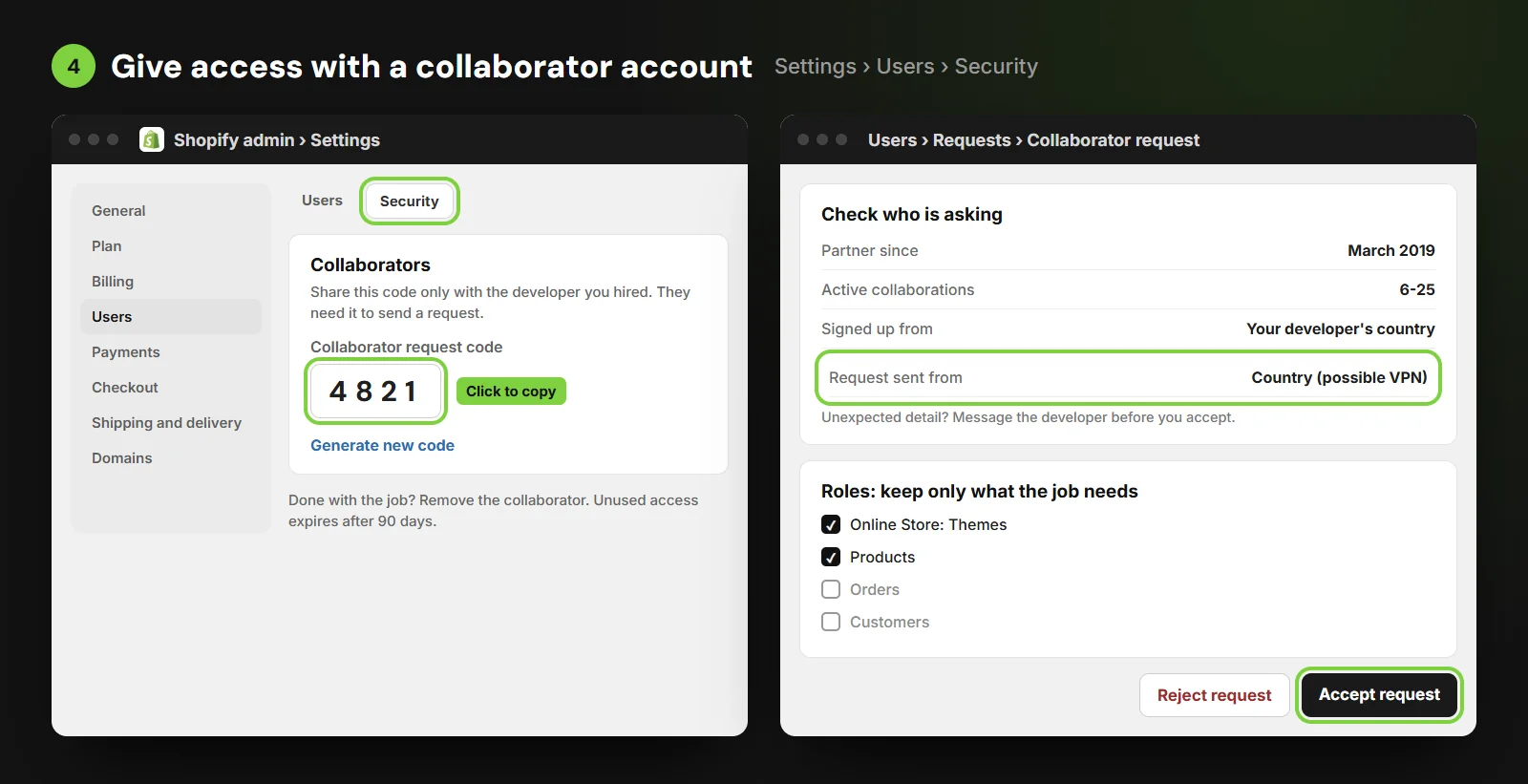
Some rules from Shopify: collaborators must use a secure sign-in method, such as a passkey or two-step authentication. They can’t get the Administrator role on a single store, and you can’t transfer store ownership to them. Access ends by itself if they don’t log in for 90 days.
If your developer is not a Shopify Partner, add them as a staff user instead. Staff users count toward your plan’s user limit.
When the job is done
- Test every “done” check from your brief on a phone and a computer.
- Keep a copy of your old theme for a few weeks. My guide to changing your Shopify theme safely shows how to duplicate one.
- Ask for the written list of changes.
- Remove the collaborator account under Settings, then Users, unless you need more help soon.
- For a new store, run my Shopify launch checklist before you announce it.
How to hire a Shopify developer: which way fits you?
Here is the short version for each situation:
- Small, clear task: a fixed-price package on Fiverr, or a freelancer you were referred to.
- Custom job with several parts: Upwork or a direct contract, with milestones.
- Large build or custom app: compare a few agencies in the Partner Directory.
- Not sure what is wrong: pay for a short review first.
Frequently asked questions
How much does it cost to hire a Shopify developer?
It depends on the job, the scope and the developer’s experience. Small fixes usually have a fixed price, and bigger projects are split into milestones. Send the same brief to two or three people to get quotes you can compare.
How do I give a Shopify developer access to my store?
Go to Settings, then Users, then Security, and copy the 4-digit collaborator request code. Send it to the developer. When the request arrives, check the details, remove extra permissions and click Accept request.
Where can I find a Shopify developer near me?
Most Shopify work is done remotely, so you don’t need to find a Shopify developer in your own city. If you prefer local help, the Partner Directory lets you filter by location, and Fiverr and Upwork show each freelancer’s country.
Can I trust reviews in the Shopify Partner Directory?
Shopify says it blocks or removes fake, misleading and paid reviews, and profiles show data from Shopify itself. Still, reviews are one signal. Look at live stores the Partner worked on.
Is Fiverr or Upwork better for hiring a Shopify developer?
Fiverr is easier for small, clear jobs with fixed packages. Upwork is better for a custom scope or hourly work. On both, you pay through the platform before work starts, and both add a fee for buyers.
How to hire a Shopify developer without sharing your password?
Never give a developer your login. Shopify does not allow Partners to ask for a merchant’s password. A real Shopify developer for hire asks for a collaborator request code or a staff account.
That is how to hire a Shopify developer without the usual stress: a clear brief, careful questions, payment in parts and safe access. If you would like a second opinion on your brief, or a quote, you can work with me directly. Message me on WhatsApp with your store link and the job, and I will reply honestly.



