


Holiday sales bring more orders, and a few of them are not what they seem. A Shopify high risk order is Shopify’s warning that the payment may come from a stolen card. Ship it, and you can lose the product, the money and a chargeback fee. Cancel a real one, and you lose a sale.
In this guide I explain what Shopify’s fraud analysis shows and what to do next. I have handled flagged orders on many client stores, and this is my routine. Everything is checked against Shopify’s help pages, as of November 2026.
Here is what you will learn:
- What the risk levels and fraud indicators mean.
- Six steps to check, contact, cancel or ship a flagged order.
- How to cancel high risk orders on autopilot with
 Shopify Flow.
- How chargebacks work, and what they cost in the US, UK and EU.
- Where Shopify Protect works, and when a fraud app is worth it.
 Shopify Flow.
What a Shopify high risk order means
A Shopify high risk order is an order that Shopify’s fraud analysis rates as likely to end in a fraud chargeback. It is a warning, not proof. Many flagged orders are real, but never ship one before you check it.
Online card orders that Shopify can verify get a low, medium or high risk level. Medium and high risk orders show a warning symbol on the Orders page. The rating comes from machine learning trained on transactions across all Shopify stores.
Next to the risk level, you get a recommended next step. The Order risk evaluation view can show one of three lines:
- You can fulfill this order
- Confirm with the customer before fulfilling
- Consider canceling this order
Plans matter. Fraud indicators come with the Basic plan or higher. The overall advice needs the Grow plan or higher, or Shopify Payments. Test, free, gift card, POS, B2B and subscription renewal orders get no advice.
The fraud indicators Shopify checks
Indicators are single facts about the order. Shopify lists checks like these:
- Does the card pass the Address Verification System (AVS) check?
- Did the customer enter the correct CVV code?
- Does the customer’s location match the payment method?
- Is there unusual device or network activity?
- Did the customer try more than one card?
Icons mark each indicator as linked to fraud, linked to real buyers, or neutral. One red line is not the risk level. Go by the overall advice.

Blocked checkouts never become orders
Shopify Payments can also block some risky checkouts before an order exists. Find them in Orders, then Abandoned checkouts, in the Blocked view. No payment is taken. If you know the buyer, send them a draft order invoice instead.
What to do with a Shopify high risk order: 6 steps
The short answer: don’t ship it, check the details, try to reach the customer, then fulfill or cancel and refund.
Step 1: Hold the order
Don’t fulfill anything yet. If you see fraud analysis isn’t available yet, wait a few minutes and refresh.
Step 2: Open the fraud analysis
Shopify’s guide to reviewing orders with fraud analysis has the full reference. The steps are:
- In your Shopify admin, go to Orders and click the flagged order.
- In the Order risk section, click Order risk evaluation.
- Read the risk level, the next step and every indicator.
- If an app also rates the order, click its tab to see its view.
On the Shopify mobile app, open the order and tap About this order or Order risk evaluation, depending on your app version.
Step 3: Check the details yourself
These checks take about five minutes:
- IP address: is it far from the billing address? Is it a proxy or a web hosting company?
- Addresses: put billing and shipping into a map app. Different continents is a red flag. A gift to a friend is not.
- Email: search it. See if it has a history or social profiles.
- Repeat pattern: look for several orders with different names and billing addresses, all going to one shipping address.
Step 4: Contact the customer
Call the phone number on the order, or send a short email. On desktop, the revised assessment can show a Contact customer button when the advice is to investigate. It opens an email dialog and sends nothing until you do.
Keep it friendly. Ask the buyer to confirm the items and the shipping address. A real customer knows the details. Fraudsters often give a fake number or never reply.
Step 5: Decide: ship or cancel
If the buyer confirms and the details make sense, you can fulfill. If they don’t reply within a day or two, or the answers don’t match, cancel. When in doubt on an expensive order, canceling usually costs less than a chargeback.
Step 6: Cancel and refund the order
- Open the order and click More actions, then Cancel order.
- In Refund payment, choose Original payment method.
- In Reason for cancellation, choose the fraud reason.
- Add a Staff note with why you canceled. It helps if a dispute comes later.
- Keep Restock inventory ticked so the items go back on sale.
- Click Cancel order.
Refund to the original card so the money goes back to the real cardholder. If the payment was only authorized, canceling voids it. Card fees aren’t returned on refunds. If you bought a shipping label, void it to get the cost back.

Cancel high risk orders automatically with Shopify Flow
You can cancel high risk orders automatically with Shopify Flow, Shopify’s free automation app for the Basic, Grow, Advanced and Plus plans. It checks every order for you. That helps a lot in a busy holiday week.
Use the “Order risk analyzed” trigger
This trigger starts a workflow when Shopify’s own fraud analysis is complete. Use it instead of Order created, which can run before the risk level exists.
Install the template
- In your admin, go to Apps, then Flow.
- Click Create workflow, then Browse templates.
- Select Risk, then the cancel template. Shopify’s pages call it Cancel high-risk orders or Cancel and restock high risk orders.
- Click the Send internal email step and put in your own email address.
- Click Turn on workflow.
The template cancels, refunds and restocks, tags the order and the customer, and emails you. Shopify recommends checking canceled orders by hand afterwards. The Cancel order action doesn’t void labels you already bought.

A softer option: hold, don’t cancel
Auto-cancel also hits real buyers the analysis gets wrong. In peak season, I prefer the same trigger with Hold fulfillment order and Add order tags. Nothing ships, and a person makes the final call.
Manual payment capture
To check orders before you charge the card, go to Settings, then Payments. In Payment capture method, select Manually and save. With Shopify Payments, you have 7 days to capture. You can also turn on Send a warning 1 day before an authorization expires. The capture template in Flow only works when capture is set to manual.
Why fraudulent orders lead to chargebacks
A chargeback happens when the real cardholder sees a charge they didn’t make and disputes it with their bank. With fraudulent orders, this usually comes after you have shipped. The bank takes the disputed amount right away, plus a chargeback fee.
Shopify doesn’t decide the outcome or cover the loss. You usually get 7 to 21 days to send evidence, and the decision can take up to 75 days.
Two details catch store owners out:
- Every chargeback counts. Your chargeback rate is based on disputes filed, not outcomes. Winning doesn’t remove it.
- Canceling doesn’t always stop a dispute. An authorization hold can show on the cardholder’s statement even when no money is taken. If they report it, their bank can still file a chargeback.
Disputes through  PayPal follow PayPal’s own process. If PayPal isn’t fully set up yet, see my Shopify PayPal partially active guide.
Shopify warns that shipping high risk orders can lead to more chargebacks, and even removal from Shopify Payments. If your payouts already stopped, read my guide to Shopify payouts paused.
Fraud tools by country: US, UK and EU
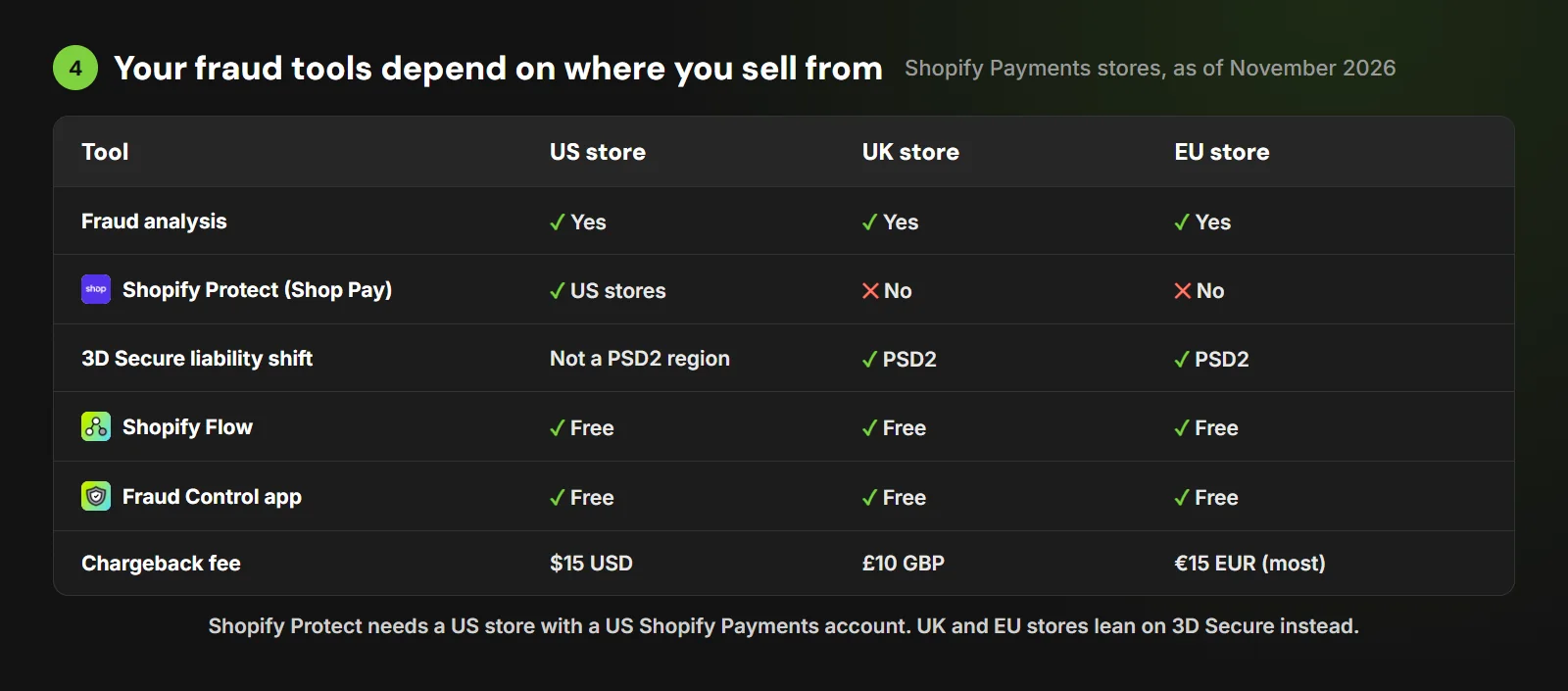
Your protection depends on where your store is based. This table covers Shopify Payments stores, as of November 2026.
| Tool | US store | UK store | EU store |
|---|---|---|---|
| Fraud analysis | Yes | Yes | Yes |
| Shopify Protect | Yes, Shop Pay | No | No |
| 3D Secure (PSD2) | Not a PSD2 region | Yes | Yes |
| Shopify Flow | Free | Free | Free |
| Chargeback fee | $15 USD | £10 GBP | €15 EUR (most) |
Some EU countries also allow a local currency fee, for example 150 SEK in Sweden. Ireland adds 23% VAT to the €15 fee.
Shopify Protect (US stores only)
Shopify Protect is free chargeback protection for orders paid with  Shop Pay. If a protected order gets a fraud or “unrecognized” chargeback, Shopify credits back the amount and the fee.
The rules are strict. Your store must be in the US, with a US Shopify Payments account. The order must hold only shipped physical items, fulfilled with tracking from a supported carrier within 7 days and in transit within 10. Changing the shipping address after checkout voids protection.
3D Secure for UK and EU stores
UK and EU stores can’t use Shopify Protect. Instead, Shopify Payments stores in PSD2 regions (the EEA and the UK) use 3D Secure. The buyer confirms the payment with their bank when the bank asks for it. Payments checked this way generally qualify for a liability shift. The card issuer, not you, then carries fraud chargebacks. But card companies can remove that shift if a store gets too many.
When a fraud app helps
For most small stores, fraud analysis plus one Flow workflow is enough. Shopify also makes a free app,  Fraud Control. It shows your high risk order rate and chargebacks. With Shopify Payments, it can block checkouts by email, IP address or address. On November 25, 2026, its listing showed 2.2 stars from 23 reviews, so test it first.
A paid third-party fraud app can make sense when:
- You sell items that are easy to resell, like electronics or designer goods.
- You get many flagged orders every week and can’t check them by hand.
- Your payment provider has fewer fraud tools than Shopify Payments.
- You need chargeback protection outside the US.
Fraud apps show their scores next to Shopify’s on each order. Read their terms, as cover and cost vary.
Common mistakes with fraudulent orders
- Shipping fast to beat the holiday rush. A late parcel costs a little goodwill. A fraud chargeback costs the product, the money and a fee.
- Ignoring medium risk. Medium risk orders are flagged too. Give them the same quick check.
- Changing the address without a second look. If a flagged buyer asks to ship somewhere new, check the order again. On a US store, a changed address also removes Shopify Protect.
- Bulk canceling refunded orders. Shopify warns this can refund twice. Cancel those one by one and choose Later.
- Using the “Order created” trigger. Your workflow can run before the risk level exists.
- Refunding to store credit. The real cardholder doesn’t get their money back, and the fraudster keeps a balance.
Watch for card testing too: bots try many stolen cards with small payments. If a wave of small flagged orders comes in, hold them all and cancel high risk orders before anything ships.
Which way should you handle a Shopify high risk order?
Match the method to your order volume:
- Few orders a day: check each flagged order by hand with the six steps. It is free and takes minutes.
- Busy season or many flags: add a Flow workflow that holds and tags high risk orders, so nothing ships by accident.
- Clear fraud waves: use the cancel template, and look at the canceled orders each morning.
- High-value goods or many chargebacks: add manual capture, and consider a fraud app.
Before peak season, test your setup. With Shopify Payments in test mode, place a test order using [email protected] as the email. It simulates a Shopify high risk order.
Frequently asked questions
Should I fulfill a Shopify high risk order?
Not before you check it. Read the fraud analysis, check the addresses and contact the customer. Ship only if they confirm and the details make sense. Otherwise cancel and refund.
How does Shopify fraud analysis work?
It looks at checks like AVS, CVV, location and device activity, then gives card orders a low, medium or high risk level. It learns from orders across all Shopify stores.
Is Shopify fraud analysis accurate?
It is a good warning system, but not perfect. Real buyers sometimes get flagged. For example, someone sending a gift has different billing and shipping addresses. That is why it pays to check an order before you cancel it.
Can Shopify automatically cancel high risk orders?
Yes, with the free Shopify Flow app. Use the Cancel high-risk orders template with the Order risk analyzed trigger. It cancels, refunds, restocks, tags and emails you.
What does a medium risk order mean on Shopify?
Some details look unusual, but not enough for a high flag. The order still gets a warning symbol. Check the indicators, and contact the customer if anything doesn’t add up.
Does Shopify have fraud protection?
Yes. Fraud analysis is built in for online card orders that Shopify can verify. US stores using Shop Pay also get Shopify Protect, which covers fraud chargebacks on orders that meet its rules. UK and EU stores rely on 3D Secure instead.
A five-minute check on each flagged order protects your money and your payment account. To see what fees and refunds really cost you, try my free Shopify fee calculator, or browse all my free Shopify tools. If you want help setting up fraud checks and Flow workflows, I do this in my Shopify store management service. Message me on WhatsApp and I will take a look.



