


Since June 19, 2026, every online store that sells to consumers in the EU needs a clear way for buyers to cancel a purchase online. Most pages that rank for the Shopify withdrawal button are app listings. You may not need an app at all. Shopify already has the parts built in: self-serve returns and cancellations, return and cancellation rules, and market-specific policies.
In this guide I show you how to set it up with those settings first, what still needs a check, and when an app makes sense. It is for store owners in Europe and for US and other non-EU sellers who ship to EU customers. I have set up returns and policies on many client stores, and this is the order I work in.
This is general information, not legal advice. The rule comes from Directive (EU) 2023/2673, and the EU’s Your Europe returns page explains the right of withdrawal in plain words. Check your final setup with a lawyer in your main EU market.
Here is what you will learn:
- What the EU withdrawal button is and who needs it
- How to set up a Shopify withdrawal button in 5 steps, without an app
- What your customer sees, from the link to the email
- Where the built-in setup has gaps, and when an app is the better choice
What is the EU withdrawal button?
The EU withdrawal button is a clearly labeled button or link that lets a customer cancel an online purchase from your store, without emailing you. It was added to the EU Consumer Rights Directive. EU countries had to apply it from June 19, 2026.
The right of withdrawal itself is not new. EU consumers can cancel most online purchases within 14 days of receiving the goods, without giving a reason. What changed is how they cancel. Now they must be able to do it through a “withdrawal function” on your site, as easily as they placed the order.
The law (Article 11a) asks for four things:
- A clear label. The function says “withdraw from contract here” or something equally clear. German law uses “Vertrag widerrufen”.
- Always available. It stays easy to find for the whole withdrawal period.
- Two steps. The customer gives their name, the order, and where to send the confirmation. Then they press a second button labeled “confirm withdrawal” or similar.
- A receipt on a durable medium. You send a confirmation, usually by email, with what they sent and the date and time.
Skipping it has a cost. Shopify’s Help Center lists legal warnings and fines of up to 4% of annual turnover in some member states. The 14-day cooling-off period can also stretch to 12 months and 14 days.
Does your Shopify store need a withdrawal button?
Yes, if you sell online to consumers in the EU. Shopify’s guidance says it applies to any business selling online to EU consumers, wherever the business is located. So a US store that ships to France or Germany is covered for those orders.
Some products are often exempt from the 14-day right of withdrawal:
- Custom or personalized goods, such as an engraved ring
- Perishable goods, such as fresh food
- Sealed hygiene goods, and sealed audio, video or software, once opened
- Digital content where the customer agreed to start the download and accepted losing the right
This is not the full list, so check yours with your advisor.
Managed Markets: if you sell to the EU through Shopify Managed Markets, Shopify applies compliant cancellation and return policies to those EU orders automatically. You still answer the requests and pay for returns, and product-level exemptions aren’t supported.
How to set up the Shopify withdrawal button without an app
The built-in Shopify withdrawal button is not one single button. It is a link to the customer account. There, each order has Cancel items or Return items actions. Your rules decide which items qualify and for how long. These 5 steps follow Shopify’s EU right of withdrawal setup guide, with my notes.
Step 1: Turn on self-serve returns and cancellations
Customers send requests from the new version of customer accounts. Legacy accounts don’t show return or cancel options, so switch to the new version first in Settings, then Customer accounts. On that page:
- No Order actions section (for example on the Starter plan): in Customer accounts, turn on Self-serve returns and cancellations, choose Return and cancel requests, and click Save.
- An Order actions section: click Manage, then the settings icon. Turn on both Return and Cancel, then click Save. On Advanced or Plus you can set this per market, so check each EU market.
You need both. Cancel covers the time before shipping, and Return covers the 14 days after delivery.
Step 2: Set your cancellation and return rules
Go to Settings, then Policies. In Return and cancellation rules, click your rule.
- In Cancellation rules, turn the rules on and choose Until item is fulfilled.
- In Return rules, turn the rules on and set Return window to 14 days or more.
- In Starting from, choose Delivery of last item in order.
- Tick Extend to account for weekends or holidays.
- Under Return shipping, choose who pays. You can charge EU customers for return postage only if you told them before they bought.
- Under Final sale items, add only truly exempt products, then click Save.
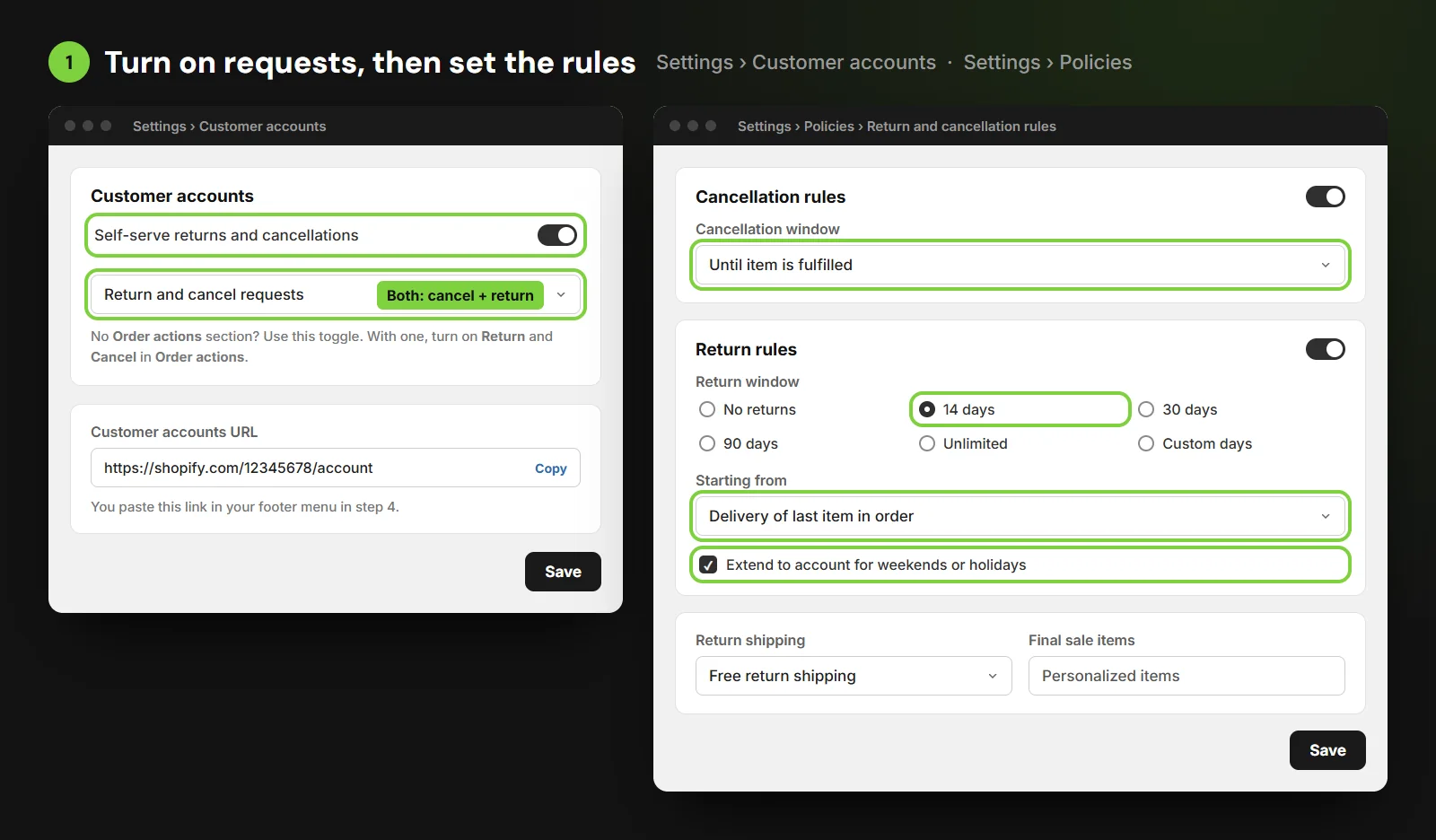
Rule changes only apply to future orders. Orders placed before you saved keep the old rules.
Step 3: Give EU markets their own rule (optional)
Selling worldwide with a shorter return window outside Europe? Keep your default rule and add one for the EU.
- In Return and cancellation rules, click Add rule.
- In Eligibility, click Add market and select your EU markets.
- Use the same settings as in Step 2, then click Save.
The rule follows the market the order was placed in, not where the customer lives. If your EU countries sit inside a larger “International” market, check where an EU order really lands.
Step 4: Add the Shopify withdrawal button link
The account icon in your header is easy to miss. The law wants a clearly labeled function, so add your own link:
- In Settings, then Customer accounts, copy the customer accounts URL. It looks like https://shopify.com/<store ID>/account.
- Go to Content, then Menus, and click Footer menu.
- Click Add menu item. In Name, type Withdraw from contract here, and translate it for each store language.
- In Link, paste the URL. Click Add, then Save.
In both Dawn and Horizon, open the theme editor, select the Footer section, and check that a Menu block uses your Footer menu. You can also show a different menu per market if you only want the link in the EU.
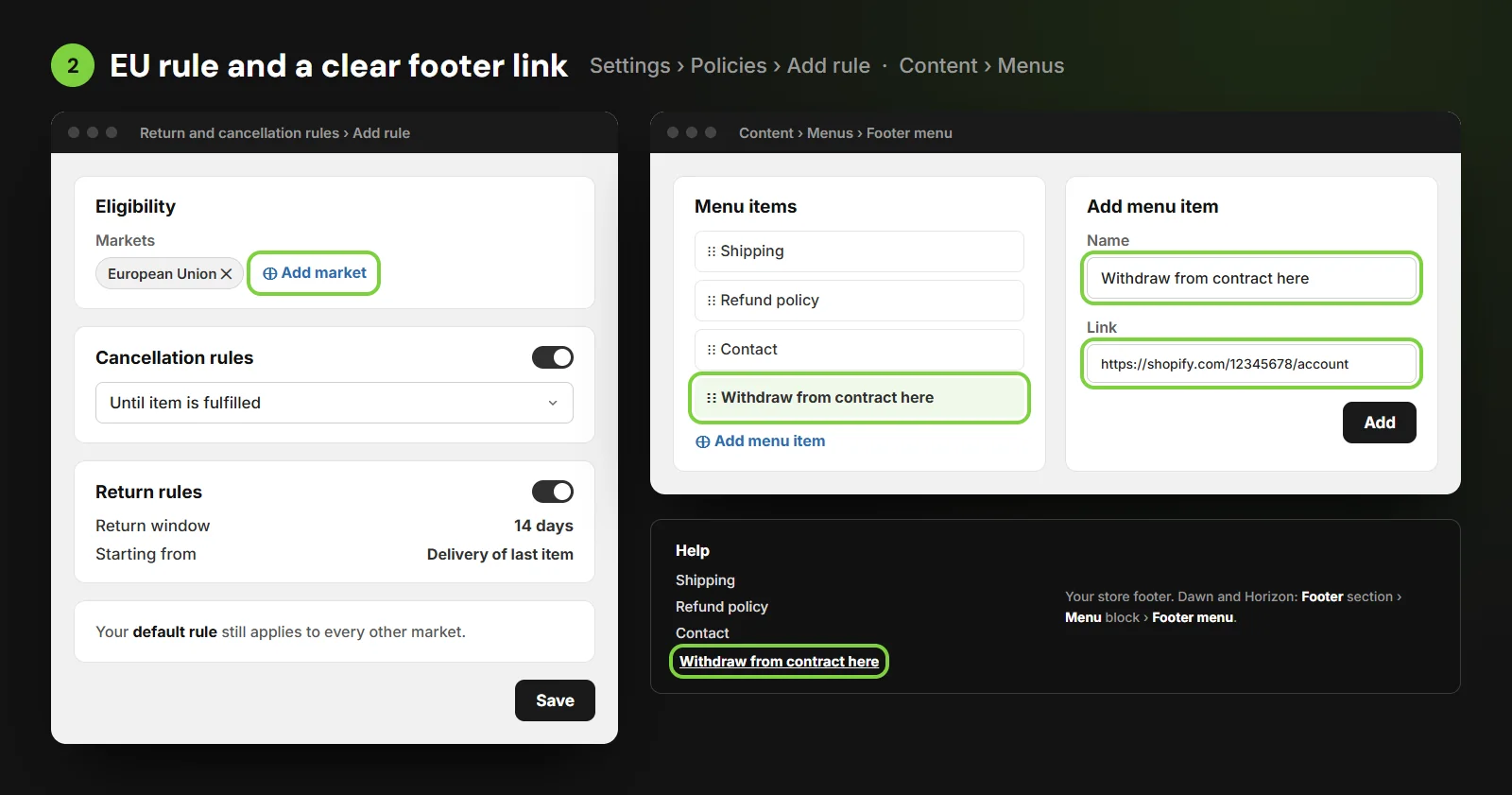
Step 5: Update your policy and test it
The directive also changed what you tell buyers before they order. Your information must now mention the withdrawal function and where to find it. Add a short section to your refund policy: how long the right of withdrawal lasts, who pays return shipping, which items are exempt, and where the link is.
No policy yet? My free Shopify Policy Generator writes a refund and return policy you can paste into Settings, then Policies. Edit it to match Step 2. Then place a test order with your own email and request a cancellation. Fulfill a second test order and request a return.
What your customer sees
Here is the built-in Shopify withdrawal button flow from the customer’s side:
- They click your footer link, or open the order from their confirmation email.
- To return or cancel, they sign in with their email and a 6-digit code. No password is needed.
- On the order status page, they click Cancel items, Return items or Cancel or return.
- They pick the items, choose a reason, and submit.
- They get an email confirming the request before you review it.
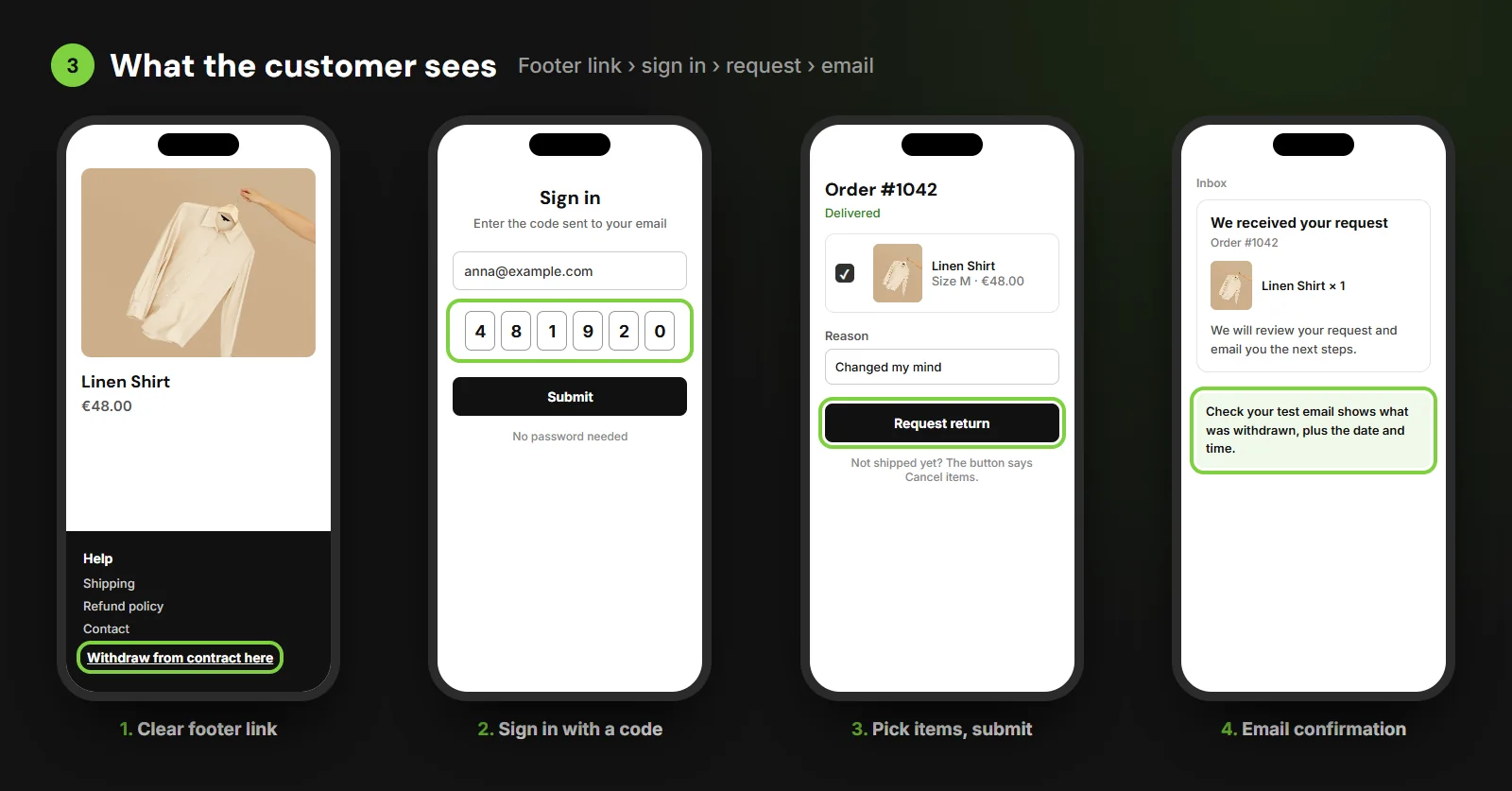
On your side, a cancellation request shows as a banner on the order. Click Remove items to refund it. A return request shows on a Return requested card. Requests don’t resolve themselves. Shopify notes that EU refunds are due within 14 days of the request. Use the Customer request filter on your Orders page every working day.
Built-in setup vs the law: what to check
Shopify says clearly that these tools don’t make your store compliant on their own. Here is how the built-in Shopify withdrawal button lines up with the EU rule, as of November 2026.
| Law asks for | Built-in Shopify | What to check |
|---|---|---|
| Clear label | Your footer link name | Account buttons say Cancel or Return |
| Always available | Footer link on every page | Menu is live in every EU market |
| Name and order details | Taken from the order | Sign-in step with a code |
| Confirm step | Submit button | Button wording |
| Email receipt | Request confirmation email | Shows items, date and time |
Three gaps come up most often:
- Wording. You choose the footer label, but the account buttons say Cancel or Return, not “confirm withdrawal”. Whether that is clear enough is a question for your lawyer.
- Sign-in. The directive doesn’t mention sign-in. Some advisors still prefer a form without one, because a code step adds friction.
- The receipt. Open your test email and check that it shows what was withdrawn and when. Return request emails are in Settings, then Notifications, then Returns.

When does an EU withdrawal button app make sense?
An app makes sense when your legal review asks for something the built-in flow can’t give. The Shopify App Store has many EU withdrawal button apps. Most add a form on its own page. I don’t recommend any one of them here. Match the features to a real need:
- A form with no sign-in, where the customer types the order number and email
- The exact wording “withdraw from contract here” and “confirm withdrawal” on every button
- A receipt with a request ID, date and time, plus a log you can export
- EU-only requests on a plan that can’t switch self-serve per market
- Services or digital products that don’t fit the return flow
Before you install one, check the price and the EU languages. Also check that it links to real Shopify orders and removes its code cleanly.
Built-in or app: which way should you use?
For most small and mid-size stores, I start with the built-in Shopify withdrawal button. It costs nothing, it uses Shopify’s own order data, and the requests land where you already work. Add an app only if your legal review points to a gap.
| Your situation | Best way |
|---|---|
| Physical goods, new customer accounts | Built-in setup |
| Non-EU store with some EU orders | Built-in + EU market rule |
| Selling through Managed Markets | Automatic EU policy |
| Lawyer wants a no-login form | App or custom form |
| Services or digital products | App or custom form |
Common mistakes with the right of withdrawal on Shopify
- Turning on only returns. Without Cancel, customers can’t withdraw before the order ships.
- Counting from the wrong day. Start the window from Delivery of last item in order, not the order date.
- Turning return rules off. With rules off, customers can request a return with no time limit. To stop returns in other markets, choose No returns in their rule instead.
- Making everything final sale. Marking normal products final sale blocks EU customers from a legal right.
- Hiding the link. A link buried in a FAQ is not “prominently displayed”. Put it in the footer, then mention it on your Shopify FAQ page too.
- Slow refunds. A request does not refund itself. Check new requests daily.
If you dropship, plan returns with your supplier too. My guide to dropshipping returns on Shopify covers return addresses and supplier claims. New stores can add this setup to the Shopify launch checklist.
Frequently asked questions
Is there a built-in Shopify withdrawal button?
Not as one dedicated button, as of November 2026. The built-in way is self-serve returns and cancellations in customer accounts, plus your return and cancellation rules. You add a clearly named footer link, such as “Withdraw from contract here”, to the customer account.
What is the EU withdrawal button?
It is a clearly labeled button or link that lets EU consumers cancel an online purchase from your store, with a two-step confirmation and an automatic email receipt. It has applied since June 19, 2026.
Does the EU withdrawal button law apply to stores outside the EU?
Yes. It applies to any business that sells online to consumers in the EU, wherever the business is based. A US or UK store needs it for its EU orders.
How long is the right of withdrawal?
For goods, 14 days from delivery. If the last day falls on a non-working day, it moves to the next working day. Without a proper withdrawal function, Shopify warns it can stretch to 12 months and 14 days.
Do I need an EU withdrawal button app on Shopify?
Not always. Many stores can use the built-in self-serve returns and cancellations. An app helps if you want a form without sign-in, exact legal wording on every button, or you sell services that don’t fit returns.
What happens if I don’t add a Shopify withdrawal button?
Shopify’s Help Center lists legal warnings, fines of up to 4% of annual turnover in some member states, and a withdrawal period that can extend to 12 months and 14 days.
A clear withdrawal link and fast refunds build trust with EU shoppers. For more guides like this, see my Shopify tips. If you would rather have it done for you, I set up return rules, policies and customer accounts as part of my Shopify store management service. Message me on WhatsApp and I will take a look.



