

A Shopify speed test shows how fast your store loads for shoppers, and what slows it down. Type your store address in the tool above, pick phone or desktop, and you get Google’s speed score, the Core Web Vitals and the top fixes. Each fix is explained in plain English, with what it usually means on a Shopify store.
Here is what you will learn:
- How to use the Shopify speed test and read each result
- What the score and the Core Web Vitals mean, with Google’s own limits
- Why your phone score is lower than your desktop score
- The most common Shopify speed problems and how to fix them
- What not to worry about, and the mistakes I see most often
How to use the Shopify speed test
- Type your store address, such as yourstore.com. You can also paste a full link to a product or collection page.
- Choose Phone or Desktop. Phone is the default, and it is the one to watch.
- Click Test speed. Google loads the page on its own servers, so the test usually takes 20 to 60 seconds, and up to 2 minutes for a heavy page.
- Read the score first, then the real visitor data, the lab numbers and the fixes. Run it 2 or 3 times, because scores move a little.
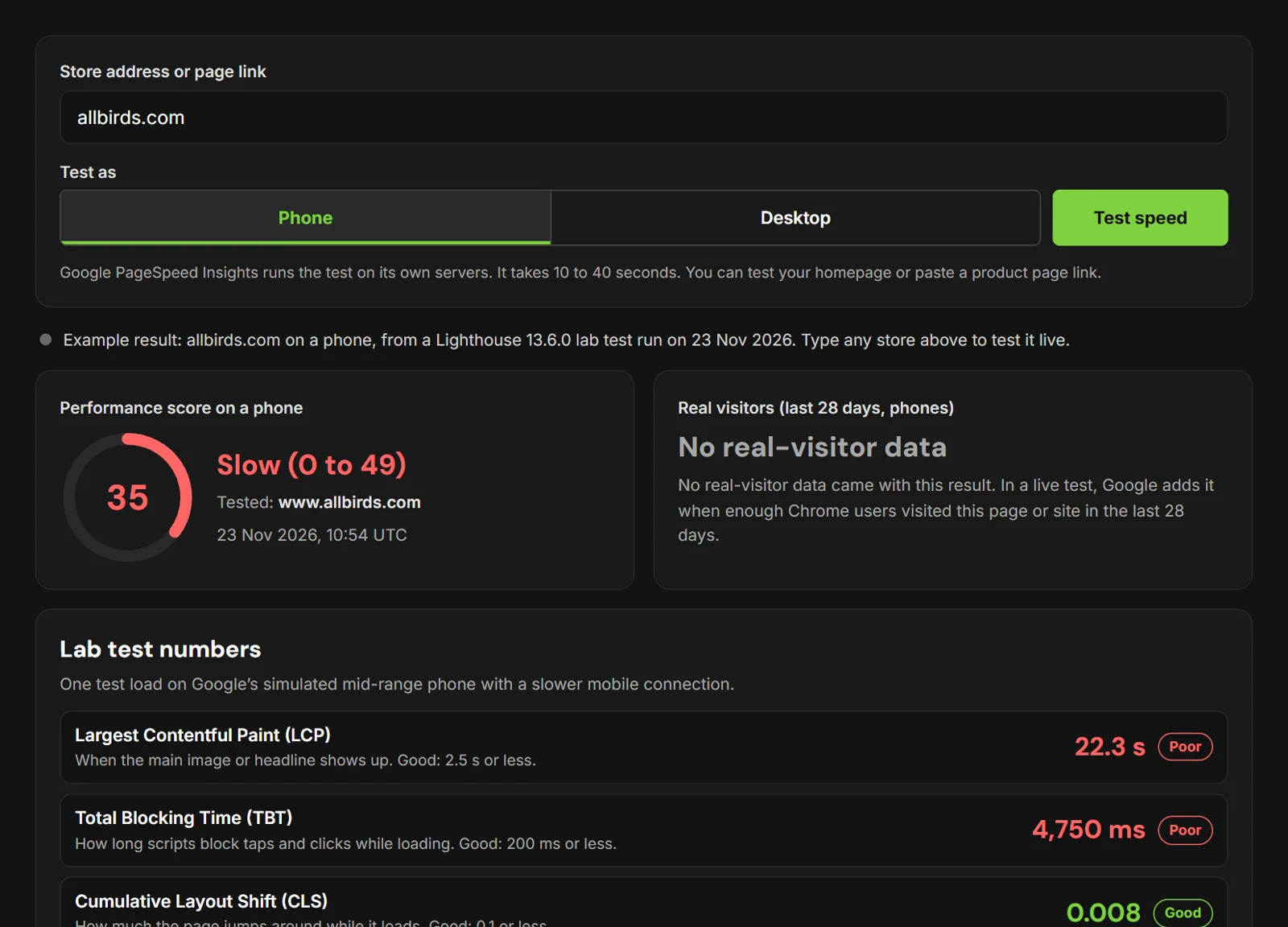
The tool uses Google PageSpeed Insights, the same engine as Google’s own speed page. When the page first loads, you see a real example result for Allbirds, a large Shopify brand, from a lab test I ran on 23 Nov 2026.
What the Shopify speed test measures
The big number is the performance score, from 0 to 100. Google loads the page once in a test browser, measures five things, and turns them into one score. Here is the formula in plain words: each of the five numbers gets its own score, and the final score is a weighted average of them. A Shopify speed test takes about half a minute, so run it while you read on.
| Lab number | What it shows | Weight |
|---|---|---|
| Total Blocking Time | Scripts blocking taps | 30% |
| Largest Contentful Paint | Main content shows | 25% |
| Cumulative Layout Shift | Page jumping around | 25% |
| First Contentful Paint | First thing shows | 10% |
| Speed Index | How fast the screen fills | 10% |
Google colours the score like this: 0 to 49 is red (poor), 50 to 89 is orange (needs work), and 90 to 100 is green (good).
Core Web Vitals in plain words
Core Web Vitals are three numbers Google uses to judge how a page feels to real people. Shopify’s own speed reports use the same three.
| Metric | Plain meaning | Good | Poor |
|---|---|---|---|
| LCP (loading) | When the main image or headline shows | 2.5 s or less | Over 4 s |
| INP (response) | How fast the page reacts to a tap | 200 ms or less | Over 500 ms |
| CLS (stability) | How much things jump while loading | 0.1 or less | Over 0.25 |
Anything between good and poor counts as “needs improvement”. Google checks these at the 75th percentile. That means 3 out of 4 visits must be as fast as the limit or faster.
The other lab numbers
- First Contentful Paint (FCP) is when the first text or image appears. On a phone, 1.8 seconds or less is good.
- Total Blocking Time (TBT) adds up the time scripts keep the page too busy to respond. On a phone, 200 ms or less is good. A lab test can’t tap the page, so TBT stands in for INP.
- Speed Index shows how fast the visible part of the screen fills in. On a phone, 3.4 seconds or less is good.
Why a Shopify speed test scores phones lower
Almost every store scores lower on a phone, and that is normal. For the phone test, Google loads your page on a simulated mid-range phone with a slower mobile connection. That phone has a much weaker processor than a laptop. Every script from every app has to run on that small processor, so heavy pages suffer most. Run the Shopify store speed test on your home page first, then on one product page. Save the result of each Shopify speed test so you can compare later.
The desktop test uses a fast computer, but its limits are stricter. A good desktop LCP is 1.2 seconds, not 2.5. So when a Shopify speed check shows 40 on a phone and 75 on desktop, nothing is broken.
Which one matters more? Check your own traffic in Shopify’s Sessions by device type report. On most stores I have worked on, phones bring most of the visits. If that is true for you, fix the phone score first.
Lab data vs field data
The Shopify speed test shows two kinds of data, and they answer different questions. A quick Shopify speed check after every new app is the easiest habit to keep.
- Lab data comes from one test load on Google’s servers. It is great for finding problems, but it is still one load on one simulated phone.
- Field data comes from real Chrome users who visited the page over the last 28 days. It shows in the Real visitors card.
If your Shopify speed test shows no field data, don’t worry. New and small stores often have none, because Google needs enough visits first. If one page has too few visits, Google may show data for the whole site instead, and the tool tells you when that happens.
Shopify has its own field data too. The speed summary sits on the Online Store > Themes page, and the full reports live in Analytics > Reports. Shopify explains them in its guide to web performance reports. That page says the data can be up to 36 hours behind and covers the last 90 days. Shopify collects it from Chromium browsers and Firefox, while PageSpeed Insights uses Chrome users only, so the two never match exactly.
How to read your results
Here is how to read a Shopify speed check, top to bottom. Repeat the Shopify speed test two or three times and look at the middle score. A Shopify store speed test on a slow phone network shows the worst case your buyers see.
- The score ring. Red, orange or green shows where you stand.
- Real visitors. If you see “Passes Core Web Vitals”, real shoppers get a good experience, even if the lab score looks low.
- Lab test numbers. Each one gets a tag (Good, Needs work or Poor) and the good limit for your device.
- What slows this page down. Google’s top findings, biggest first, with a Shopify explanation for each.
- Outside scripts. The apps, tags and widgets from other companies, sorted by how much work they cause.
- Shopify store? A check that the page loads Shopify files, so the tips apply.
Common Shopify speed problems and fixes
Shopify’s own help pages name the three biggest factors: your theme, your apps, and any extra code you added, such as tag managers. That matches what I see in a Shopify store speed test almost every time. Do a Shopify store speed test again after each fix, so you know which change helped.
Too many apps and app embeds
Many apps load code on every page, even pages where the app does nothing. In a Shopify speed test, this shows up as “too much JavaScript” and “scripts keep the phone busy”.
- Remove apps you no longer use. Shopify warns that uninstalling an app does not always remove its code from your theme, so check with the app developer.
- Open the theme editor and look at App embeds. Turn off any embed you don’t need.
Tracking scripts and tag managers
Pixels and tags pile up. In the Allbirds example, Google Tag Manager alone caused 759 ms of script work and 1.2 MB of downloads. Go through your tag manager and remove old tags, test tags and duplicates. If your Meta pixel seems broken after a cleanup, my guide to the Shopify Meta pixel not working will help you check it.
Images
Shopify already does a lot here. It serves images from a fast global network, often in WebP format, and turns GIFs into animated WebP. It resizes images too, but only to the width your theme asks for. Problems start when images skip the theme, for example inside custom HTML, a page builder or an app block.
- Use the theme’s own image sections where you can.
- Shopify accepts images up to 5000 x 5000 px. Upload big enough to look sharp, but crop out empty space.
- Use fewer slides. A slideshow at the top is often the slowest part of the page.
Theme choice
An old or heavy theme can hold back everything else. Shopify says its Horizon family and Online Store 2.0 themes are free and built for speed. It also warns that animations and lots of sections on one page can slow things down. If your theme is very old, compare a fresh free theme in a Shopify speed check before you decide. My Dawn vs Horizon comparison helps you pick one, and my guide on how to change your Shopify theme walks you through the switch. If you stay on Dawn or Horizon, keep it current with my theme updates tracker.
Fonts
Each font and each weight is another file. Fonts from the theme font picker are usually fine. Extra fonts uploaded by hand or added by apps cause “text waits for fonts” findings. Use one or two fonts and only the weights you need.
Video
An autoplay video at the top of the homepage is heavy. Move it lower, use a still image on phones, or show a play button instead.
Things that jump around
Pop-ups, announcement bars, review stars and app blocks that load late push content down. That hurts CLS and makes shoppers tap the wrong thing. Give them a set height, or move them lower.

What not to obsess over
A Shopify speed test is a guide, not an exam. Skip these worries: Book a Shopify speed check on your calendar once a month.
- A perfect 100. Google says a 100 is very hard to reach and not expected. Going from 99 to 100 takes about as much work as going from 90 to 94.
- Things Shopify already handles. Shopify sets browser caching to one year for its own files, compresses and minifies files, and runs a global network. Tips about servers, compression or adding a network don’t apply to you.
- Small swings. A score that moves from 52 to 58 between runs is normal.
- Apps that promise a higher score. A speed app is still another app. Check what it really changes before you install it.
Worked example: Allbirds on a phone
I ran a Shopify store speed test lab check on allbirds.com on 23 Nov 2026, with Lighthouse 13.6.0, the engine behind PageSpeed Insights. Here is the phone result: A Shopify speed check on a phone is the one that matters most for sales.
| Number | Result | Tag |
|---|---|---|
| Performance score | 35 | Poor |
| Largest Contentful Paint | 22.3 s | Poor |
| Total Blocking Time | 4,750 ms | Poor |
| Cumulative Layout Shift | 0.008 | Good |
| First Contentful Paint | 1.4 s | Good |
| Speed Index | 12.6 s | Poor |
How to read it: the first content shows fast, at 1.4 seconds, and nothing jumps around. But the main content arrives very late, and scripts block the phone for almost 5 seconds. The top finding is “scripts keep the phone busy”, and the tool found 15 outside scripts. Google Tag Manager, Microsoft Clarity and Facebook sit near the top. So the main fix here is not the theme. It is fewer and lighter scripts.
The desktop test of the same page scored 49. That is better, but still in the red, for the same reason.
For comparison, Shopify’s Dawn demo store scored 86 on a phone in the same Shopify speed test setup that day. Its only outside script entry was Shopify itself, and its blocking time was 180 ms.
One more lesson: Allbirds is a large, busy brand, and it still scores 35 in the lab. A low score does not mean no sales. If your store gets visits but no orders, speed is only one of the checks in my guide to Shopify traffic but no sales.
Common mistakes
- Testing once. Run the Shopify speed test 2 or 3 times and look at the middle result.
- Only testing the homepage. Shoppers often land on product pages from ads. Test your best-selling product page too.
- Testing a store with a password. A Shopify speed test only sees the password page, not your shop.
- Changing many things at once. Make one change, then run a Shopify speed check again, so you know what helped.
- Ignoring field data. If real visitors pass Core Web Vitals, a red lab score is less urgent.
- Pasting code without testing. If you add snippets from my Shopify code snippets page or anywhere else, run the test before and after.