

This free Shopify product description generator turns the facts you already know about a product into a finished description. You type the name, who it is for, a few features and the specs. It gives you three layouts in clean HTML to paste into Shopify, plus an SEO title and a meta description.
It does not use AI. It uses fixed sentence templates and your own words, so it never makes up a size, a material or a claim. What you type is what the shopper reads, just arranged so it is easy to scan.
Here is what you will learn:
- How to use the generator in about five minutes
- The simple formula behind every description it builds
- Two worked examples, plus quick examples for five more product types
- Which layout to pick, and how to paste the HTML into Shopify
- The mistakes that make any description weaker
How to use the Shopify product description generator
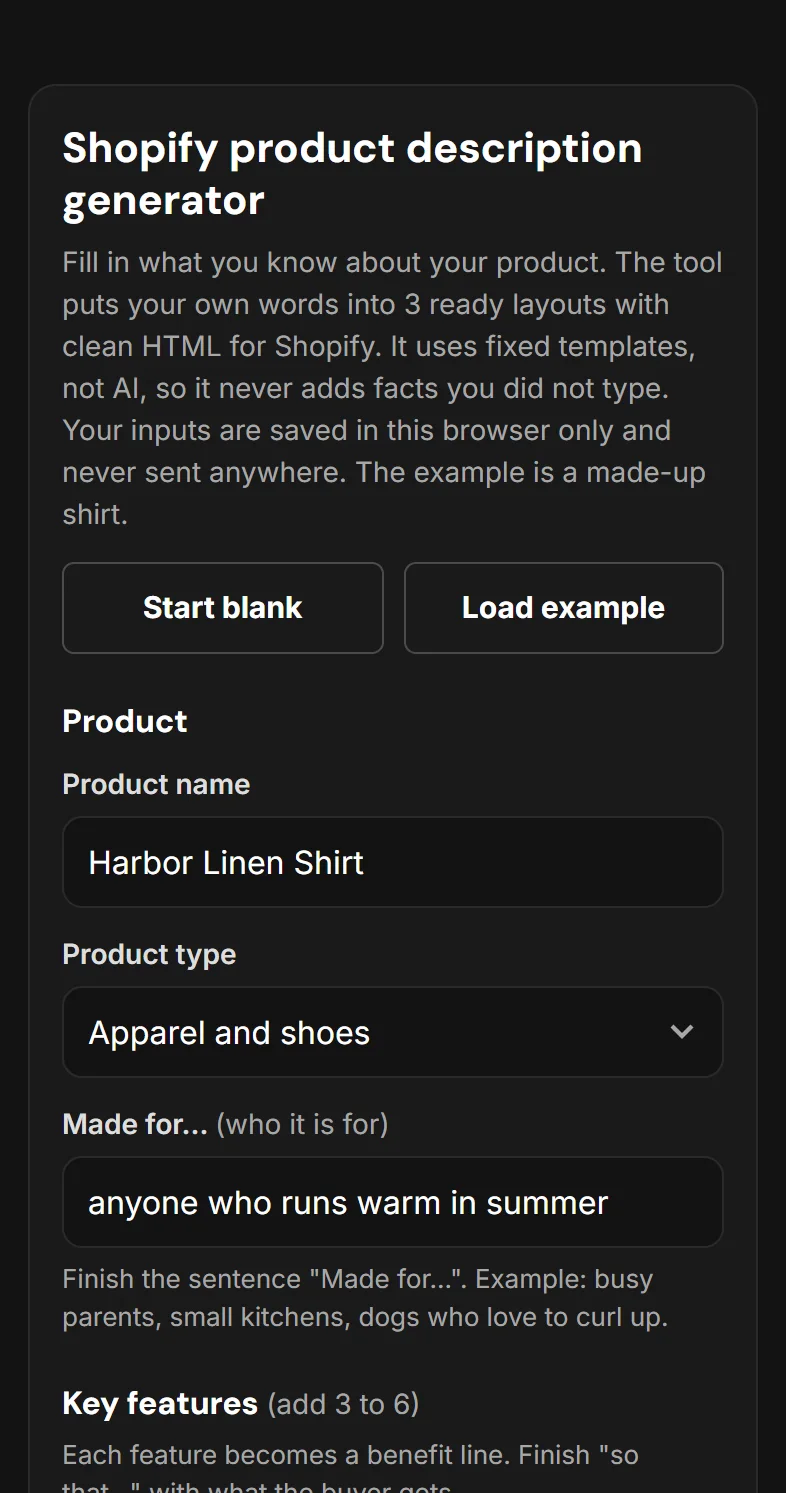
The Shopify product description generator opens with a made-up linen shirt so you can see how it works. Click Start blank to clear it, or type over it.

- Add the product name and type. The type changes the headings and hints. Beauty shows How to use, and food shows Storage.
- Finish the line “Made for…”. Name the buyer: busy parents, small kitchens, dogs who love to curl up.
- Add 3 to 6 key features. Next to each one, finish “so that…” with what the buyer gets.
- Fill in the specs. One row per fact, such as Material and 100% linen.
- Add the extras. Size and fit, care, what’s in the box and a shipping line. Leave one empty and that section disappears.
- Pick a tone and a layout, then click Copy HTML for Shopify or Copy text for anywhere else.
Don’t like a phrase? Click Shuffle wording. It moves through six sets of phrasing in a fixed order, so the same set always gives the same text. Your facts never change, only the words around them.
This free product description generator runs in your browser. Your inputs are saved there, so you can close the tab and come back later. Nothing is sent to a server.
A free product description generator with no AI
Most tools sold as a product description maker send your words to an AI model. That is fast, but AI fills gaps with guesses. Shopify’s own help center warns that its built-in writer can include “product benefits even when you didn’t list any explicitly”.
This free product description generator works the other way. It is a template engine. Every sentence is a fixed frame with a slot for your words, like “[feature], which means [benefit].” If you leave a field empty, the sentence that needs it is left out.
| Question | This generator | AI writers |
|---|---|---|
| Where do facts come from? | Only your inputs | Your prompt plus guesses |
| Can it add claims? | No | Yes, check every line |
| Output | Fixed layouts in clean HTML | Free-form text |
| Best for | Accurate, consistent pages | First drafts and new ideas |
The trade-off is real. A template can’t think of a clever angle for you. If you want an AI first draft, Shopify’s automatic product descriptions feature works inside the product editor on a desktop. Check its facts, then put them through the Shopify product description generator for a clean layout.
The product description formula in plain words
Any product description maker is only as good as its formula. Every layout the Shopify product description generator builds follows this one:
Description = who it is for + features turned into benefits + the facts + shipping.
- Who it is for. One opening line names the buyer, so the right person thinks “that’s me”.
- Feature and benefit lines. A feature is what the product has. A benefit is what the buyer gets. The tool joins them with “so”, “so that” or “which means”.
- The facts. Specs, size, care and box contents, in a table or a short list.
- Shipping and returns. One short line that answers “when will it arrive?”
The benefit line is the part that sells. “Pre-washed fabric” is a fact. “Pre-washed fabric, so it feels soft from the first wear” tells the shopper why it matters. If you only fill in one thing well, make it the “so that…” boxes.
This is the short version. My full guide on how to write Shopify product descriptions that sell covers the 7-part method, length, tone and SEO in depth.
Worked example 1: a linen shirt in the Shopify product description generator
These are the sample inputs in the Shopify product description generator. The shirt is made up.
- Name: Harbor Linen Shirt. Made for: anyone who runs warm in summer.
- Features: 100% European linen, relaxed fit with a straight hem, pre-washed fabric, each with a “so that…” line.
- Specs, size and fit, care, box contents and a shipping line.
With the friendly tone and the Bullets + specs layout, the intro reads: “Meet Harbor Linen Shirt, made for anyone who runs warm in summer. It is an easy pick for your wardrobe.” Then come three benefit bullets:
- 100% European linen, which means it stays cool and breathable on hot days.
- Relaxed fit with a straight hem, so that you can wear it tucked or untucked.
- Pre-washed fabric, so it feels soft from the first wear.
Below that sit a specs table and short sections for size and fit, care and what’s in the box. The full description is 118 words, with a reading ease score of 91 out of 100 (very easy).
The SEO title is “Harbor Linen Shirt: 100% European linen”, which is 39 characters. The meta description is 138 characters. Adding the shipping line would have taken it to 190, so the tool left that part out to stay under 155.
Worked example 2: a vitamin C serum (beauty)
This made-up serum uses the premium tone. It is “made for anyone with dry, dull-looking skin”, with three features, two specs and a How to use line. The intro becomes “Daily Glow Vitamin C Serum, designed for anyone with dry, dull-looking skin. Every detail is listed below.” The bullets sit under a Key features heading:
- Lightweight gel texture, which means it sinks in fast and sits well under makeup.
- Vitamin C and hyaluronic acid, so that skin looks brighter and feels softer.
- Fragrance-free formula, which means there is no added scent.
The result is 101 words with a reading ease of 78, which is fairly easy. The SEO title is 51 characters and the meta description is 141.
Look at the second benefit. “Skin looks brighter” describes how skin looks. “Treats acne” would be a drug claim. In the US, the FDA decides if a product is a cosmetic or a drug by its intended use, and selling a cosmetic with a drug claim can break the law. The beauty type shows that warning. The tool also flags words like “cure”, “heals” and “anti-aging” in any field.
Quick examples for other product types
Each type changes the headings and hints. Here is one line per type, exactly as the Shopify product description generator writes it.
Home decor
“Hand-glazed ceramic base, which means every lamp looks a little different.” The size field is called Size, for dimensions like “45 cm tall”.
Jewelry
“Freshwater pearls, which means each pair is slightly unique.” Put drop length or ring size in Size and fit.
Electronics and gadgets
“10,000 mAh battery, which means you can top up your phone on the go.” The size field becomes Size and compatibility.
Pet products
With the playful tone: “Good news for dogs who love to curl up: meet Cozy Den Dog Bed.” Then: “Raised bolster edges, which means your dog has a place to rest its head.”
Food and supplements
“Single-scoop serving, which means it mixes into water or a smoothie in seconds.” Care becomes Storage, and this type always shows a health claims warning. In the US, a supplement can’t claim to diagnose, treat, cure or prevent a disease. Claims about how it affects the body also need an FDA disclaimer.
Anything else fits the Other (general) type, with plain headings like Details, Size and Care.
Which layout should you use?
The free product description generator gives you three layouts from the same inputs.
| Layout | Shape | Best for |
|---|---|---|
| Bullets + specs | Intro, bullets, specs table, short sections | Most products |
| Story | Short paragraphs, specs list, closing line | Gifts and brand-led items |
| Minimal | One line, bullets, one table | Simple or low-price items |
For the sample shirt, Minimal is the shortest at 96 words. Story is the longest at 123, because it turns the bullets into sentences and adds a closing line. If you are not sure, start with Bullets + specs. It is the easiest to scan on a phone.
SEO title and meta description from the same inputs
The Shopify product description generator also writes a search title and a meta description, with live character counts.
- SEO title: the product name plus your first feature, kept to 60 characters. If that is too long, it tries the name plus the buyer. If even the name is over 60, the count turns red.
- Meta description: an opening line, up to three features and the shipping line, but only the parts that fit in 155 characters. It drops whole parts that don’t fit.
Shopify’s SEO help suggests page titles of 60 characters or fewer, and about 160 characters for a meta description. I use 155 to leave some room.
To see how both look in search results, paste them into my meta description length checker. Then add them in the product’s Search engine listing section.
How to paste the HTML into Shopify
Once the Shopify product description generator shows a version you like, click Copy HTML. Then:
- From your Shopify admin, go to Products and open the product.
- In the Description box, click the Show HTML button. It looks like <>.
- Select everything in the box and paste the HTML over it.
- Click the same button again to go back to the normal view and check it.
- Click Save.
The HTML uses only headings, paragraphs, lists and a simple table, with no inline styles, so your theme styles it. For clothing, add a size chart from my Shopify size chart generator.
Mistakes to avoid with any product description maker
A product description maker saves time, but it can’t fix weak inputs. These are the mistakes I see most on client stores.
Leaving the “so that…” boxes empty
The Shopify product description generator still works with features alone, but you get a list of facts with no reason to care.
Typing claims you can’t prove
A template repeats whatever you type, true or not. The US FTC says ads must be truthful, and health claims need competent and reliable scientific evidence. Even a free product description generator can’t check your facts, so only type what you can prove.
Pasting the supplier’s text into the boxes
Supplier text often sits on hundreds of stores. Shopify’s help center says resellers shouldn’t copy the maker’s exact description, because your own words help the page stay unique to search engines. Take the facts, then write the “so that…” lines in the Shopify product description generator yourself.
Skipping the questions that stop a sale
Size, care and delivery time often come up before someone buys. If customers keep emailing the same question, add the answer to the description or to a Shopify FAQ page. If you get visits but few orders, my guide on Shopify traffic but no sales covers other causes.