

A customer emails you a receipt, but you can’t find the sale. Or  ShipStation shows nothing to ship. A Shopify order not showing is scary, but the sale is rarely lost. In most cases a filter, a status or an app rule is hiding it.
In this guide I show you where missing orders hide and how to get them back in view. I have fixed this on many client stores, and these are the checks I run, in this order. App rules are as of November 2026.
Here is what you will learn:
- How to find any order in your admin in under a minute
- Why orders hide in the Orders list: views, archiving, holds and payment status
- How to fix orders not showing up in the Shopify app on your phone
- What to do about an order not showing in ShipStation or
 Royal Mail Click and Drop
- Why new order emails stop arriving, and how to test them
 Royal Mail Click and Drop
Shopify order not showing? Start with this quick check
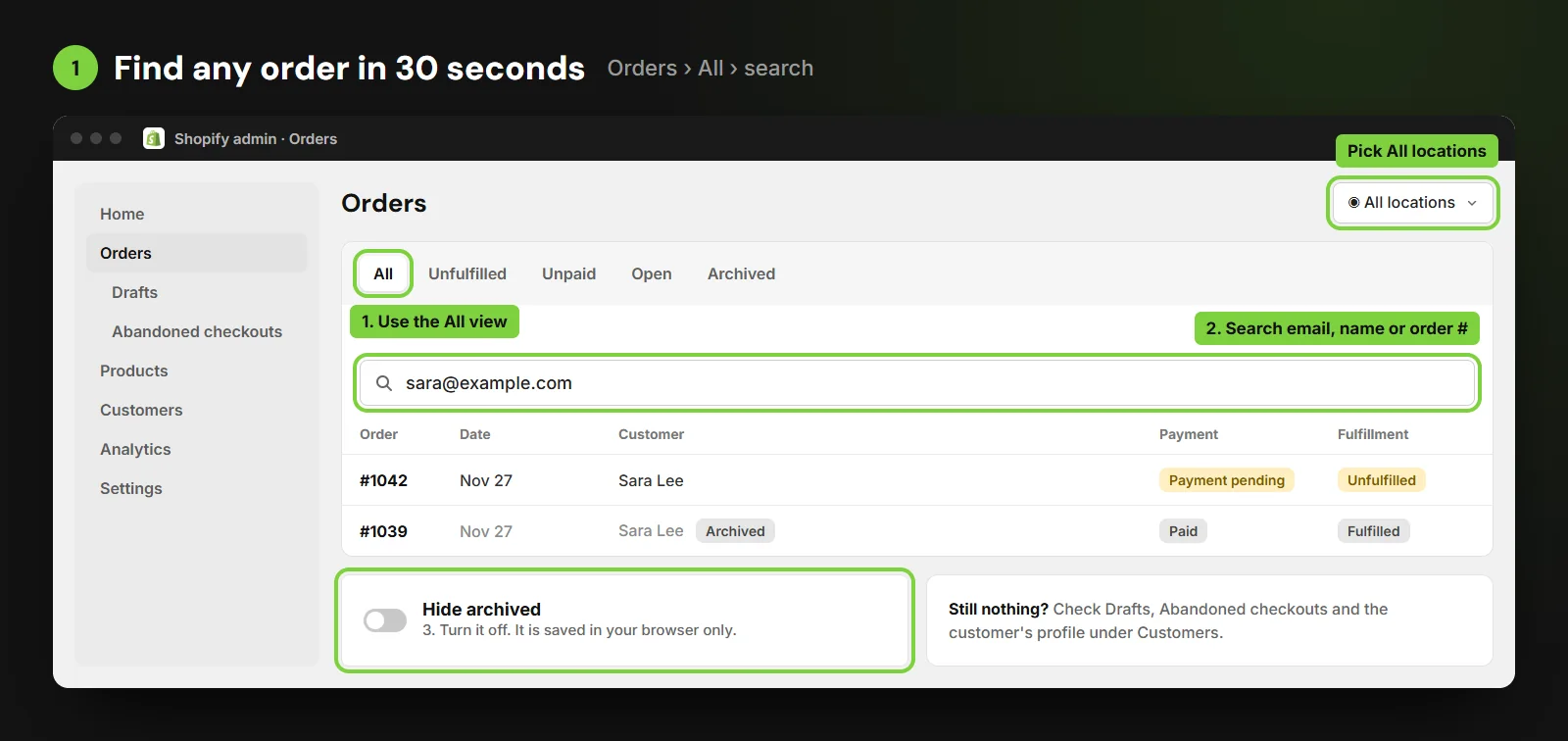
When you have a Shopify order not showing, first search for it on the All view. That view has no saved filters. With the checks below, it shows every order your store has. Most “missing” orders turn up in this one step.
- In your Shopify admin, go to Orders.
- Click the All tab at the top of the list.
- Check the location selector. It must say All locations.
- In the search bar, type the order number, the customer’s email or their name.
- If Hide archived is on, turn it off and search again.
Shopify’s help page on filtering orders lists every filter you can use. Search by email works well because each customer profile has only one email.
Shopify orders not showing up: causes table
Use this table to match what you see with the likely cause. Each row has its own section below.
| What you see | Likely cause | Quick fix |
|---|---|---|
| Order missing from a tab | Saved view or filter | Use the All view |
| Old order gone | Archived | Turn off Hide archived |
| Few orders at one shop | Location selector | Pick All locations |
| “Order” not in the list | Draft or abandoned checkout | Check Drafts and Abandoned checkouts |
| Not in Unfulfilled | On hold | Check the hold reason |
| Orders not showing up in the app | App session or wrong store | Log out and back in |
| Order not showing in ShipStation | Import rules | Search all statuses, refresh |
| No new order email | Staff notification setup | Send a test notification |
How to find any order in your Shopify admin
If the quick check fails, look in three more places. Together they tell you whether a Shopify order not showing in your list exists at all.
Search the customer profile
Go to Customers and search the customer’s email. Shopify creates a profile when someone places an order, and also when they abandon a checkout. So a profile with no orders usually means the checkout never finished. If the customer has two profiles with different emails, the order may sit on the other one.
Search with the payment ID
If the customer sends a bank or card receipt, ask for the payment reference. In the Orders search bar, type payment_id: and the ID. Shopify matches it when your payment provider records that ID.
Check your payment provider
If no payment exists there either, no order was placed. If the provider shows a payment but Shopify has no order, contact Shopify Support with the time, the customer’s email and the payment reference.
Shopify order not showing in the Orders list
An order that exists can still drop out of the view you use every day. These are the usual reasons for a Shopify order not showing in the list.
A saved view or filter hides it
Every tab on the Orders page is a saved view with its own filters. The Unfulfilled view, for example, only shows open orders that still need shipping. A filter on date, channel or tag can quietly hide orders too. Use the All view when you are hunting, because it has no saved filters and can’t be changed or deleted.
The location selector is separate from views. If someone picked one location, that choice applies to every view, so orders from other locations seem to vanish.
The order was archived
By default, Shopify archives orders that are paid and fulfilled, and orders that are fully refunded. Archived orders move to their own view. On the All view, a Hide archived setting can also hide them. It is saved in your browser, so a colleague may see orders that you don’t.
You can change automatic archiving in Settings, then General, in the Order processing section. To bring orders back, select them and use the unarchive bulk action.
It is a draft order, not an order yet
Phone and invoice sales start as draft orders, which sit under Drafts. A draft becomes a real order only once it is paid or marked as paid. Shopify deletes drafts created on or after April 1, 2025 after 1 year without any edits.
It is an abandoned checkout
Abandoned checkouts are not orders. Shopify counts a checkout as abandoned when it stays unfinished for more than ten minutes after the customer enters an email. Find them under Orders, then Abandoned checkouts. If Shopify Payments blocked a risky payment, that attempt shows in the Blocked view there. Shopify deletes abandoned checkouts after three months. If recovery emails stopped too, see my guide on abandoned cart emails not sending.
Payment is pending or authorized
These orders do exist, so search the Unpaid view. Payment pending appears with some non-card payment methods, cash on delivery, payment due later, or when Shopify Payments setup wasn’t finished. Authorized appears only if you capture payments manually. The order is created and stock is reserved, but you must capture before the authorization expires.
A fraud check or a hold stops it
Orders On hold are left out of the Unfulfilled view. Some holds come from Shopify or apps. A sales channel can hold an order for 5 minutes to 24 hours for a fraud check. An upsell app holds it for up to one hour. Orders flagged by fraud analysis show an icon next to the order number. For those, follow my high risk order guide before you ship.
One more: if you haven’t chosen how to handle international orders with Managed Markets, they wait under Awaiting order acceptance. Shopify cancels them if you don’t decide within 7 days.

Orders not showing up in the Shopify app
Orders not showing up on your phone, but visible on a computer? Then the problem is the app, not the order.
- Check the store. If you run more than one store, make sure the app is open on the right one.
- Update the app. Old versions can cause problems.
- Reset the session. On iPhone, open your phone’s Settings, tap Shopify and turn on Remove all sessions on next launch. On Android, tap Clear data and Clear cache for the Shopify app.
- Log out and back in. This often clears a stale list.
- Check staff permissions. A staff account needs the View permission under Orders to see orders at all.
Also check the Shopify Status page for outages.
Shopify order not showing in ShipStation
An order not showing in ShipStation usually imported with a different status, or it breaks one of the import rules. Here are ShipStation’s rules from its Shopify integration guide, as of November 2026:
- The order was created within the last 90 days.
- It has at least one physical product. In Shopify, the product needs This is a physical product ticked.
- It has a ship-to address.
- It is not a draft order.
- It is not closed or archived, unless you turn on Import Closed Orders.
Steps to fix an order not showing in ShipStation
- Search every status. Click Advanced Search, set Order Status to (Any) and search the order number. Pending orders land in Awaiting Payment, and holds land in On Hold.
- Import now. Automatic imports can be two hours apart, so click the import button for your store.
- Check the store connection. If the store shows an error, reconnect it from the current ShipStation layout, not the Legacy one.
- Check Shop Pay orders. ShipStation suggests turning on Map Voided and Pending Payment as Awaiting Payment if you use Shop Pay. Without it, some Shop Pay orders import as Cancelled.
- Check auto-fulfillment. If Shopify fulfills orders automatically, they are fulfilled and archived at once, so ShipStation skips them.
 Shop Pay. Without it, some Shop Pay orders import as Cancelled.
Two more surprises. A refunded Shopify order can still import unless you also cancel it. And orders with several fulfillments in Shopify can show up as several orders in ShipStation.

Shopify order not showing in Click and Drop and other apps
Royal Mail’s Click and Drop app is stricter. Its Shopify guide says it imports only orders that are Paid, Unfulfilled and no older than 7 days. Partially fulfilled orders need a box ticked in your integration settings. New orders arrive about every 15 to 30 minutes, so wait half an hour before you worry. My Shopify Royal Mail guide covers the full setup.
For any other shipping, print or fulfillment app, check these points:
- Payment status. Many apps skip unpaid, pending or authorized orders.
- Fulfillment status. Fulfilled and archived orders are usually skipped.
- Location. Some apps work with one location only. Click and Drop, for example, supports one store location.
- Tags. If the app filters by order tag, a missing tag means no import.
- Order age. By default, Shopify apps can read only orders from the last 60 days. Older orders need extra access that the app must request.
Orders handled by a third-party fulfillment service may not import either. Check the app’s own settings before you reconnect anything.
New order emails not arriving
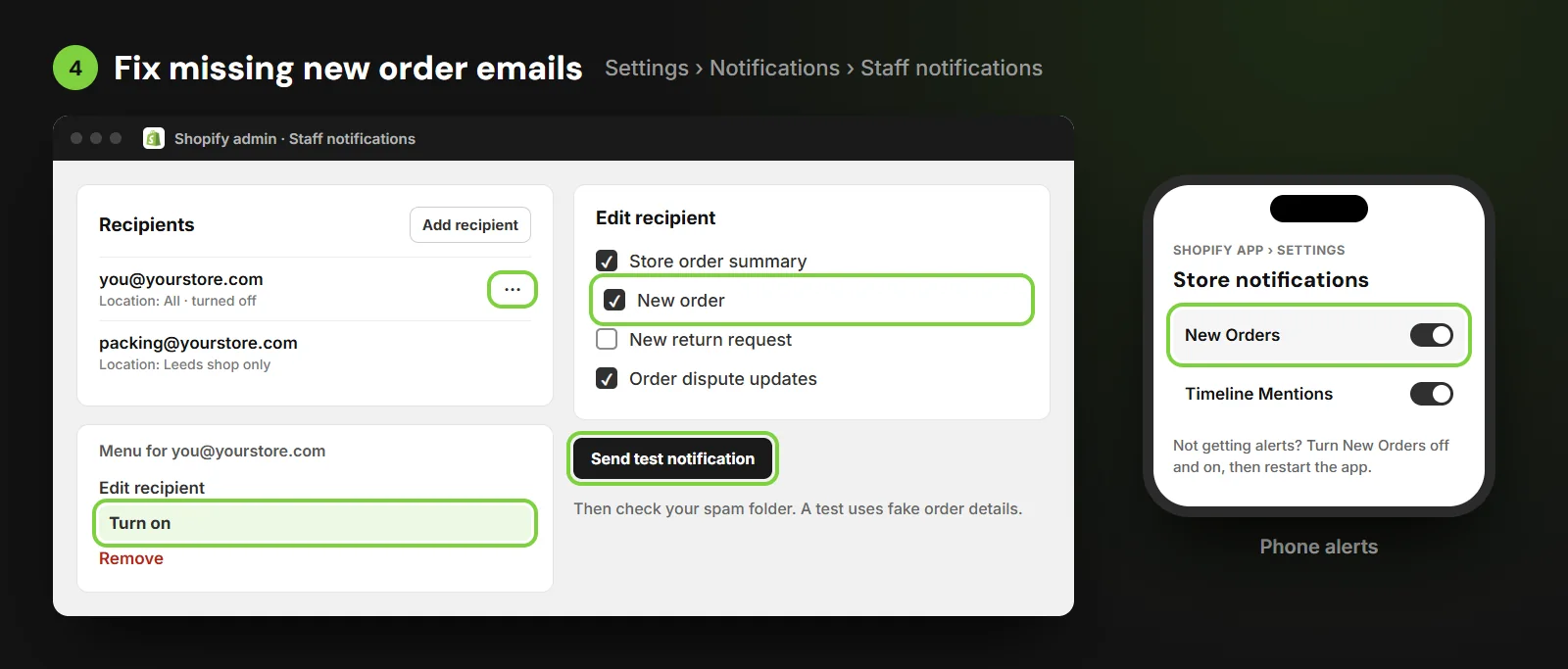
Sometimes the order is fine, and only the alert is missing. Staff emails come from Settings, then Notifications, then Staff notifications.
- Under Recipients, check that your email is listed. If not, click Add recipient.
- Click the … menu next to it. If it says Turn on, the alerts are off.
- Click Edit recipient and make sure New order is selected.
- If you use POS, check the location. A recipient set to one location only gets that location’s orders.
- Click Send test notification, then check your spam folder.
For phone alerts, open the Shopify app settings and tap Store notifications. On iPhone, turn New Orders off and on again, then restart the app. If customers say their receipt never came, read my guide to the order confirmation email.
Common mistakes that hide orders
Most cases of a Shopify order not showing that I see on client stores come from these habits.
- Working from a saved view. Teams build views for packing and forget their filters.
- Leaving the location selector on one shop. It sticks across every view.
- Deleting orders to clean up. Deleted orders leave your admin and reports. Archive instead.
- Auto-fulfilling physical products. Orders skip your shipping app and get archived.
- Recreating an order by hand too soon. If the real order turns up later, you ship twice. Search first.
- Refunding without canceling. ShipStation may still import a refunded order. To stop the sale properly, follow my guide to cancel an order.
If an order exists but has the wrong items, don’t make a new one. You can edit the order instead.
Which fix should you try first?
Go from the simplest cause to the rarest. First, search the All view with all locations and archived orders shown. Next, check Drafts, Abandoned checkouts and the customer profile. Then check payment status and holds.
If the order is in Shopify but you have an order not showing in ShipStation or another app, the app’s import rules are the cause. Search every status in the app, import again, and compare the order with its rules. Contact Shopify Support only when your payment provider shows a payment and Shopify shows no order anywhere.
Frequently asked questions
Why is my Shopify order not showing up?
Usually a filter, a location setting or archiving hides it. Search the All view by email. If nothing turns up, check Drafts, Abandoned checkouts and your payment provider.
What does payment pending mean on Shopify?
The order exists, but the money hasn’t arrived yet. It happens with some non-card payment methods, cash on delivery, payment terms, or unfinished Shopify Payments setup.
What does archive order mean on Shopify?
Archiving means you are done with the order. It leaves your open list but stays in your admin. Shopify archives paid and fulfilled orders by default.
Why are my Shopify orders not showing up in ShipStation?
The order may be older than 90 days, have no physical product or address, be archived, or sit in another status. Search all statuses, then import again.
Why are Shopify orders not showing in Click and Drop?
Click and Drop imports only paid, unfulfilled orders up to 7 days old. New orders can take 15 to 30 minutes to arrive.
Why are my Shopify order notifications not working?
Check Staff notifications: the recipient must be on, with New order selected and the right location. Send a test notification and check your spam folder.
A Shopify order not showing is almost always hidden, not lost, so search calmly before you change anything. For more help, see my free Shopify tools. If you would rather have it checked for you, I fix order, app and notification settings as part of my Shopify store management service. Message me on WhatsApp and I will take a look.



