


A proper Shopify invoice matters most when you sell in Europe. EU and UK customers, and above all business buyers, expect a VAT invoice with the right details. Germany adds its own e-invoicing rules on top, and the next big date is 1 January 2027.
Shopify can now create VAT invoices and printable invoices without an app. I have set up invoices on many client stores in the EU and the UK, and this is the setup I use. This is general information, not tax advice. Facts are as of November 2026, so check anything that matters with your tax adviser.
Here is what you will learn:
- What an EU VAT invoice must show, based on the EU VAT Directive
- Two ways to create a Shopify invoice without an app
- How customers get their invoice, and what “Send invoice” really does
- B2B orders: VAT numbers and the reverse charge note
- Germany’s e-invoicing rules, XRechnung and ZUGFeRD in plain English
- When an invoice app is worth paying for
Does Shopify create invoices?
Yes. Shopify has two built-in ways to make a Shopify invoice, and neither needs an app:
- VAT invoices. For orders shipped to the EU or the UK, Shopify can create a VAT invoice for each order. Customers see it on their order status page.
- Order document templates. You design an invoice template once, then print it or save it as a PDF invoice for any order, alone or in bulk.
Shopify’s older order printer apps are closed to new installs. Stores that have one can keep using it.
| Option | What it makes | How the customer gets it | Best for |
|---|---|---|---|
| VAT invoices | VAT invoice per order | Order status page | EU and UK orders |
| Invoice template | Printable PDF | You send it | Custom layout, bulk print |
| “Send invoice” | Payment request | Email with checkout link | Draft and unpaid orders |
| Invoice app | PDF, credit notes, e-invoices | Email attachment | B2B and Germany |
What must an EU VAT invoice show?
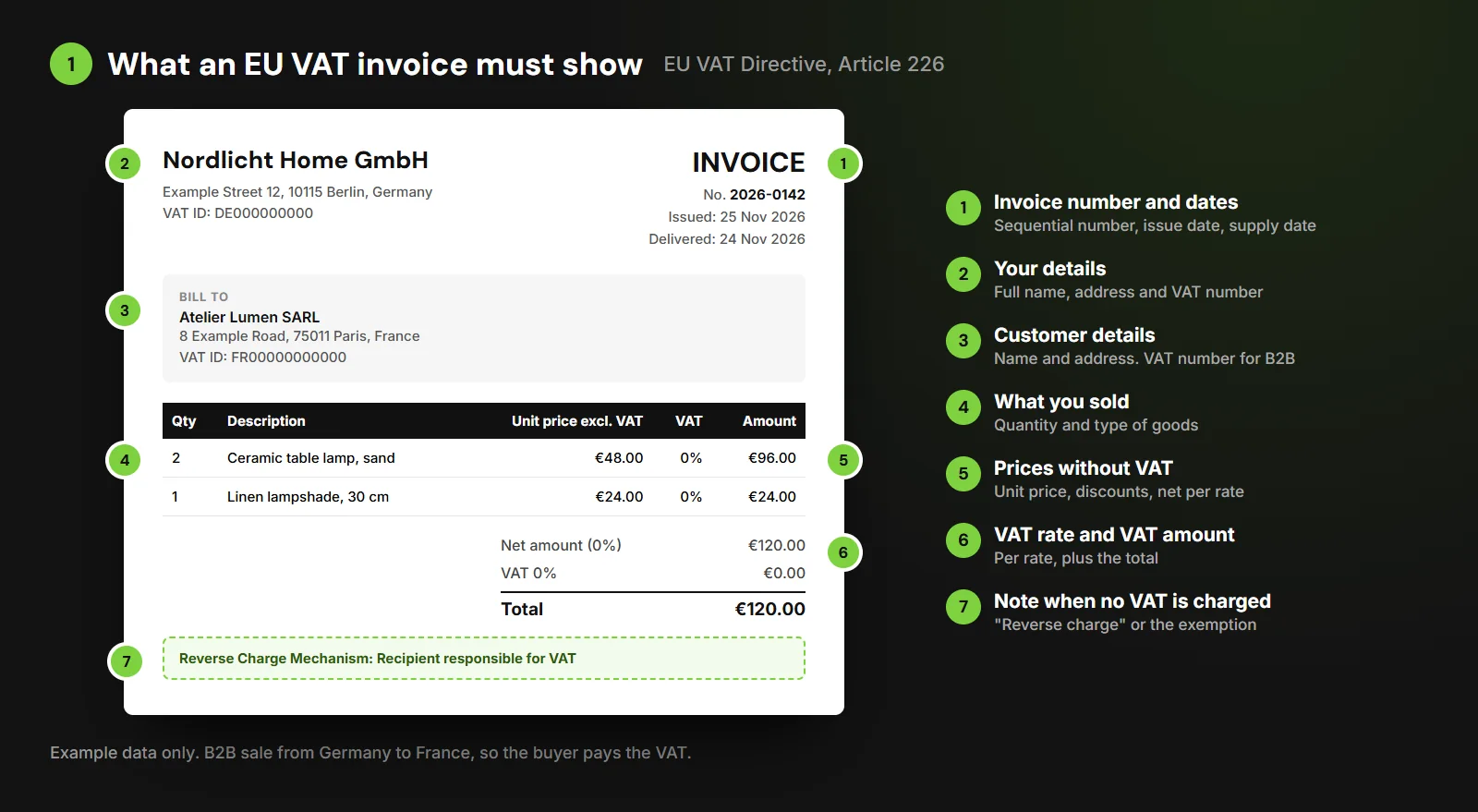
An EU VAT invoice must show the details listed in Article 226 of the EU VAT Directive. Here is what a Shopify invoice for an EU order needs:
- The date of issue.
- A sequential number that identifies the invoice. You can use more than one series.
- Your VAT number.
- The customer’s VAT number, when the customer pays the VAT (reverse charge) or buys goods from another EU country.
- Your full name and address, and the customer’s.
- The quantity and type of goods.
- The date of supply, if it differs from the issue date.
- The amount before VAT for each rate, the unit price without VAT, and any discounts.
- The VAT rate and the VAT amount.
- A note when no VAT is charged: the words “Reverse charge” when the customer pays the VAT, or a reference to the exemption.
No signature is needed. Prices can be in any currency, but the VAT amount must also appear in the currency of the country where VAT is due.
When do you have to issue an invoice?
Under EU law, you must issue an invoice for every sale to a business. Sales to consumers are different. For distance sales of goods to another EU country, an invoice is needed unless you use the One-Stop Shop (OSS). EU countries can still add their own rules.
In Germany, the Federal Ministry of Finance says invoices to consumers are usually voluntary for VAT purposes. Shoppers still ask for them, so offer one anyway. Small amounts have simpler rules: Germany allows short invoices up to €250 gross, and the UK allows simplified VAT invoices up to £250.
How do you turn on VAT invoices in Shopify?
You turn them on in your tax settings, and Shopify then creates a VAT invoice for each eligible order. Complete your VAT registrations first, so each Shopify invoice shows the right VAT number.
Steps
- In your Shopify admin, go to Settings, then Taxes and duties.
- Select European Union or United Kingdom.
- In the VAT Invoices section, select Generate and display invoices when orders are placed.
- Optional: choose a custom logo. It applies to all your VAT invoices.
One detail many stores miss: the invoice shows your legal business name only if it is in your billing address settings. Otherwise it shows your store name.

Which orders get a VAT invoice?
Shopify’s VAT invoices help page lists the rules. An order gets one only when all of these are true:
- It ships to the EU or the UK.
- VAT was calculated on it, even if the VAT is zero.
- No duties were calculated and charged on it.
- It came through Shopify checkout, not a third-party channel or app.
As of November 2026, automatic VAT invoices don’t work for orders shipping to Portugal. If you charge duties at checkout, see my guide to the EU customs duty on Shopify, because those orders need another invoice solution.
VAT invoices are a Shopify Tax feature. Shopify Tax fees are fully discounted until your store passes a sales threshold of 100,000 in its pricing currency. After that, a per-order fee of up to 0.99 applies. If VAT is missing from orders, fix that first with my guide to Shopify taxes not showing at checkout.
How to make a PDF invoice with order documents
Order document templates let you print or save a Shopify invoice for any order, with your own layout. They work for every country, including US orders.
Step 1: Create the invoice template
- Go to Settings, then Shipping and delivery.
- In the Documents section, click Create document, then Invoice.
- Give it a name, such as VAT invoice A4.
- Optional: select Preselect when printing multiple documents.
- Edit the template in the code editor. It uses HTML, CSS and Liquid.
- Click Preview, pick a real order, check it, then click Save.
The template starts with Shopify’s default invoice. Compare it with the list above. I always type the legal business name, address and VAT number into the template, then check the VAT lines.
Step 2: Print it or save it as a PDF
- Go to Orders and open an order.
- Click More actions, then Print multiple documents.
- Select your invoice template.
- Under Paper size, choose 8.27 × 11.69 (A4) for Europe.
- Click Continue to print, then save as PDF in the print preview.
For many orders, select them on the Orders page and click Print, then Print multiple documents (up to 1,500 documents at a time). Allow pop-ups, because the documents open in a new tab.

How do customers get their Shopify invoice?
With VAT invoices on, customers find the invoice on their order status page. They can save or print it as a PDF. Shopify doesn’t email the invoice as an attachment.
Your order confirmation email can link to the order status page, so the Shopify invoice is one click away. To send it by hand, open the order. In the Timeline or VAT invoice section, click the invoice, download the PDF and email it.
Watch out for the Send invoice button. On draft orders and unpaid orders, it emails a checkout link so the customer can pay. That is a payment request, not a VAT invoice.
B2B orders: VAT numbers and reverse charge
For business buyers in another EU country, Shopify can collect and check their VAT number at checkout and remove the VAT. This is the reverse charge: the buyer reports the VAT, not you.
- Go to Settings, then Checkout.
- In Customer information, set Company VAT number to Optional.
- Click Save, and make sure VAT invoices are on.
Shopify checks each number in real time with the EU’s VIES system. When the exemption applies, the VAT invoice gets the note Reverse Charge Mechanism: Recipient responsible for VAT.
Know the limits. It only works for stores using Shopify Tax in the EU or UK, and it needs an EU fulfillment location shipping to another EU country or the UK. Orders from the UK to the EU don’t get it.
If VIES is down, Shopify charges VAT by default. For regular B2B buyers, set their tax status to Don’t collect tax in their customer profile before they order.
Germany’s e-invoicing rules for Shopify stores
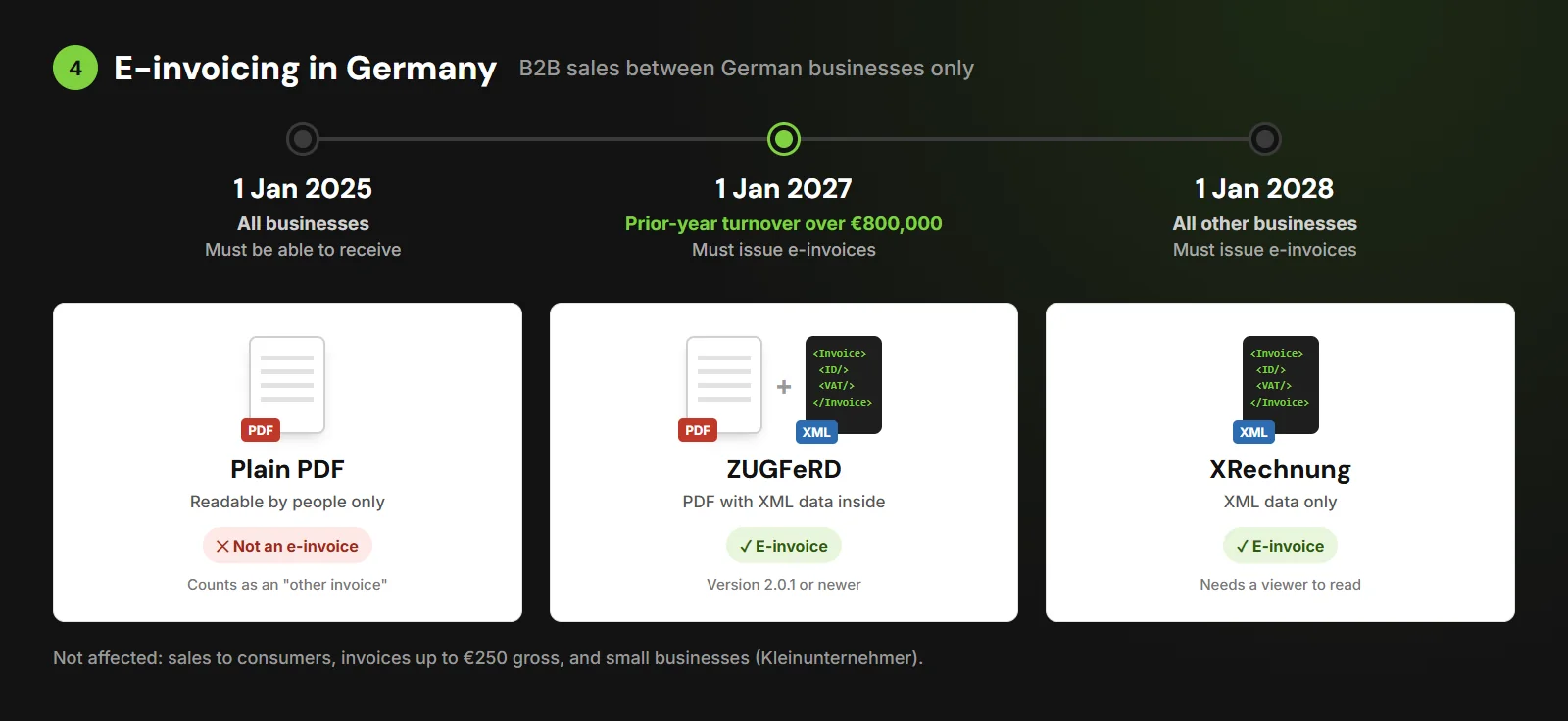
German e-invoicing only affects sales between businesses based in Germany. Sales to consumers are not included. These are the dates from the German Federal Ministry of Finance (BMF) FAQ:
| Date | Who | What changes |
|---|---|---|
| 1 Jan 2025 | All German businesses | Must be able to receive e-invoices |
| 1 Jan 2027 | Prior-year turnover over €800,000 | Must issue e-invoices to German businesses |
| 1 Jan 2028 | All other businesses | Must issue e-invoices too |
Until your date, you can still send paper invoices. A PDF sent by email is allowed only if your buyer agrees.
What is an e-invoice?
An e-invoice is an invoice in a structured data format that software can read, based on the European standard EN 16931. Since 2025, a plain PDF invoice is not an e-invoice in Germany. It counts as an “other invoice”, like paper.
XRechnung and ZUGFeRD explained
- XRechnung is a pure XML file. There is no PDF, so people need a viewer to read it. The German tax portal ELSTER has a free viewer.
- ZUGFeRD is a PDF with the XML data inside it. People read the PDF, and software reads the XML. The BMF accepts version 2.0.1 and newer, except the MINIMUM and BASIC-WL profiles.
With ZUGFeRD, the XML part now wins if it differs from the PDF. So the data must be right, not only the layout.
Who doesn’t need e-invoicing?
- Sales to consumers.
- Invoices up to €250 gross.
- Small businesses under the German small business rule (Kleinunternehmer).
- Foreign sellers registered for VAT in Germany without a fixed establishment there. They can say so on the invoice.
To receive e-invoices, an email inbox is enough. Germany requires you to keep invoices for eight years. The BMF says it is not a fine-able offence today to skip an e-invoice when one is due. Your buyer can still demand one, and may lose their VAT deduction without it.
Rules outside Germany
The UK will require VAT invoices to be e-invoices from April 2029, per an HMRC policy paper from October 2026. The EU adds digital reporting for cross-border B2B sales from 1 July 2030, and EU countries may set their own rules sooner. The US has no VAT, so a Shopify invoice there is mainly a record for buyers and bookkeeping. Selling across the EU? See my Shopify Markets Europe guide.
When do you need a Shopify invoice app?
You need a Shopify invoice app when the built-in options can’t do the job. I found no XRechnung or ZUGFeRD export in Shopify’s help center as of November 2026, so German B2B sellers facing the 2027 or 2028 deadline need an app or accounting tool for it. Other good reasons:
- You want a PDF attached to an email automatically.
- You need credit notes from refunds, or your own invoice numbering.
- You ship to Portugal, charge duties, or sell through other channels.
Two popular apps, checked on the Shopify App Store on November 25, 2026 (facts from their listings, not my own tests):
 Sufio: rated 4.8 from 475 reviews, plans from $7 per month (15 invoices). Its help center says invoices for German accounts include ZUGFeRD data, as a public beta.
- Order Printer Pro: PDF Invoice: rated 4.9 from 3,101 reviews, free up to 50 orders per month, then $10. E-invoicing and Peppol come as a paid add-on inside the app.
 Sufio: rated 4.8 from 475 reviews, plans from $7 per month (15 invoices). Its help center says invoices for German accounts include ZUGFeRD data, as a public beta.
 Order Printer Pro: PDF Invoice: rated 4.9 from 3,101 reviews, free up to 50 orders per month, then $10. E-invoicing and Peppol come as a paid add-on inside the app.
| Your situation | What to use |
|---|---|
| B2C store, EU or UK orders | Shopify VAT invoices |
| Need a custom layout | Invoice template |
| EU B2B, other countries | VAT invoices + VAT number field |
| German B2B, 2027 or 2028 | App with e-invoices |
| US store | Invoice template |
Common mistakes with Shopify invoices
- Treating “Send invoice” as a tax invoice. It is only a payment link.
- Using the order confirmation as an invoice. It isn’t built as a VAT invoice. Check it against the list above.
- VAT number field on, VAT invoices off. Shopify says to use both together.
- Plain PDFs to German businesses after your deadline. From 2027 or 2028, send e-invoices.
- Not keeping copies. Keep every invoice and credit note. In Germany, that means eight years.
Frequently asked questions
Does Shopify automatically send invoices to customers?
Not as an email attachment. With VAT invoices on, each Shopify invoice appears on the order status page, which the order confirmation can link to. For emailed PDFs, use an app.
How do I get a PDF invoice from Shopify?
Open the order and click More actions, then Print multiple documents. Pick your invoice template, click Continue to print and save it as a PDF. For VAT invoices, click the invoice in the order’s VAT invoice section and download it.
Can I edit the Shopify invoice template?
Yes. Go to Settings, then Shipping and delivery, and open the template in the Documents section. You can change the HTML, CSS and Liquid, then preview it with a real order.
Is a PDF invoice an e-invoice in Germany?
No. Since 2025, an e-invoice must use a structured format such as XRechnung or ZUGFeRD. A plain PDF counts as an “other invoice”, allowed between German businesses only during the transition and with the buyer’s consent.
Do I need e-invoicing for sales to consumers?
No. Germany’s rules cover sales between businesses based in Germany. Sales to consumers are not included, so a normal VAT invoice or PDF is fine.
Does Shopify add the reverse charge note to invoices?
Yes, when a business buyer enters a valid VAT number at checkout on an eligible cross-border order. The Shopify invoice then says “Reverse Charge Mechanism: Recipient responsible for VAT”.
A clean invoice setup saves you hours of emails from customers and accountants. For more practical guides, see my Shopify tips. If you would rather have it done for you, I set up VAT invoices, templates and invoice apps as part of my Shopify store management service. Message me on WhatsApp and I will check your setup.



